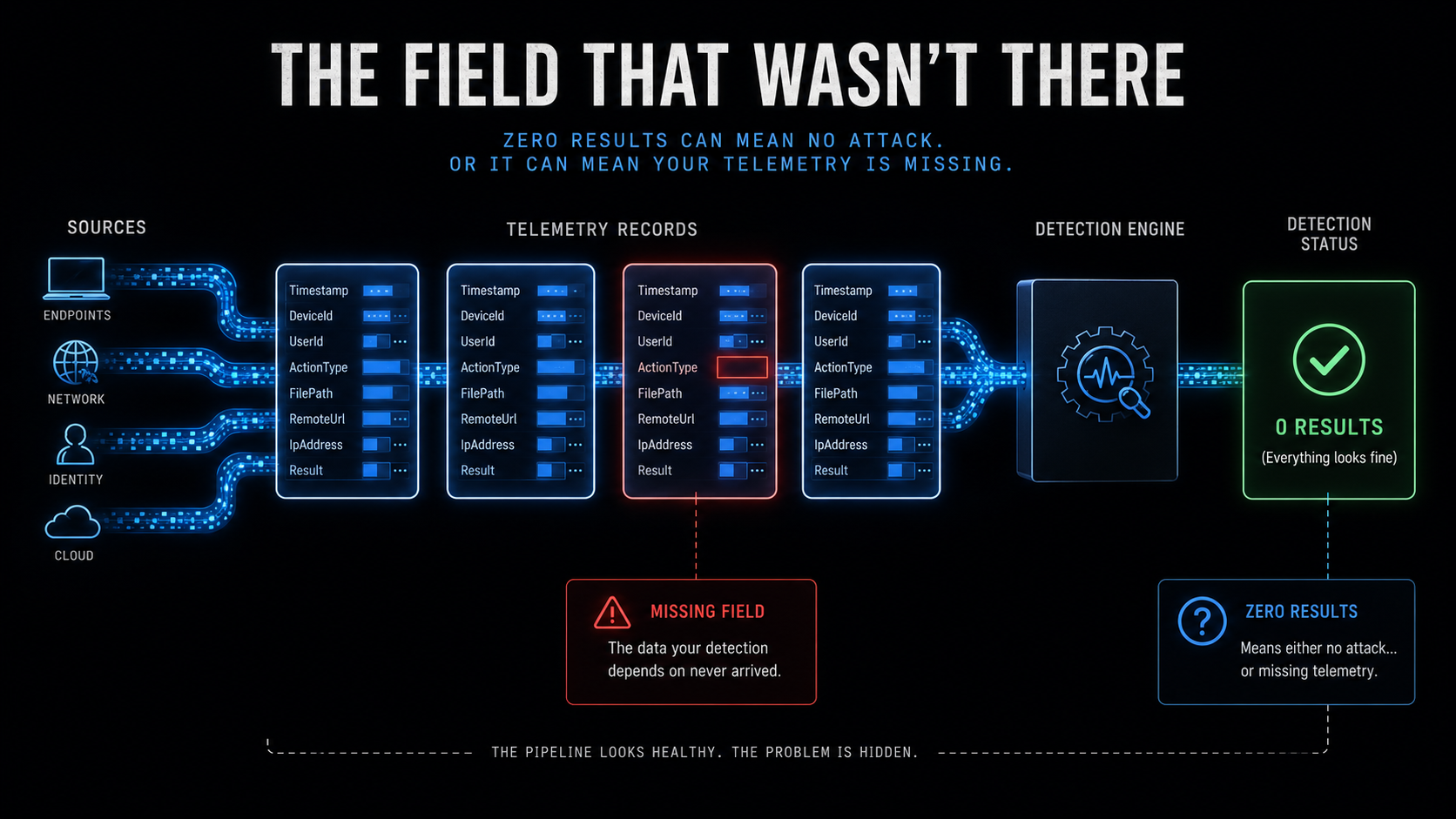
Four Telegram session-theft detections across three days. Four Citrix NetScaler auth-bypass detections across three more. A Teams phishing correlation that joins two tables on a field the brief warns isn’t populated. A three-table credential-compromise chain that requires a license half the industry doesn’t have. Twenty-two detections this week, and more than half of them depend on a column, an ActionType, a risk score, or a URL field that may not exist in your environment — and every one of them fails silently when it doesn’t.
Last week the DevSecOpsDadAttack Detection Engineering pipeline (run on a Raspberry Pi) wrote the same query eight times. This week it wrote different queries, each one reasonable in isolation, each one honest about its own blind spots in the caveats section — and every one of them will return zero rows if the telemetry prerequisite isn’t met, and zero rows looks exactly like “nothing happened.” That is the shape of the problem this week: a detection that returns nothing when there is nothing to detect is working. A detection that returns nothing because a field is empty is lying.
Act I collapses the four Telegram data-theft detections into one and fixes the ActionType dependency that makes all of them unreliable. Act II takes apart Saturday’s Teams-phishing-to-credential-use correlation — the most interesting query of the week and the one with the most fragile join key. The honorable mention is Sunday’s three-table credential-compromise chain, and as with the last three weeks, the most operationally useful detection is the one that was already almost right.
🥇 Act I: Four Ways to Miss Telegram Session Theft
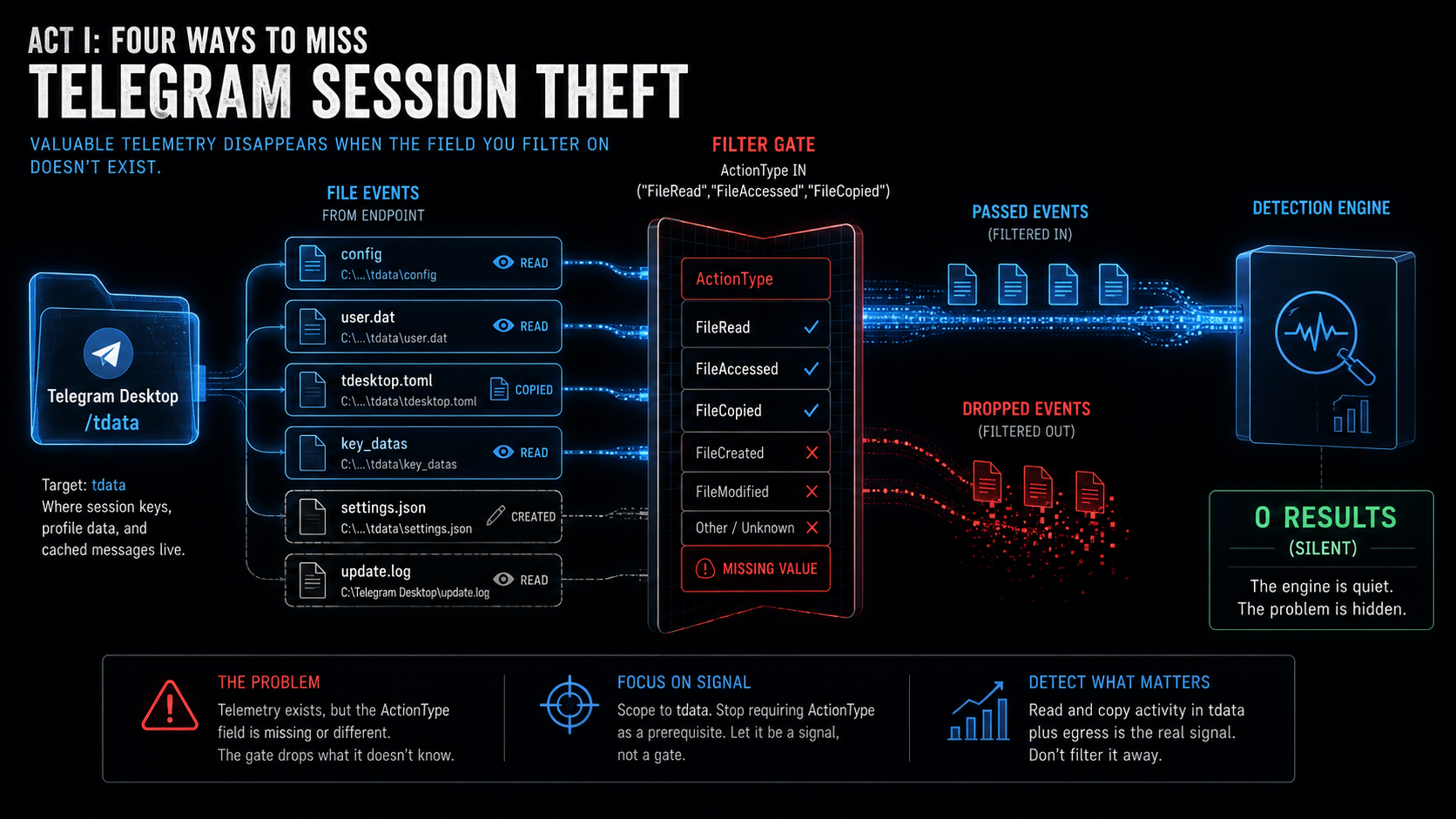
The Armored Likho / Still Toolkit reporting landed on Monday and the pipeline responded. Across Monday, Tuesday, and Wednesday, it produced four detections for Telegram data theft, distributed across two shapes:
Shape 1 — File access to the Telegram data directory:
// Monday Detection 5 (file access + network correlation)
DeviceFileEvents
| where FolderPath has TelegramDataPath   // "Telegram Desktop"
| where ActionType in ("FileRead", "FileAccessed", "FileCopied", "FileCreated")
| where not(InitiatingProcessFileName in~ (LegitTelegramProcs))
// ...joined to DeviceNetworkEvents on DeviceName + InitiatingProcessId

// Tuesday Detection 5 (file access only, tighter scope)
DeviceFileEvents
| where FolderPath has_all ("Telegram Desktop", "tdata")
| where ActionType in ("FileRead", "FileAccessed", "FileCopied")
| where InitiatingProcessFileName !in~ ("Telegram.exe", "Updater.exe")
Shape 2 — Network connections to the Telegram API:
// Tuesday Detection 1 (network only)
DeviceNetworkEvents
| where RemoteUrl has_any ("api.telegram.org", "t.me")
| where InitiatingProcessFileName !in~ (browsers_and_telegram)

// Wednesday Detection 1 (network + registry persistence)
DeviceNetworkEvents
| where RemoteUrl has "api.telegram.org"
// ...joined to DeviceRegistryEvents on DeviceId within 60 minutes
Four detections, two shapes, three problems — and the third one is the reason none of them work reliably.
First, the scoping. Monday’s Detection 5 uses FolderPath has "Telegram Desktop", which matches any file anywhere in the Telegram Desktop directory — the application binary, the updater, a log file, a theme. Tuesday’s Detection 5 tightens this to FolderPath has_all ("Telegram Desktop", "tdata"), which restricts to the tdata subdirectory where session keys, profile data, and cached messages actually live. That’s the right scope — tdata is the thing the infostealer wants, and everything else in the Telegram Desktop folder is noise. Tuesday’s version is better, and Monday’s version should have been Tuesday’s version from the start.
Second, the network detections. Both Tuesday’s Detection 1 and Wednesday’s Detection 1 filter on RemoteUrl has_any ("api.telegram.org", "t.me"). Both briefs include the same caveat: “RemoteUrl is only populated in DeviceNetworkEvents when HTTPS inspection or a DNS proxy is in place; without it, the api.telegram.org and t.me filters will return no results and the query will silently produce empty output.” The detection works if your environment has TLS inspection or a DNS proxy feeding MDE. If it doesn’t — and most environments don’t — the where clause matches nothing, the query returns zero rows, and you conclude that no process is talking to Telegram. You’d be wrong. The process is talking to Telegram; the RemoteUrl field is empty.
Third, and this is the one that matters: every file-access detection this week depends on ActionType values that MDE may not emit. Monday uses ActionType in ("FileRead", "FileAccessed", "FileCopied", "FileCreated"). Tuesday uses ActionType in ("FileRead", "FileAccessed", "FileCopied"). Both briefs warn — correctly — that FileRead and FileAccessed may not be generated for all file access operations on Windows endpoints. Monday’s tuning notes even include the validation query: “Confirm ActionType availability: DeviceFileEvents → where TimeGenerated >= ago(1d) → summarize count() by ActionType.” But the detection is published with the filter in place, and the analyst who deploys it without running the validation gets a query that will never fire — not because no one is stealing Telegram sessions, but because MDE on their endpoints doesn’t write the event that the query is looking for.
The Telegram session-theft detection shape is correct. An unexpected process reading files from tdata is a high-fidelity signal. The problem is that the detection as written asks for an event type that the sensor may not produce. The fix is to stop filtering on what MDE should emit and start working with what it does emit — and to make the query tell you which one it’s doing.
The KQL
let lookback = 1d;
// LEGITIMATE TELEGRAM PROCESSES. These are the processes that belong in
// tdata. Telegram.exe is the client. Updater.exe is the auto-updater.
// If your environment uses a Telegram fork (Unigram, Telegram Desktop
// from Flathub, etc.), add its binary name here — but verify the path,
// not just the name, because an infostealer named "Telegram.exe" in
// C:\Users\Public\Downloads is not the Telegram client.
let LegitTelegramProcs = dynamic([
    "Telegram.exe", "Updater.exe", "telegram", "updater"
]);
// KNOWN-BENIGN ACCESSORS. These are the processes you *expect* to touch
// AppData directories during normal operation. The list is a starting
// point — after baselining, extend it with your AV engine, your backup
// agent, and your endpoint management tool. Every entry here is a false-
// positive you are choosing not to see, so add entries one at a time,
// with the process path confirmed, not just the name.
let KnownBenignProcs = dynamic([
    "MsMpEng.exe", "MpCmdRun.exe",     // Defender AV
    "SenseIR.exe", "MsSense.exe",       // MDE sensor
    "SearchProtocolHost.exe",            // Windows Search indexer
    "svchost.exe"                        // Only if your baselining confirms
]);
// PROCESS CLASSIFICATION. Instead of a flat exclusion list, classify the
// accessor so the analyst sees structure. Archive tools and script engines
// are higher-signal than AV scanners; an unknown binary is highest.
let ArchiveTools = dynamic([
    "7z.exe", "7z", "WinRAR.exe", "rar.exe", "zip", "tar",
    "bandizip.exe", "peazip.exe"
]);
let ScriptEngines = dynamic([
    "python.exe", "python3", "python", "node.exe", "node",
    "powershell.exe", "pwsh.exe", "cmd.exe",
    "wscript.exe", "cscript.exe", "mshta.exe",
    "bash", "sh"
]);
let CopyTools = dynamic([
    "xcopy.exe", "robocopy.exe", "rsync", "rclone.exe", "rclone",
    "cp", "copy"
]);
// ============================================================
// STEP 1: FILE-LEVEL SIGNAL — tdata directory access.
//
// THE FIX: Do NOT filter on ActionType. Every version of this
// detection this week filters on FileRead, FileAccessed, or
// FileCopied — ActionType values that MDE may not emit on your
// endpoints. Instead, we take EVERY file event in the tdata
// directory from a non-Telegram process and keep ActionType as
// an OUTPUT field. The analyst sees what type of access occurred;
// the detection doesn't silently fail when the type isn't there.
//
// The tradeoff: without the ActionType filter, you will see
// FileCreated and FileModified events — a process writing INTO
// tdata, not reading FROM it. That is a different signal (possibly
// more concerning — something is modifying session state), and it
// is worth seeing rather than filtering out. If your MDE deployment
// does emit FileRead, you can add it back as a severity booster
// in the extend below, not as a where-clause gate.
// ============================================================
DeviceFileEvents
| where TimeGenerated >= ago(lookback)
| where FolderPath has_all ("Telegram Desktop", "tdata")
| where not(InitiatingProcessFileName in~ (LegitTelegramProcs))
| where not(InitiatingProcessFileName in~ (KnownBenignProcs))
// Classify the accessing process. The prefilter above is the gate;
// the case below is the label.
| extend Self = tolower(InitiatingProcessFileName)
| extend AccessorClass = case(
      Self in (ArchiveTools),    "ArchiveTool",
      Self in (ScriptEngines),   "ScriptEngine",
      Self in (CopyTools),       "CopyTool",
                                 "Other"
  )
// ActionType as a SIGNAL, not a GATE. If FileRead is present, the
// signal is stronger. If it's FileCreated or FileModified, the signal
// is different but still worth investigating. If the only ActionType
// your environment produces is FileCreated, this detection still fires.
| extend IsReadLikeAction = ActionType in ("FileRead", "FileAccessed", "FileCopied")
// Path depth within tdata: are we seeing access to the top-level
// directory listing, or to specific session files inside it?
| extend TdataDepth = countof(FolderPath, "\\") - countof(
    extract(@"^(.*\\tdata)", 1, FolderPath), "\\")
| project
    TimeGenerated,
    DeviceName,
    DeviceId,
    InitiatingProcessFileName,
    InitiatingProcessFolderPath,
    InitiatingProcessCommandLine,
    InitiatingProcessAccountName,
    FileName,
    FolderPath,
    ActionType,
    IsReadLikeAction,
    AccessorClass,
    TdataDepth,
    SHA256,
    InitiatingProcessId
| summarize
    Events        = count(),
    ReadLikeEvents = countif(IsReadLikeAction),
    ActionTypes   = make_set(ActionType, 10),
    FilesTouched  = dcount(FileName),
    FileList      = make_set(FileName, 15),
    FolderList    = make_set(FolderPath, 10),
    SampleCmd     = take_any(InitiatingProcessCommandLine),
    ProcessPath   = take_any(InitiatingProcessFolderPath),
    Accounts      = make_set(InitiatingProcessAccountName, 5),
    FirstSeen     = min(TimeGenerated),
    LastSeen      = max(TimeGenerated)
    by DeviceName, DeviceId, InitiatingProcessFileName,
       AccessorClass, SHA256
// Ranking: script engines and archive tools first (infostealer
// pattern), then "Other" (unknown binaries), then by volume.
// ReadLikeEvents > 0 is a severity booster, not a filter.
| order by AccessorClass asc, ReadLikeEvents desc,
           FilesTouched desc, Events desc
The line that does the work
// THE FIX: Do NOT filter on ActionType.
// ...
| extend IsReadLikeAction = ActionType in ("FileRead", "FileAccessed", "FileCopied")
Two decisions, and the second one only makes sense because of the first.
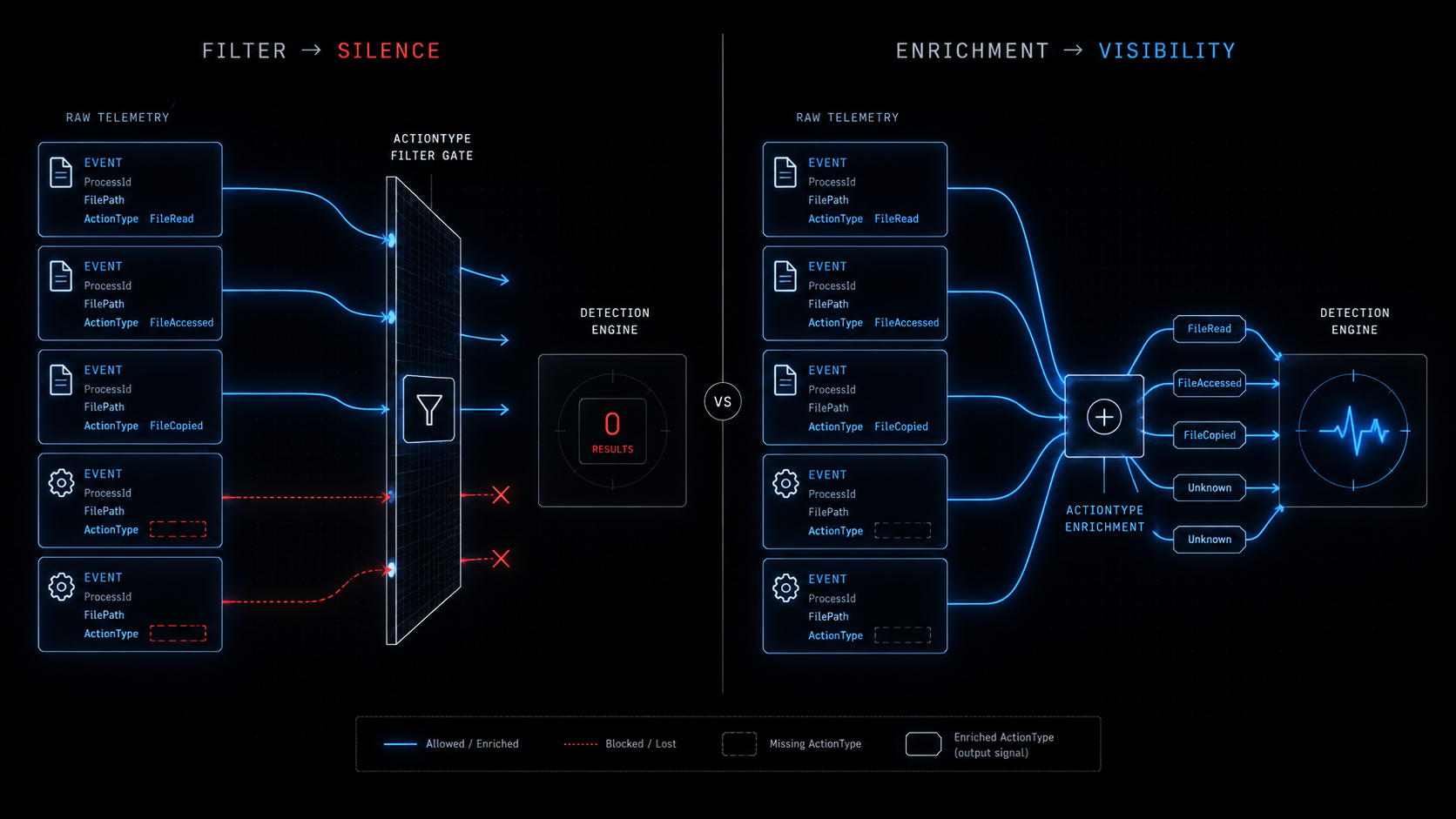
The first decision is the absence of a line: there is no where ActionType in (...) clause. Every Telegram detection this week has one. Monday filters on four ActionType values. Tuesday filters on three. Both warn that some of them may not exist. The fix is to remove the filter entirely and let every file event in the tdata directory through. If MDE emits FileRead, you see it. If MDE only emits FileCreated and FileModified, you see those instead. The detection fires either way, and the analyst knows which events actually arrived.
The second decision is IsReadLikeAction — a boolean that tells the analyst whether the event was a read-type action or a write-type action. It is an extend, not a where. It appears in the output, not in the filter. A FileRead event in the tdata directory is a stronger signal than a FileCreated event (reading session files is theft; creating files is modification), and the analyst should see that distinction. But a FileCreated event from python.exe in the tdata directory is still worth investigating, and the query that filters it out because it doesn’t say “FileRead” has just hidden the event that the analyst needed to see.
Note the tradeoff this creates: without the ActionType filter, the query will fire on more events. A legitimate application that writes a cache file into the tdata directory — rare, but possible — will appear. The classifier (AccessorClass) and the ranking (order by AccessorClass asc, ReadLikeEvents desc) are the controls for this: archive tools and script engines surface first because those are the infostealer pattern, and events with ReadLikeEvents > 0 sort above events without. The analyst sees structure instead of noise, and the query never goes silent because a field wasn’t there.
Four detections, two shapes, zero that check their own telemetry
The pattern this week is not identical queries — it’s queries that depend on identical assumptions. Monday, Tuesday, and Tuesday again all assume FileRead exists in DeviceFileEvents. Tuesday and Wednesday both assume RemoteUrl is populated in DeviceNetworkEvents. None of them check.
The briefs are honest about this. Every one of them includes a caveat section that says, in effect, “this field might not be there.” Monday’s tuning notes include the validation query. Tuesday’s caveats include the fallback approach (correlate with DeviceDnsEvents when RemoteUrl is empty). But the detection ships with the assumption baked in, and the caveat is in a section that the analyst deploying the rule may not read.
This is worth a section because the fix is not in the KQL. The KQL can remove the ActionType filter (as above). The KQL cannot check whether the sensor is producing the events you need — that’s an infrastructure question, and the answer is a validation query that should run before the detection deploys, not after it fails to fire for a month.
Here are the two validation queries that should run before any Telegram detection deploys:
// VALIDATION 1: Does your MDE deployment emit file-read events?
// If FileRead and FileAccessed don't appear in the results,
// the original detections from Monday and Tuesday will never fire.
// The fixed detection above will fire on FileCreated/FileModified instead.
DeviceFileEvents
| where TimeGenerated >= ago(7d)
| summarize EventCount = count() by ActionType
| order by EventCount desc

// VALIDATION 2: Does your environment populate RemoteUrl?
// If RemoteUrl is empty for most rows, Tuesday D1 and Wednesday D1
// will never fire. Use DeviceDnsEvents as a fallback.
DeviceNetworkEvents
| where TimeGenerated >= ago(7d)
| summarize
    Total = count(),
    HasUrl = countif(isnotempty(RemoteUrl)),
    UrlRate = round(100.0 * countif(isnotempty(RemoteUrl)) / count(), 1)
If Validation 1 shows no FileRead rows, you know the original detections were blind and the fixed version is your only option. If Validation 2 shows a UrlRate below 10%, you know the network-based Telegram detections are ineffective and you need the DNS fallback. These two queries take 30 seconds to run and they tell you whether the week’s detection investment is real or theatre.
Keeping it honest
- Removing the ActionType filter increases noise. A
FileCreatedevent intdatafrom a legitimate application — an Electron app that writes a temp file, a sync tool that mirrors the directory — will now appear. The classifier mitigates this: known-benign processes are excluded, and the remaining events are ranked by process class and read-like action count. But the first week of deployment will require tuning theKnownBenignProcslist against your environment, and the tuning cost is the price of a detection that actually fires. - This query cannot see the network side. Monday’s Detection 5 joins file access to network activity to catch the exfiltration. This query deliberately omits the network join because the network side depends on
RemoteUrlorRemoteIPresolution, and the Act I fix is about the file side. If you want the network correlation, use Monday’s join structure withDeviceDnsEventsas the URL source (queryDnsName has "telegram"rather thanRemoteUrl has "api.telegram.org") — but know that the DNS-based approach misses Telegram API calls that go through a CDN or DoH resolver. - Telegram portable installations will be missed. The
FolderPath has_all ("Telegram Desktop", "tdata")filter assumes the standard Windows installation path under%AppData%\Roaming\Telegram Desktop\tdata. A portable Telegram installation in a USB drive or a custom directory breaks this filter. If your users run portable Telegram, add the alternative paths — but the standard path covers the default Windows installation, which is where the Still Toolkit looks. - The
KnownBenignProcslist is what I could think of. It includes Defender AV, the MDE sensor, and Windows Search. Your environment will have others — your backup agent, your DLP tool, your endpoint management agent. The list is a starting point, not a finished product, and every entry you add is a process you are choosing not to alert on. Validate the process path, not just the name: a malicious binary namedMsMpEng.exeinC:\Users\Public\Downloadsshould not be excluded.
🥈 Act II: The Phishing Message That Correlates With Every Login
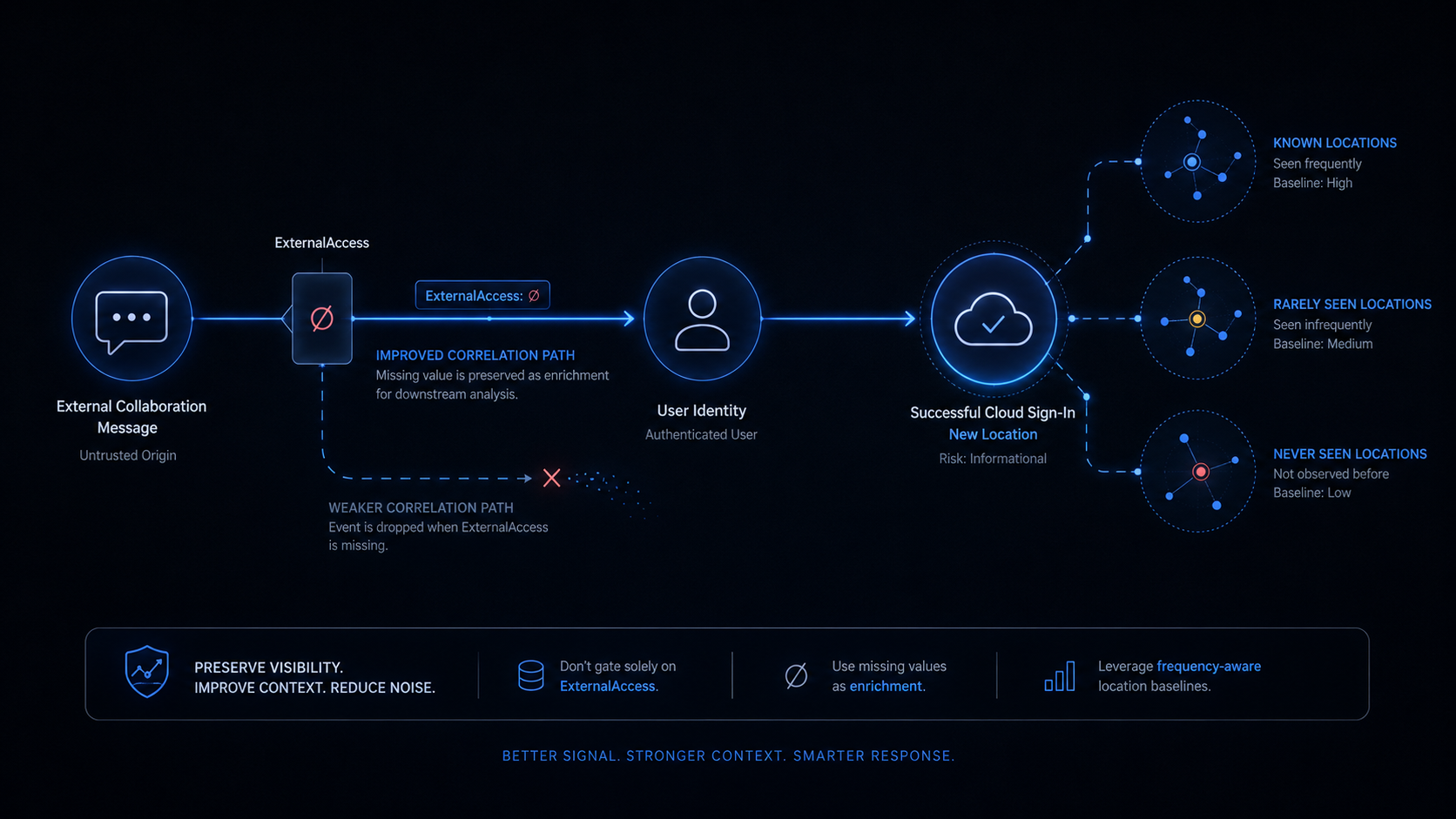
Saturday’s Detection 2 is the most interesting query of the week. It correlates OfficeActivity (Teams external messages) with SigninLogs (Entra authentication events) to detect a compound signal: a user receives an external Teams message containing a link, and within six hours, that same user signs in from a location they’ve never used before. The detection shape is exactly right — Teams phishing is the delivery channel Unit 42 reported, and a new-location sign-in after a phishing lure is the credential-theft consequence.
The implementation has three problems, and the first one is the same shape as Act I.
let ExternalTeamsMessages = OfficeActivity
    | where RecordType == "MicrosoftTeams"
    | where Operation in ("MessageCreatedHasLink", "MessageSent", "MemberAdded")
    | where ExternalAccess == true
    | where isnotempty(UserId)
    | project PhishTime = TimeGenerated, TargetUser = tolower(UserId);
First: ExternalAccess == true may not be populated. The brief’s own caveats say it: “The OfficeActivity ‘ExternalAccess’ field is not consistently populated for all Teams message operation types.” For MessageSent and MessageCreatedHasLink, external sender identification may require parsing the Members JSON array, which varies in structure across audit log versions. If ExternalAccess is null for your tenant’s Teams events, the where ExternalAccess == true filter drops every row, and the query returns nothing. Same pattern as Act I: the detection depends on a field that may not be there, and the failure mode is silence.
Second: the six-hour correlation window with user identity as the only anchor. The correlation says: any external Teams message to user Alice, followed by any sign-in by user Alice from a new location within six hours, is a finding. In an organisation where users receive external Teams messages routinely (vendors, partners, customers) and travel or use VPN (new locations), this is a coincidence engine. Alice gets a legitimate vendor message at 9 AM. Alice signs in from the airport VPN at 2 PM. The query reports a phishing-to-credential-use correlation. The anchor is correct (same user), the temporal window is too wide, and there is no content-level signal from the Teams message to distinguish a phishing lure from a legitimate vendor update.
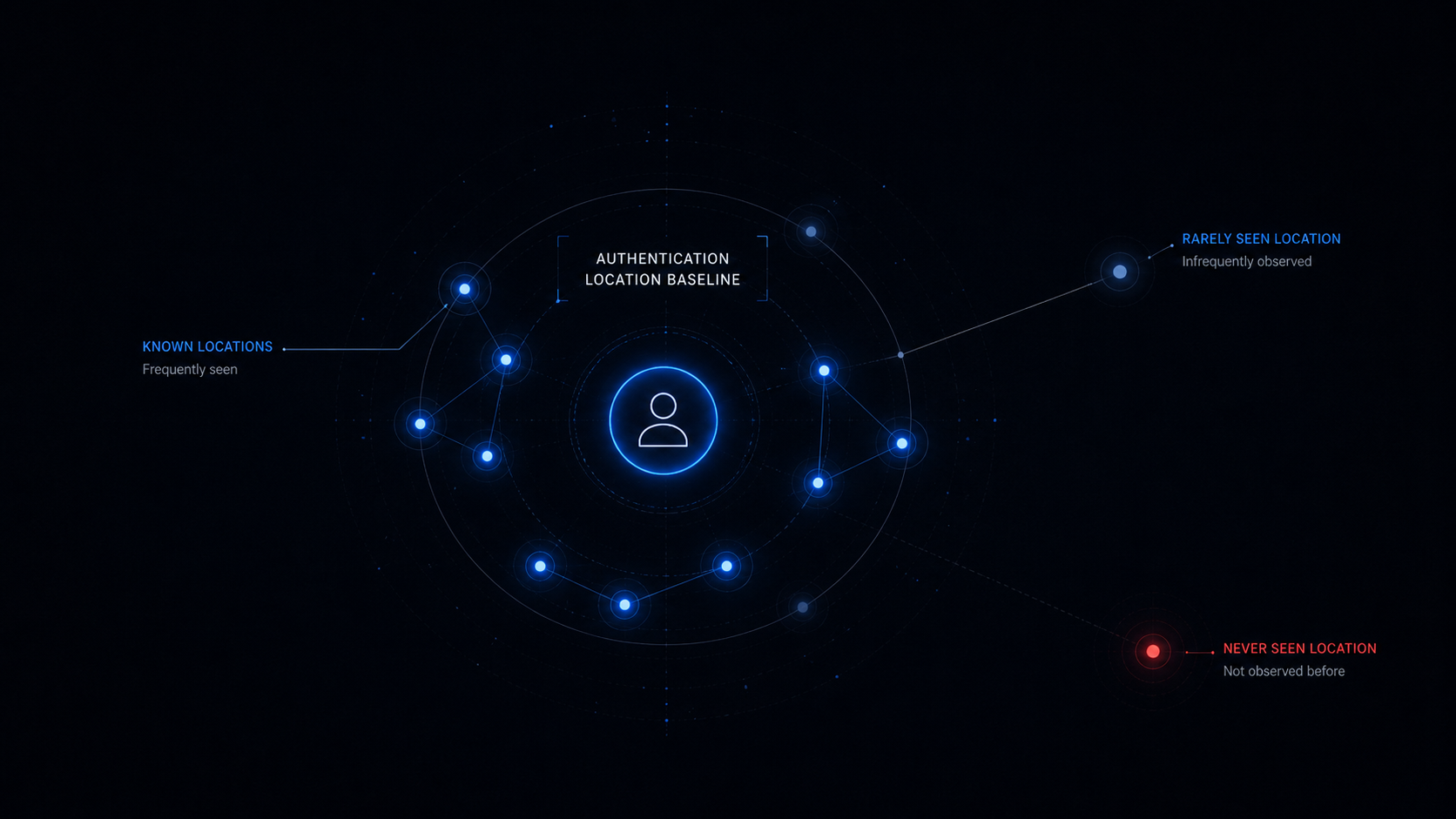
Third: the location baseline is binary. The BaselineLocations subquery builds a make_set of every Location value the user has signed in from in the past 30 days. The detection surfaces any sign-in from a location not in that set. But Location in SigninLogs is a compound field — it can be a country code, a city, or a city-plus-state, depending on the geolocation provider and the connection type. A user who has baselined with Location = "US" will not match Location = "California, US" if the granularity changes. And a user with only two days of baseline history (newly onboarded, recently migrated to a new tenant) will have almost every location appear new.
The fix keeps the correlation structure — external Teams message followed by anomalous sign-in — and addresses each problem. ExternalAccess becomes an enrichment field rather than a gate, replaced by a sender-domain check that works when the boolean doesn’t. The correlation window tightens. The location baseline adds frequency and recency so the analyst can distinguish “never seen this location” from “seen it once 28 days ago.”
The KQL
let baseline_window = 30d;
let detection_window = 24h;
let correlation_window = 4h;
// ============================================================
// STEP 1: TEAMS MESSAGES — external senders.
//
// THE FIX: Don't gate on ExternalAccess. Use it as enrichment
// when it's populated, and fall back to the sender's domain when
// it's not. The OfficeActivity Teams audit record carries UserId
// as the recipient. For identifying external senders, we check
// whether the Operation itself indicates an external interaction.
//
// "MemberAdded" with an external user is the strongest signal —
// someone was added to a chat or team from outside the org.
// "MessageCreatedHasLink" is the delivery mechanism the Unit 42
// reporting describes. "MessageSent" is broad but captures the
// remainder.
//
// The ExternalAccess field, when populated, is authoritative.
// When it's null, we let the event through and flag it as
// "ExternalAccess not confirmed" in the output. The analyst sees
// both categories and can filter in triage.
// ============================================================
let TeamsMessages = OfficeActivity
| where TimeGenerated >= ago(detection_window)
| where RecordType == "MicrosoftTeams"
| where Operation in ("MessageCreatedHasLink", "MessageSent", "MemberAdded")
| where isnotempty(UserId)
// ExternalAccess as enrichment, not a gate.
| extend ExternalConfirmed = iif(ExternalAccess == true, true, false)
| extend ExternalNull = iif(isnull(ExternalAccess), true, false)
// When ExternalAccess IS populated and is false, this is an
// internal message — drop it. When it's null, keep it for review.
| where ExternalAccess == true or isnull(ExternalAccess)
| project
    PhishTime = TimeGenerated,
    TargetUser = tolower(UserId),
    Operation,
    ExternalConfirmed,
    ExternalNull;
// ============================================================
// STEP 2: LOCATION BASELINE — where has this user signed in from?
//
// The original query builds a binary set: locations you've seen,
// and locations you haven't. This version adds frequency and
// recency so the analyst can distinguish "truly new" from "rare."
// A user who signed in from Location X once, 29 days ago, clears
// the binary baseline and is invisible on day 30. With frequency,
// that single-use location is flagged as rare, not normal.
// ============================================================
let LocationBaseline = SigninLogs
| where TimeGenerated between (ago(baseline_window) .. ago(detection_window))
| where ResultType == 0
| where isnotempty(Location)
| summarize
    LocationUseCount = count(),
    LocationUseDays  = dcount(bin(TimeGenerated, 1d)),
    LastSeenAt       = max(TimeGenerated)
    by UserPrincipalName = tolower(UserPrincipalName), Location;
// ============================================================
// STEP 3: RECENT SIGN-INS — successful authentication in the
// detection window.
// ============================================================
let RecentSignins = SigninLogs
| where TimeGenerated >= ago(detection_window)
| where ResultType == 0
| where isnotempty(Location)
| project
    SigninTime = TimeGenerated,
    UPN = tolower(UserPrincipalName),
    SigninIP = IPAddress,
    SigninLocation = Location,
    AppDisplayName,
    UserAgent,
    ConditionalAccessStatus,
    RiskLevelDuringSignIn,
    DeviceDetail;
// ============================================================
// STEP 4: CORRELATE — Teams message → sign-in from
// new or rare location.
//
// The correlation window is 4 hours, not 6. The attack chain
// described by Unit 42 is: phishing message → user clicks link →
// credential harvested → attacker uses credential. That chain
// is minutes to low hours; 6 hours brings in too much legitimate
// travel and VPN activity. 4 hours is still generous; if your
// environment is high-travel, tighten to 2.
//
// The join is on user identity (TargetUser == UPN). This is the
// correct anchor — the phishing message targets a specific user,
// and the credential use is by that user. There is no device
// anchor because the attacker signs in from their own device,
// not the victim's.
// ============================================================
RecentSignins
| join kind=inner TeamsMessages on $left.UPN == $right.TargetUser
| where SigninTime between (PhishTime .. (PhishTime + correlation_window))
// Baseline join: was this location seen before?
| join kind=leftouter LocationBaseline
    on $left.UPN == $right.UserPrincipalName,
       $left.SigninLocation == $right.Location
// NEW location: not in the baseline at all.
// RARE location: in the baseline but used very infrequently.
| extend LocationStatus = case(
      isnull(LocationUseCount),                    "NeverSeen",
      LocationUseCount <= 2 and LocationUseDays <= 1, "RarelySeen",
                                                   "Known"
  )
| where LocationStatus in ("NeverSeen", "RarelySeen")
| project
    PhishTime,
    SigninTime,
    CorrelationMinutes = datetime_diff('minute', SigninTime, PhishTime),
    UPN,
    SigninIP,
    SigninLocation,
    LocationStatus,
    LocationUseCount,
    LocationUseDays,
    LastSeenAt,
    Operation,
    ExternalConfirmed,
    ExternalNull,
    AppDisplayName,
    UserAgent,
    ConditionalAccessStatus,
    RiskLevelDuringSignIn,
    DeviceDetail
| order by LocationStatus asc, CorrelationMinutes asc
The line that does the work
| where ExternalAccess == true or isnull(ExternalAccess)
One line, and it converts a silent failure into a visible enrichment.
The original query filters on ExternalAccess == true. When the field is populated, that filter is correct — it restricts to external messages. When the field is null, the filter drops the row, the Teams message disappears from the pipeline, and the correlation never happens. The fix keeps the row when ExternalAccess is null and adds ExternalConfirmed and ExternalNull to the output. The analyst sees both: rows where external status is confirmed, and rows where it isn’t. The confirmed rows are higher-signal. The unconfirmed rows are worth reviewing. Neither is discarded.
This is the same structural move as Act I’s IsReadLikeAction. The field that distinguishes high-signal from low-signal events becomes an output column, not a filter predicate. When the field is populated, it accelerates triage. When it isn’t, the detection still fires.
Note the LocationStatus classifier — NeverSeen vs RarelySeen vs Known. The original query uses leftanti to find locations not in the baseline. That’s binary: either the location exists in the 30-day history or it doesn’t. A user who signed in from a location exactly once, 29 days ago, is in the baseline; the same user who signed in from that location once, 31 days ago, is not. The frequency-aware baseline catches both: NeverSeen is the binary miss, RarelySeen is the near-miss that the binary baseline would have let through. This is the same extension as last week’s RareAdmins in the SharePoint baseline honorable mention — same pattern, different domain.
Keeping it honest
- This detection will fire on legitimate activity. A user who receives a vendor message through Teams and then signs in from the airport VPN within four hours is a true positive of the query and a false positive of the detection. The classifier mitigates —
ExternalConfirmedandLocationStatushelp the analyst prioritise — but the first week of deployment will require tuning the correlation window and potentially adding VPN egress IP exclusions. - The
MembersJSON array is the real source of sender identity, and I’m not parsing it. The brief mentions that external sender identification may require parsing theMembersarray, which varies in structure across audit log versions. The correct fix is to extract the sender UPN or domain fromMembersand filter on it. I chose not to do this because the schema is unstable — aparse_jsonthat works on today’s audit log format may silently return null on tomorrow’s — and theExternalAccessfallback is simpler. If you have a stableMembersschema in your tenant, parse it and use it; the sender domain is a higher-fidelity signal thanExternalAccess. RiskLevelDuringSignInis in the output but not in the filter. This is deliberate. The field requires Entra ID P2 licensing, and gating on it makes the query P2-dependent. Leaving it in the output means analysts with P2 can use it to prioritise (ahighrisk sign-in after a Teams phish is urgent), and analysts without P2 see an empty column instead of an empty result set.- The 4-hour correlation window is arbitrary. Unit 42’s reporting does not specify the typical delay between phishing delivery and credential use. Four hours captures the fast-turn credential theft that the reporting describes. If your environment has evidence of longer dwell times, extend it — but every hour you add brings in more coincidental correlations. The window is a precision-recall dial, not a ground truth.
- New users break the baseline. A user onboarded within the last 30 days has no location history. Every sign-in they make is
NeverSeen. The mitigation is to add aBaselineDepthcheck — if the user has fewer than N sign-in events in the baseline window, downgrade the alert or suppress it. I left this out to keep the query readable; add it if new-user noise is a problem.
🎖 Honorable Mention: The Three-Table Credential Compromise Chain
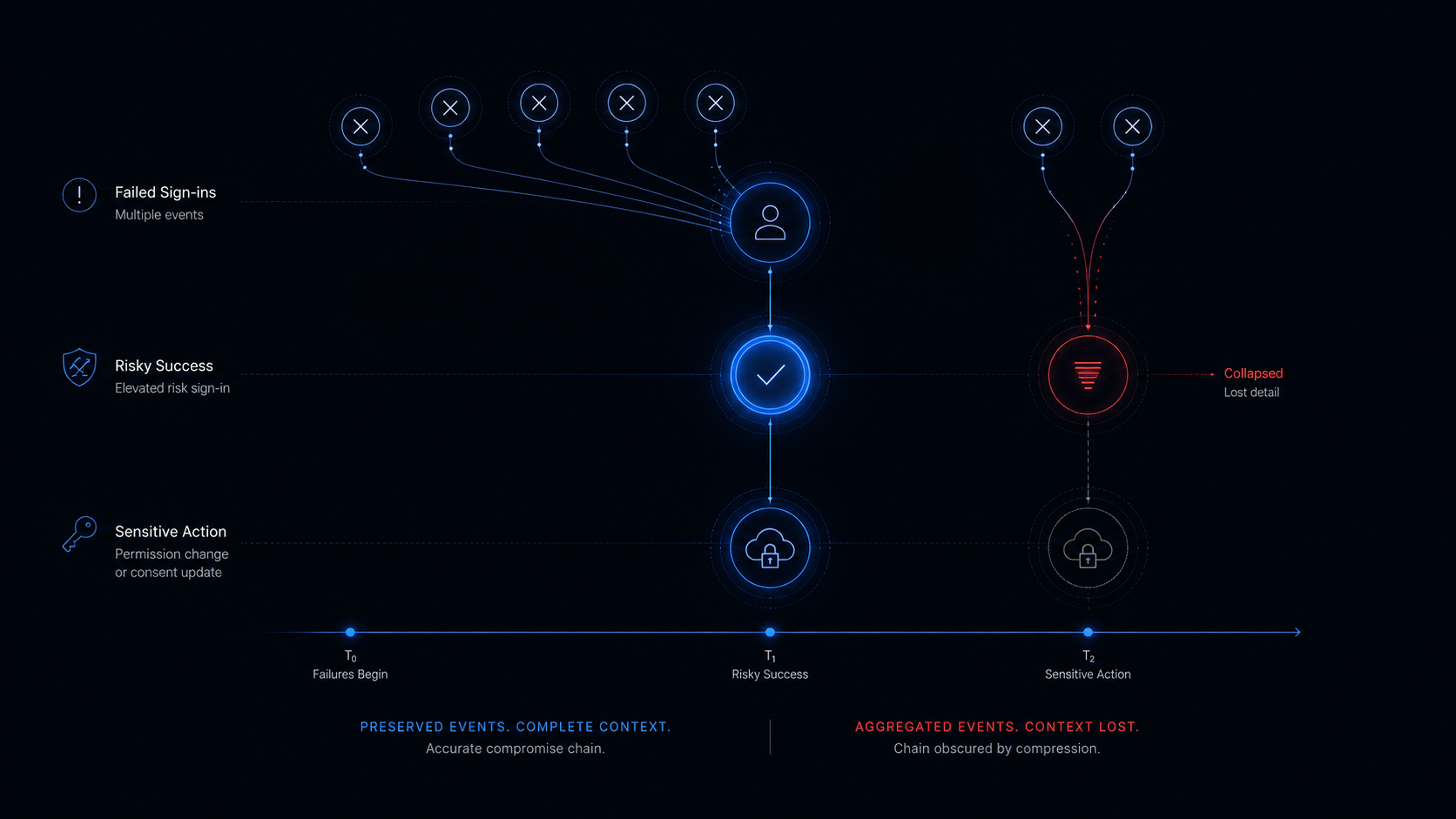
Sunday’s Detection 4 is the most operationally sophisticated query of the week. It chains three tables — SigninLogs (failed), SigninLogs (succeeded with elevated risk), and AuditLogs (post-sign-in action) — to find the compound signal: failed login attempts, followed by a risky successful login, followed by a sensitive operation within an hour. The detection is structurally right: the failed-then-succeeded pattern is the credential-theft signature, the risk score is the Identity Protection signal, and the audit action is the consequence.
The brief’s query works. Here is where it needs tightening:
let comprisedAccounts = riskySuccess
| join kind=inner (failedSignins) on UserPrincipalName
| where FailTime between ((SuccessTime - failWindow) .. SuccessTime)
| summarize
    FailCount = count(),
    FailIPs = make_set(FailIP, 10),
    SuccessTime = any(SuccessTime),  // ← problem
    SuccessIP = any(SuccessIP),
    ...
    by UserPrincipalName;
The any(SuccessTime) collapses multiple risky sign-ins per user into one arbitrary row. If Alice has two risky sign-ins — one at 10:00 from IP-A and one at 14:00 from IP-B — the query keeps one and drops the other, and the analyst gets one alert for two potentially separate compromise events. The fix is to summarise by (UserPrincipalName, SuccessTime) so each risky sign-in is preserved as a distinct finding.
The second issue is the AuditLogs join. The query correlates the risky sign-in with any audit action by the same user within an hour. That includes password changes, consent grants, and role assignments — but also reading a document, viewing a dashboard, and every other audit event that a normal user generates in the course of working. Without an OperationName filter, the query fires on every risky sign-in that is followed by any auditable activity, which is almost all of them. The fix is to restrict to operations that indicate account abuse.
The KQL
let lookback = 24h;
let failWindow = 30m;
let postCompromiseWindow = 1h;
let riskLevels = dynamic(["medium", "high"]);
// SENSITIVE OPERATIONS — the audit actions that matter after a
// credential compromise. These are the operations an attacker
// performs to maintain access, escalate privileges, or exfiltrate
// data. "Add member to role" is a privilege escalation. "Consent
// to application" is an OAuth abuse. "Update user" with a password
// or MFA change is persistence. A normal user reading a document
// is not in this list.
let SensitiveOps = dynamic([
    "Add member to role.",
    "Add app role assignment to user.",
    "Consent to application.",
    "Add delegated permission grant.",
    "Add application.",
    "Add service principal.",
    "Update user.",
    "Reset password (by admin).",
    "Reset password (self-service).",
    "Set force change user password.",
    "Update device.",
    "Add owner to application.",
    "Add owner to service principal.",
    "Set Company Information.",
    "Add member to group.",
    "Invite external user."
]);
// STEP 1: Failed sign-ins.
let FailedSignins = SigninLogs
| where TimeGenerated >= ago(lookback)
| where ResultType != 0
| project
    FailTime = TimeGenerated,
    UserPrincipalName = tolower(UserPrincipalName),
    FailIP = IPAddress,
    FailResultType = ResultType;
// STEP 2: Risky successful sign-ins.
// P2 DEPENDENCY: RiskLevelDuringSignIn requires Entra ID P2.
// Without it, this field is empty for all rows and the query
// returns nothing. This is a licensing gate, not a telemetry gap.
// If you don't have P2, this detection does not exist for you.
let RiskySuccess = SigninLogs
| where TimeGenerated >= ago(lookback)
| where ResultType == 0
| where RiskLevelDuringSignIn in (riskLevels)
| project
    SuccessTime = TimeGenerated,
    UserPrincipalName = tolower(UserPrincipalName),
    SuccessIP = IPAddress,
    RiskLevel = RiskLevelDuringSignIn,
    AppDisplayName,
    UserAgent,
    ConditionalAccessStatus,
    Location;
// STEP 3: Correlate failed → risky success.
// FIX: summarise by (UserPrincipalName, SuccessTime) so each
// distinct risky sign-in is preserved. The original summarised
// by UserPrincipalName alone and used any(SuccessTime), which
// collapsed multiple sign-ins per user into one arbitrary row.
let CompromisedSessions = RiskySuccess
| join kind=inner FailedSignins on UserPrincipalName
| where FailTime between ((SuccessTime - failWindow) .. SuccessTime)
| summarize
    FailCount      = count(),
    FailIPs        = make_set(FailIP, 10),
    DistinctFailIPs = dcount(FailIP)
    by UserPrincipalName, SuccessTime, SuccessIP,
       RiskLevel, AppDisplayName, UserAgent,
       ConditionalAccessStatus, Location;
// STEP 4: Post-compromise audit activity.
// FIX: filter to SensitiveOps. The original joined ALL audit
// events, which fires on every risky sign-in followed by normal
// work activity. SensitiveOps restricts to the operations that
// indicate account abuse: role changes, consent grants, password
// resets, owner additions.
CompromisedSessions
| join kind=inner (
    AuditLogs
    | where TimeGenerated >= ago(lookback + 1h)
    | extend Actor = tolower(tostring(InitiatedBy.user.userPrincipalName))
    | where isnotempty(Actor)
    | where OperationName in (SensitiveOps)
    | project
        AuditTime = TimeGenerated,
        Actor,
        OperationName,
        Category,
        TargetResources
) on $left.UserPrincipalName == $right.Actor
| where AuditTime between (SuccessTime .. (SuccessTime + postCompromiseWindow))
| project
    SuccessTime,
    UserPrincipalName,
    SuccessIP,
    FailIPs,
    FailCount,
    DistinctFailIPs,
    RiskLevel,
    AppDisplayName,
    UserAgent,
    ConditionalAccessStatus,
    Location,
    AuditTime,
    OperationName,
    Category,
    TargetResources,
    MinutesToAction = datetime_diff('minute', AuditTime, SuccessTime)
| order by RiskLevel desc, MinutesToAction asc
The line that does the work
    by UserPrincipalName, SuccessTime, SuccessIP,
       RiskLevel, AppDisplayName, UserAgent,
       ConditionalAccessStatus, Location;
The summarize ... by clause now includes SuccessTime, not just UserPrincipalName. This is the fix for the any() collapse: each distinct risky sign-in is a separate row, each row carries its own fail count and source IPs, and the subsequent audit-action join runs against each row independently. Two risky sign-ins by the same user at different times produce two findings, not one.
And where OperationName in (SensitiveOps) is the filter that makes the detection meaningful at scale. Without it, the query fires every time a risky sign-in is followed by any auditable activity — which is every time a user does anything in the Microsoft 365 ecosystem after signing in. With it, the query fires only when the post-sign-in activity is the kind of operation an attacker performs: role escalation, OAuth consent abuse, password reset, application registration. The audit activity is the consequence, and the consequence should be specific.
Keeping it honest
- This detection requires Entra ID P2 licensing. Without it,
RiskLevelDuringSignInis empty for all rows, theRiskySuccesssubquery returns nothing, and the entire detection chain is blind. The brief calls this out. The fix is to buy P2, not to work around it — the risk scoring is the signal, and there is no KQL substitute for a feature your tenant doesn’t have. - The
SensitiveOpslist is incomplete and organisation-dependent. The operations that matter depend on what the attacker wants. The list above covers privilege escalation, OAuth abuse, and credential persistence — the most common post-compromise actions. Your organisation may need to add mailbox-specific operations (Set-Mailbox,New-InboxRule) if Exchange Online is a high-value target, or Azure resource operations if cloud infrastructure is the concern. The list is a starting point. - Service-principal-initiated operations are invisible.
InitiatedBy.user.userPrincipalNameis null for service-principal-initiated audit events. If the attacker’s post-compromise action is performed through a service principal (common with OAuth consent abuse), the join will not match it. A supplementary query correlating onInitiatedBy.app.servicePrincipalIdwould catch this case, at the cost of a more complex join. - The 24-hour lookback with a three-table join is computationally expensive. In a tenant with millions of sign-in events per day, this query can be slow. Narrow the lookback to 6 hours for a scheduled rule, or add a pre-filter on specific
AppDisplayNamevalues (e.g., restrict toMicrosoft Azure Portal,Microsoft 365,Exchange Online) to reduce the join surface.
✨ Bonus: The Citrix Cluster and the Schema You Didn’t Check
Worth a brief section because it’s the same pipeline pattern as last week, applied to a different CVE — and because there’s a prerequisite step that none of the detections mention.
CVE-2026-19490 — the Citrix NetScaler ADC/Gateway authentication bypass — appeared in Thursday, Saturday, and Sunday. Four detections across three days:
| Day | Detection | Core shape |
|---|---|---|
| Thu | Detection 1 | leftanti: success with no prior failures |
| Sat | Detection 1 | HTTP 2xx to protected paths (cs-status parsing) |
| Sun | Detection 2 | Repeated requests to auth bypass URL paths |
| Sun | Detection 3 | External connections to management ports |
Unlike last week’s eight identical w3wp.exe queries, these four are meaningfully different. Thursday’s leftanti baseline is the “has this IP ever failed before?” question — the auth bypass signature. Saturday’s HTTP status code extraction looks at the response. Sunday’s two queries look at the request paths and the ports. Four angles on the same CVE, each one targeting a different layer of the telemetry.
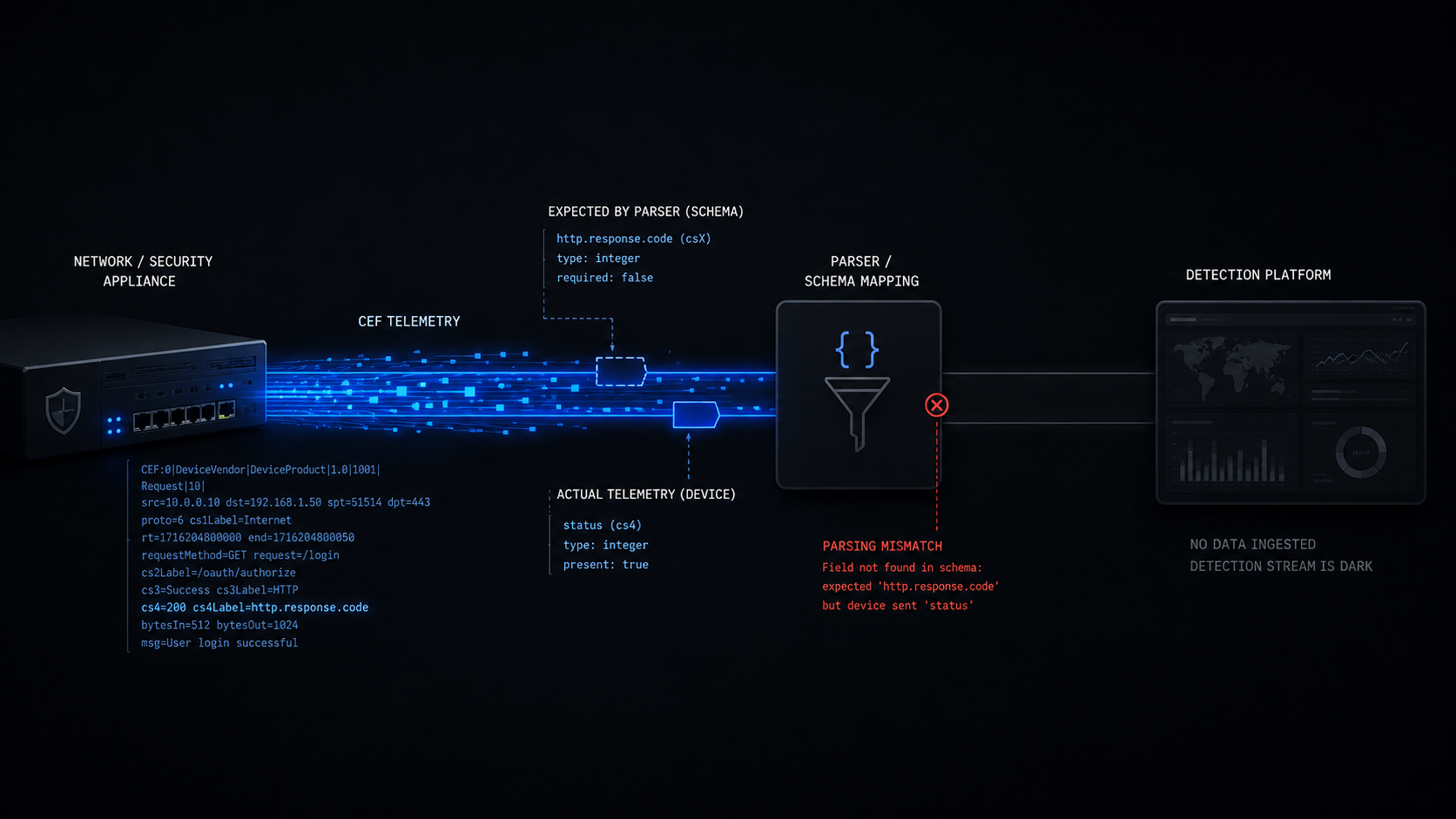
The shared problem is not redundancy — it’s the table. All four query CommonSecurityLog, which is only populated when a CEF-compatible syslog connector is configured for Citrix NetScaler. If the connector isn’t there, all four queries return nothing. And Saturday’s cs-status extraction — toint(extract(@"cs-status=(\d+)", 1, AdditionalExtensions)) — is parsing an unstructured string field with a regex against a key name that is not standardised across NetScaler firmware versions. If your NetScaler uses sc-status or httpStatusCode or embeds the response code in the message body, the extract returns null for every row, and the detection is blind.
This is the same telemetry-availability problem as Act I, applied to a network appliance instead of an endpoint agent. The detection is correct. The table might not exist. The field might not parse. And the failure mode is the same: zero rows that look like “nothing happened.”
But there is a step before the table and before the field: do you know which of your NetScaler instances are internet-facing in the first place? CVE-2026-19490 is an authentication bypass on a public-facing application (T1190). The entire attack surface is the set of NetScaler ADCs and Gateways reachable from the internet. If you don’t have that inventory, you’re deploying detections without knowing what you’re defending — and you might be missing instances that are exposed but not feeding CommonSecurityLog at all.
This is the same problem I wrote about last November in Identify Your Exposed Internet-Facing Devices Before They Identify You. That article’s core thesis is that IsInternetFacing == true in DeviceInfo is a hint, not proof — and the fix is a multi-signal KQL approach that combines public IP assignment, inbound connection telemetry, remote-access port analysis, and Defender’s own classification into a single composite view of what’s actually exposed. The same logic applies here: before you write a single CommonSecurityLog detection for a Citrix auth bypass, you should already know which Citrix instances are internet-facing, whether they’re forwarding CEF logs, and whether the CEF key names in AdditionalExtensions match the regex your detection expects. The detection is Step 2. The inventory is Step 1. And Step 1 is the one that most teams skip.
The pipeline did its job — it surfaced the CVE from multiple intelligence sources and produced four complementary detections. The detection engineer’s job is to validate the attack surface, validate the table, validate the field parsing, and deploy the subset that works in their environment. Thursday’s leftanti baseline is the one I’d ship first: it doesn’t depend on a parsed HTTP status code, it doesn’t require a specific URL path list, and it asks the detection question that most directly matches the CVE — “did an IP succeed without ever failing?” But before Thursday’s query runs, the internet-facing device inventory should already have told you where it needs to run.
The Bigger Lesson
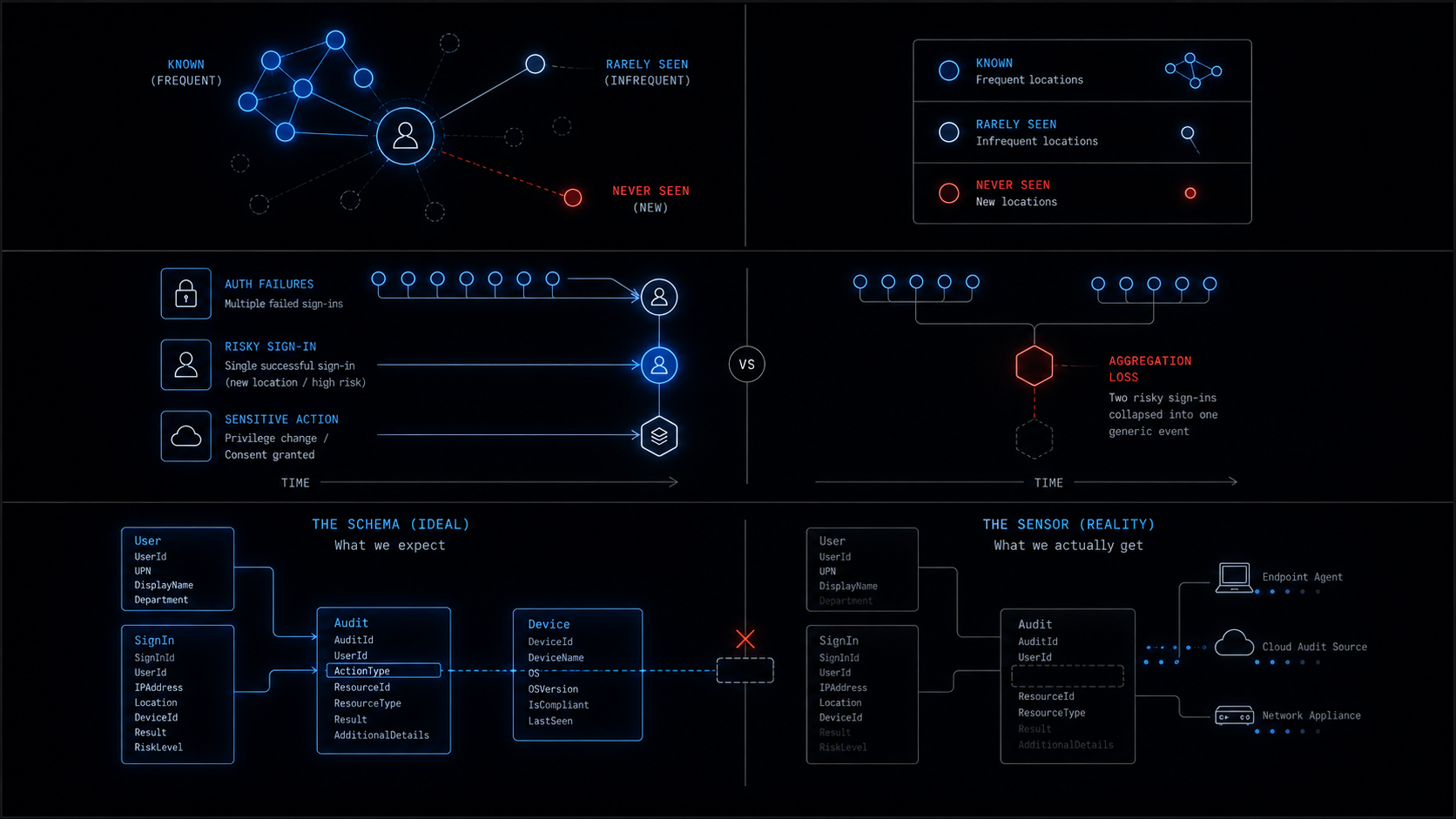
The common thread this week: the gap between the schema and the sensor.
Every detection engine works against a schema — the table definition, the column names, the documented ActionType values, the field descriptions in the Microsoft documentation. The schema says DeviceFileEvents has an ActionType column with values including FileRead. The schema says DeviceNetworkEvents has a RemoteUrl column. The schema says OfficeActivity has an ExternalAccess boolean. The schema says SigninLogs has RiskLevelDuringSignIn. The detections this week are written against the schema. They are correct against the schema.
The sensor is not the schema. The sensor is a software agent running on an endpoint, a syslog forwarder on a network appliance, an audit pipeline in a cloud service. What it actually emits depends on the agent version, the configuration, the licensing tier, the firmware, and a dozen other variables that the detection engineer cannot see from the KQL editor. FileRead may not be emitted. RemoteUrl may be empty. ExternalAccess may be null. RiskLevelDuringSignIn may require a license you don’t have. cs-status may not be the key name your NetScaler uses. And in every case, the detection fails silently — zero rows, no errors, and the dashboard shows green.
The fix is not better KQL. The fix is validation queries that run before detections deploy and tell you whether the fields you depend on actually exist in your environment. The fix is detection fields that are output columns, not filter predicates — so a missing value produces a lower-confidence finding instead of no finding. The fix is the difference between “this field was empty” (visible in the output) and “this field was empty” (invisible because the where clause dropped the row).
Three of the four improvements in this article make the same structural move: convert a filter into an enrichment. ActionType goes from a where to an extend. ExternalAccess goes from a gate to an output column. RiskLevelDuringSignIn stays in the project instead of moving to the where. In every case, the detection fires on more events, the signal-to-noise ratio is slightly lower, and the detection actually works when the field isn’t there. That is the trade — precision for reliability — and in a world where the field might not exist, reliability wins.
The most useful thing in this week’s data isn’t in any of the three queries above. It’s the pair of validation queries in Act I — summarize count() by ActionType and countif(isnotempty(RemoteUrl)) — that take 30 seconds to run and tell you whether your detection investment is real. Run them before you deploy. Run them after you deploy. Run them again when you upgrade the MDE agent. The schema doesn’t change. The sensor does.
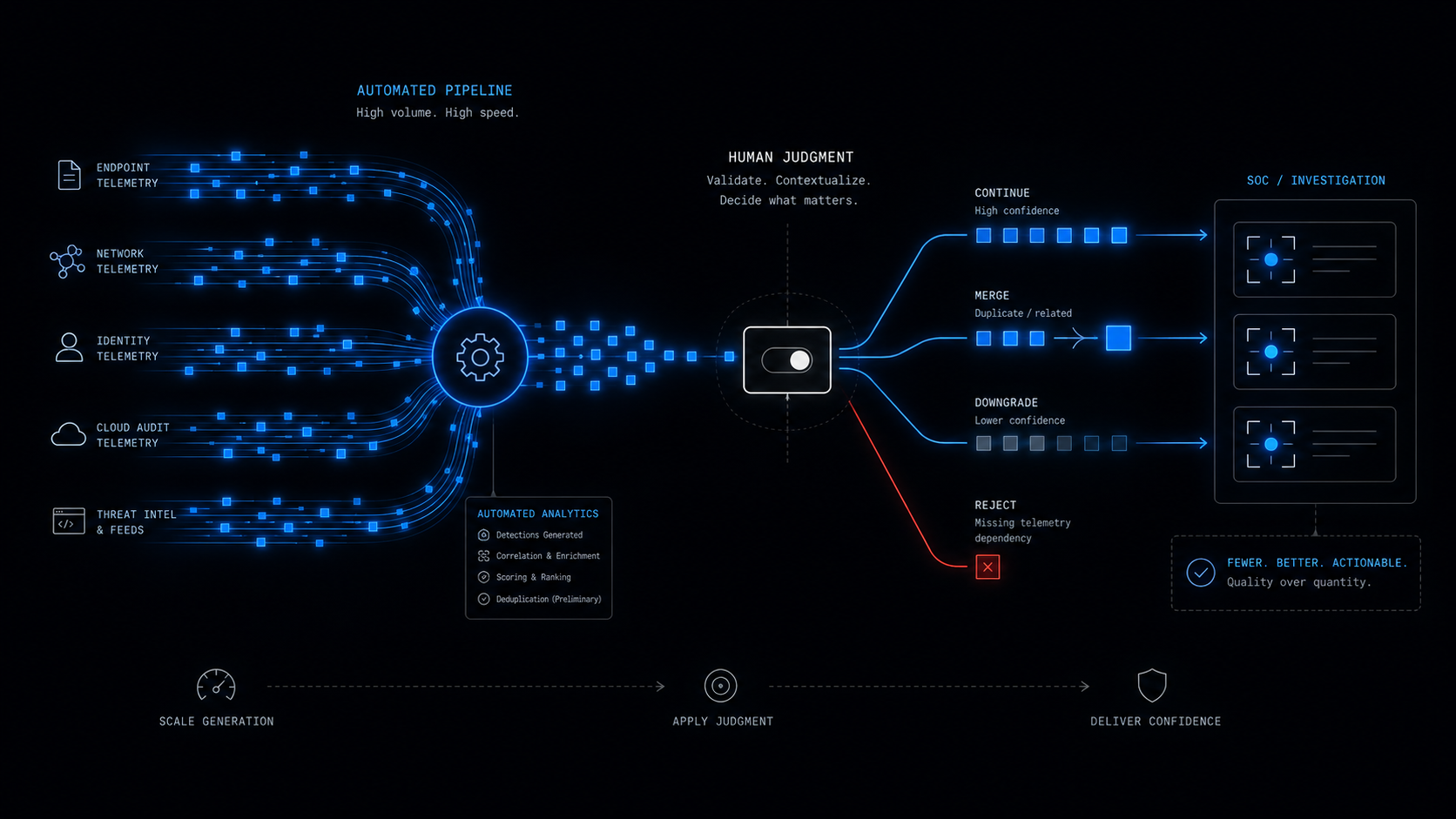
Every one of these came straight out of this week’s daily briefs — each detection shipped with ATT&CK mappings, telemetry requirements, deployment gates, triage runbooks, false-positive notes, and an honest readiness call. Twenty-two this week, and once again the ones worth writing about were the ones that needed a human between the automation and the analyst.
This kind of detection content is published daily — fresh threat intel translated straight into deployable detections, so you spend your time tuning and shipping instead of reading and re-deriving — that’s the whole point of the Daily Detection Engineering Brief at DevSecOpsDadAttack.com.
Helpful Links and References:
This Week’s Detection Engineering Briefs:
- Monday, 17th August
- Tuesday, 18th August
- Wednesday, 19th August
- Thursday, 20th August
- Friday, 21st August
- Saturday, 22nd August
- Sunday, 23rd August
DevSecOpsDadAttack Tags:
- detection-engineering
- kql
- Telegram
- Still Toolkit
- Armored Likho
- Teams Phishing
- Identity Phishing
- CVE-2026-19490
- Citrix NetScaler
- Citrix NetScaler ADC
- Citrix NetScaler Gateway
- Baselining
- OfficeActivity
- SigninLogs
- AuditLogs
- DeviceFileEvents
- DeviceNetworkEvents
- CommonSecurityLog
- Telemetry Validation
- ActionType
- Microsoft Sentinel
- Defender XDR
- Entra ID
- T1213
- T1555
- T1566
- T1566.003
- T1078
- T1190
ATT&CK Coverage in This Article:
Detected by the queries above:
- T1213 / T1213.001 — Data from Information Repositories / Local Data (Act I. Non-Telegram processes accessing
tdatasession files is collection from a local information repository. The detection surface is the file access, not the exfiltration.) - T1555 / T1555.003 — Credentials from Password Stores (Act I. Telegram session tokens in
tdatafunction as stored credentials — they grant access to the user’s Telegram account without re-authentication. Reading them is credential theft.) - T1566.003 — Spearphishing via Service (Act II. The Teams external message is the delivery channel. The detection correlates the phishing delivery with the credential-use consequence.)
- T1078 — Valid Accounts (Act II and Honorable Mention. The credential use from a new location, and the risky-success-followed-by-sensitive-operation chain, both detect the use of compromised valid accounts.)
- T1190 — Exploit Public-Facing Application (Bonus. The Citrix NetScaler auth bypass is the textbook example. All four Citrix detections in the bonus section cover consequences of this technique.)
Present in the activity, not cleanly mappable:
- T1567 / T1567.003 — Exfiltration Over Web Service / to Cloud Storage (Discussed in Act I as the network-side signal. The file-access detection does not cover exfiltration; the network-based Telegram detections from Tuesday and Wednesday do, but they depend on
RemoteUrlpopulation. The technique is present in the attack chain; the reliable telemetry for it is not inDeviceNetworkEventswithout TLS inspection.)
Deliberately unmapped:
- Act I’s baseline component is not an adversary technique. The process classifier and ActionType enrichment measure what processes access Telegram data, not what an adversary did. A backup agent accessing
tdataproduces the same row. Surface measurements are not adversary behaviour. - Act II’s location baseline is a configuration measurement, not an attack technique. It detects a change in the identity space (a new location for a known user), not a specific TTP. A user on vacation produces the same finding.
Discussed as a correction:
- T1587 (Develop Capabilities) on an endpoint-side detection. Wednesday’s Detection 1 maps T1587 to the Telegram API exfiltration + persistence correlation. T1587 is a pre-operational technique (the attacker building tools) — it describes the threat actor creating the fraud pipeline, not the pipeline’s execution on the victim’s endpoint. The endpoint detection is T1567 (exfiltration) and T1547 (persistence), not T1587.
External Sources:
- Securelist. Armored Likho expands its cyber-espionage toolkit. https://securelist.com/armored-likho-still-toolkit/121033/
- Unit 42. Identity Abuse Through Trusted Communication Channels. https://unit42.paloaltonetworks.com/communication-channel-identity-risks/
- Rapid7. Operation ASTERIX: Anatomy of a Crypto Fraud Pipeline. https://www.rapid7.com/blog/post/tr-operation-asterix-crypto-fraud-vishing-phishing
- Rapid7. CVE-2026-19490: Critical Vulnerability Affecting Citrix NetScaler ADC and NetScaler Gateway. https://www.rapid7.com/blog/post/etr-cve-2026-19490-critical-vulnerability-affecting-citrix-netscaler-adc-and-netscaler-gateway
- Rapid7. Metasploit Wrap Up: Lot of summer shells and fit http profiles. https://www.rapid7.com/blog/post/pt-metasploit-wrap-up-lot-of-summer-shells-and-fit-http-profiles
- Microsoft Security Blog. Hunting MacSync Stealer infrastructure through behavioral pivots. https://www.microsoft.com/en-us/security/blog/2026/08/18/hunting-macsync-stealer-infrastructure-through-behavioral-pivots/
- Securelist. APT group HoneyMyte upgrades CoolClient: the backdoor gets a kernel-level Windows rootkit. https://securelist.com/honeymyte-coolclient-driver-rootkit/121028/
- Unit 42. Connecting the Dots: Securing the Overlooked Corners of the SDLC Supply Chain. https://unit42.paloaltonetworks.com/sdlc-supply-chain/
- SANS ISC. Even MOAR Powershell, looking at Entra logins. https://isc.sans.edu/diary/rss/33268
- Microsoft Learn. DeviceFileEvents table in the advanced hunting schema. https://learn.microsoft.com/en-us/defender-xdr/advanced-hunting-devicefileevents-table
- Microsoft Learn. DeviceNetworkEvents table in the advanced hunting schema. https://learn.microsoft.com/en-us/defender-xdr/advanced-hunting-devicenetworkevents-table
- Microsoft Learn. OfficeActivity table in Microsoft Sentinel. https://learn.microsoft.com/en-us/azure/azure-monitor/reference/tables/officeactivity
- Microsoft Learn. SigninLogs table in Microsoft Sentinel. https://learn.microsoft.com/en-us/azure/azure-monitor/reference/tables/signinlogs
- Microsoft Learn. AuditLogs table in Microsoft Sentinel. https://learn.microsoft.com/en-us/azure/azure-monitor/reference/tables/auditlogs
- MITRE ATT&CK. Data from Information Repositories (T1213). https://attack.mitre.org/techniques/T1213/
- MITRE ATT&CK. Credentials from Password Stores (T1555). https://attack.mitre.org/techniques/T1555/
- MITRE ATT&CK. Phishing: Spearphishing via Service (T1566.003). https://attack.mitre.org/techniques/T1566/003/
- MITRE ATT&CK. Valid Accounts (T1078). https://attack.mitre.org/techniques/T1078/
- MITRE ATT&CK. Exploit Public-Facing Application (T1190). https://attack.mitre.org/techniques/T1190/
- DevSecOpsDad.com From RSS Noise to CISO Signal: Automating Cyber Threat Intel. https://www.hanley.cloud/2026-04-28-From-RSS-Noise-to-CISO-Signal-Automating-Cyber-Threat-Intelligence-That-Actually-Matters/
- DevSecOpsDad.com Identify Your Exposed Internet-Facing Devices Before They Identify You! https://www.hanley.cloud/2025-11-25-Identify-Your-Exposed-Internet-Facing-Devices-Before-They-Identify-You/
Stay Ahead of Emerging Threats
Looking for actionable threat intelligence and detection engineering insights?
DevSecOpsDadAttack publishes daily:
📈 Threat Intelligence Briefs focused on active campaigns, exploitation trends, and operational risk
🛠️ Detection Engineering Briefs with ATT&CK mappings, telemetry requirements, KQL detections, tuning guidance, and triage workflows
🔍 Practical analysis designed for SOC teams, threat hunters, detection engineers, and security leaders
Visit DevSecOpsDadAttack.com for the latest intelligence and detection content.

📚 Want to go deeper?
Anyone can aggregate threat intel. Very few teams can prove why they acted—or why they didn’t.
The below books are about closing that gap; turning curated signal into defensible decisions across KQL, PowerShell, and the Microsoft security stack.
🛠️ KQL Toolbox: Turning Logs into Decisions in Microsoft Sentinel

🧰 PowerShell Toolbox: Hands-On Automation for Auditing and Defense
📖 Ultimate Microsoft XDR for Full Spectrum Cyber Defense
Real-world detections, Sentinel, Defender XDR, and Entra ID — end to end.