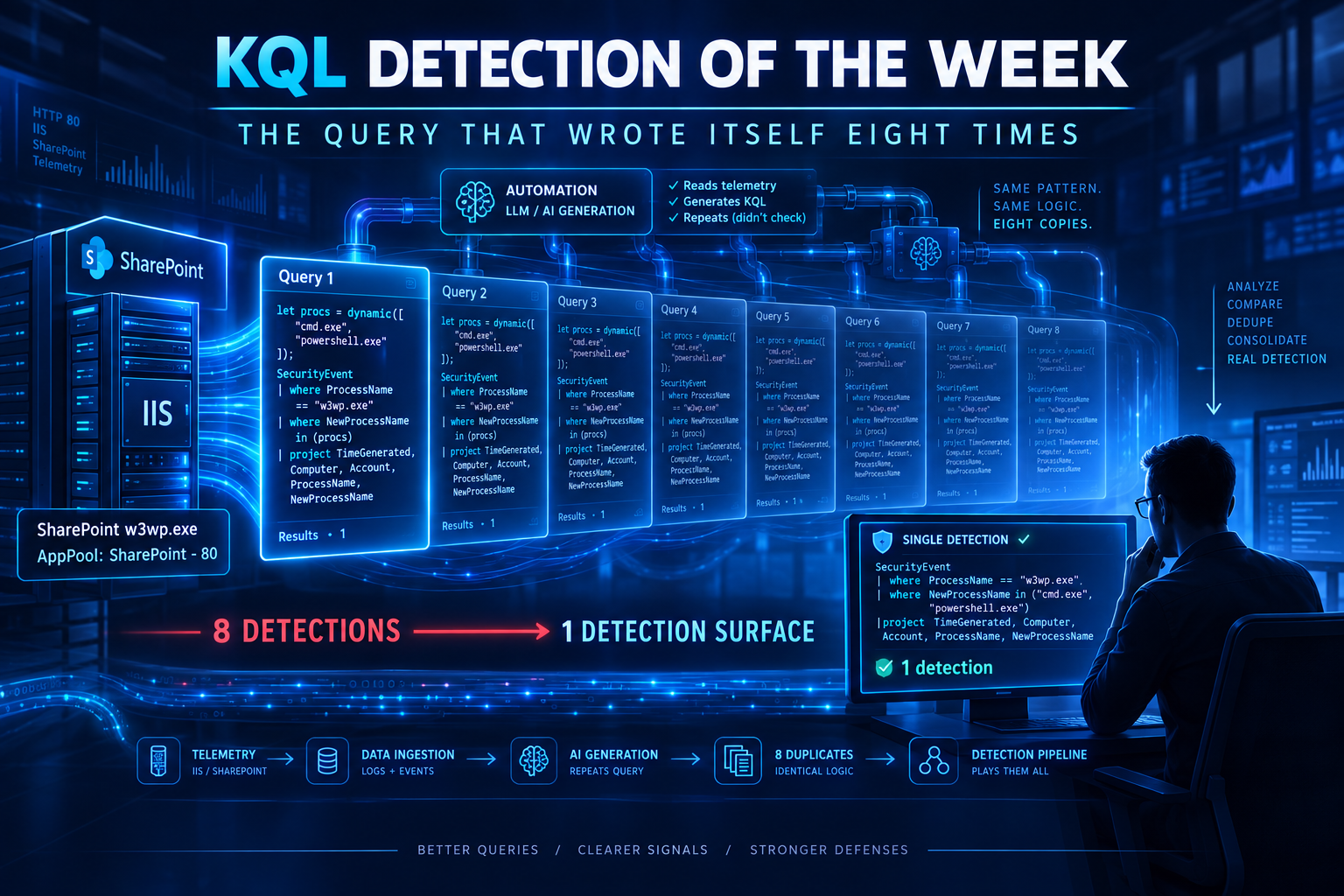
The August 2026 Patch Tuesday dropped a pair of chained SharePoint vulnerabilities — an authentication bypass (CVE-2026-55040) and a remote code execution (CVE-2026-63520) — that together give an unauthenticated attacker arbitrary code execution on your SharePoint server. CISA added 63520 to KEV the same week. The briefs noticed.
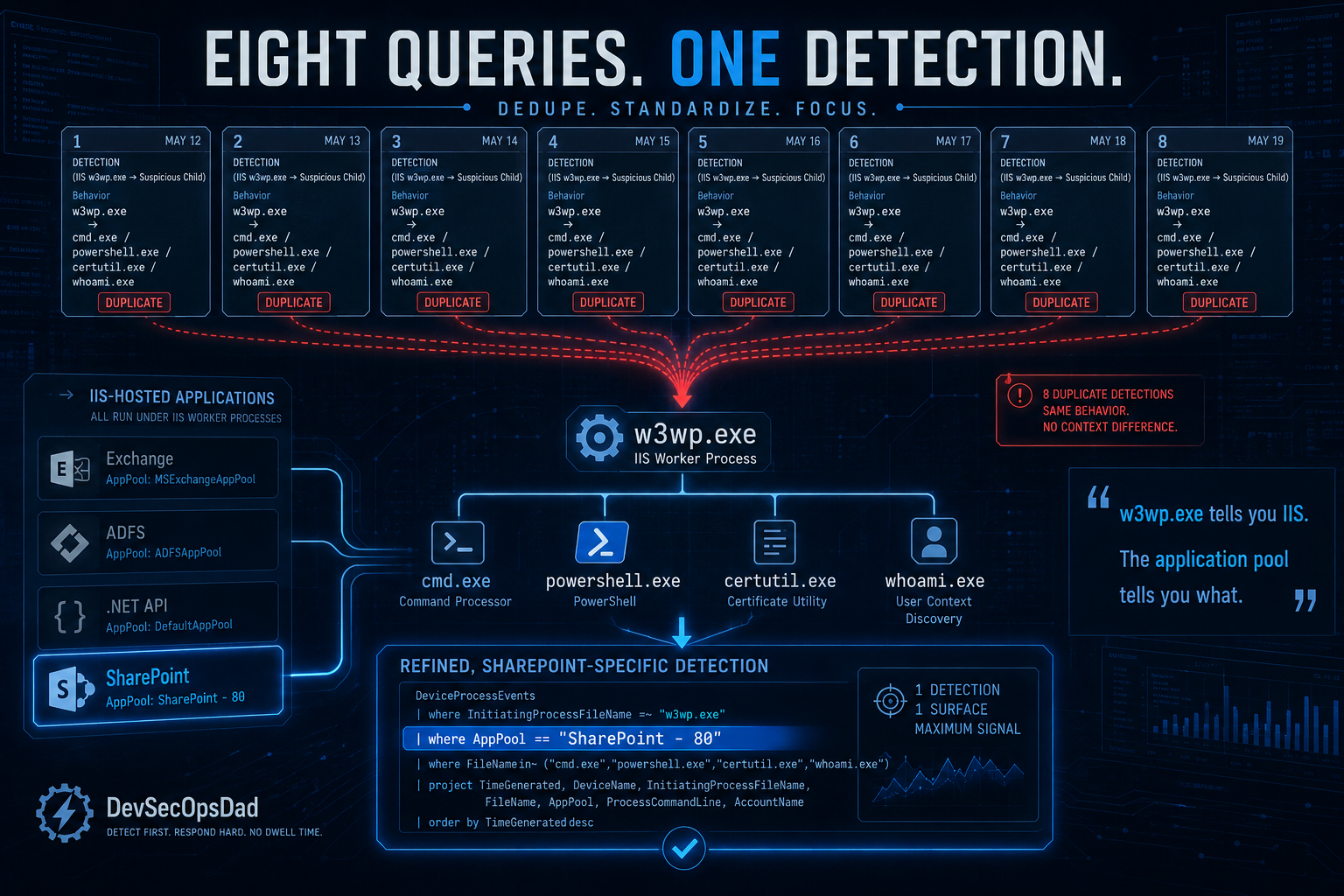
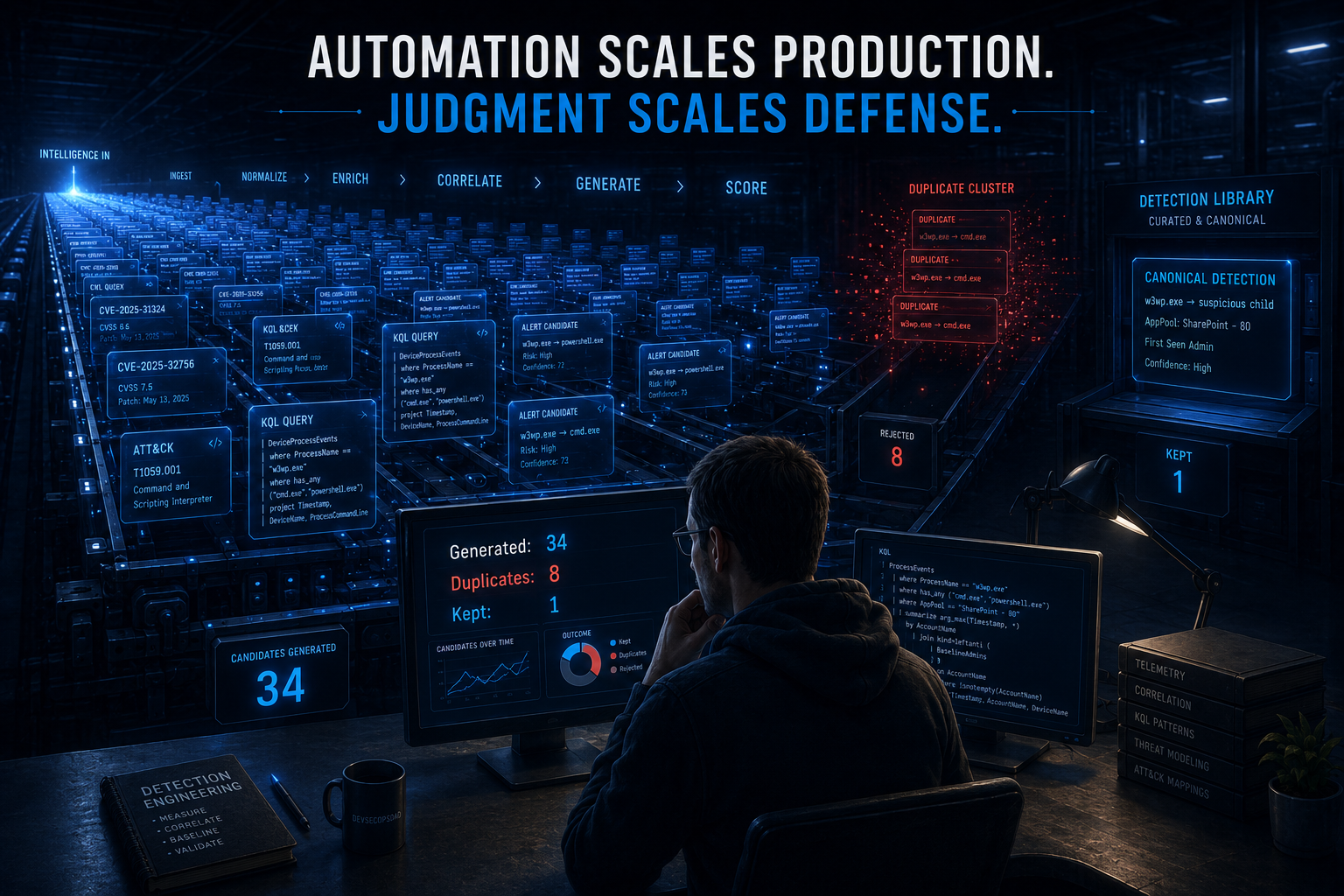
They noticed repeatedly. Across five days of Detection Engineering Briefs, the automation produced eight separate detections for the same behaviour: w3wp.exe spawns a suspicious child process. Eight queries, eight sets of tuning notes, eight triage runbooks — and every one of them hunts an IIS worker process spawning cmd.exe or powershell.exe, which is a pattern that predated these CVEs by about a decade. Meanwhile, the week’s most interesting detection is a different shape entirely — a baseline query that catches the auth bypass by asking not what was executed, but who has never administered SharePoint before today.
Thirty-four detections this week. Eight of them are the same query wearing different dates. Act I collapses them into one and fixes what none of them do: distinguish SharePoint’s w3wp.exe from everyone else’s. Act II takes apart a correlation between OfficeActivity and DeviceProcessEvents that looks high-fidelity and has no device-level join key. The honorable mention is the baseline — and as with last week’s lifecycle script inventory, it’s the one I’d ship first.
🥇 Act I: One Query, Written Eight Times, Working Zero
Here are the core shapes of this week’s w3wp.exe detections, drawn from Wednesday’s Detection 1, Thursday’s Detection 1, Friday’s Detection 1, and five more across the remaining days:
// Wednesday (the simplest version)
DeviceProcessEvents
| where InitiatingProcessFileName =~ "w3wp.exe"
| where FileName in~ (suspicious_children)

// Thursday (adds a PostExploitPatterns flag)
| where InitiatingProcessFileName =~ "w3wp.exe"
| where FileName in~ (SuspiciousChildProcs)
| extend SuspiciousCommandLine = iff(
    ProcessCommandLine has_any (PostExploitPatterns), true, false)

// Friday (adds the IIS path filter)
| where InitiatingProcessFileName =~ "w3wp.exe"
| where InitiatingProcessFolderPath has @"\Windows\System32\inetsrv"
| where FileName in~ (suspicious_children)
Eight detections, same shape, three problems, and the third one is the reason none of them work as a SharePoint detection.
First, the has_any on PostExploitPatterns. Thursday’s Detection 1 includes:
let PostExploitPatterns = dynamic(["FromBase64", "EncodedCommand", "-enc ",
    "IEX", "Invoke-Expression", "DownloadString", "DownloadFile",
    "WebClient", "certutil -decode", "bitsadmin /transfer",
    "Start-Process", "Net.WebClient"]);
Most of these are clean single terms: FromBase64, EncodedCommand, IEX. But "certutil -decode" contains a space, which is a delimiter — two terms, certutil and decode, tested independently. has_any will match any command line containing the word certutil or the word decode, separately, anywhere. Same for "bitsadmin /transfer" (three terms: bitsadmin, transfer, and the slash is a delimiter), "Start-Process" (two terms: start, process), and "Net.WebClient" (two terms: net, webclient). Any PowerShell command line containing the word process — which is most of them — matches "Start-Process" even without the cmdlet present.
This is the same tokenizer error from last week’s article, in a different query, on a different day, and it’s the third week in a row. The fix is the same: contains for substring fragments, or mv-apply for a list of them. The prefilter pattern is the same, too — index-friendly has_any for the clean terms, authoritative contains for the rest.
Second, none of the eight queries output the IIS application pool name. When w3wp.exe starts, its command line contains the pool identity: w3wp.exe -ap "SharePoint - 80" -v "v4.0" -l "..." -a .... The -ap argument is how you know which IIS application this worker process belongs to. Without it, every query this week fires on every IIS application in the estate — your API gateway, your legacy SOAP service, your ADFS proxy, your Exchange OWA — and the first thing the analyst does on every alert is look at the command line to figure out whether it’s SharePoint. Eight queries, zero of them extract the one field that makes the triage instant.
Third, and this is the one that matters: InitiatingProcessFileName =~ "w3wp.exe" is not a SharePoint detection. It is an IIS detection. Every Windows web application hosted behind IIS runs under w3wp.exe. On a server farm where SharePoint, Exchange, ADFS, and a custom .NET API all run IIS, this query fires on all four, and three of them are not what the CVE is about. Not one of the eight versions across the week scopes to SharePoint servers by device name, device group, or application pool — and the brief’s own tuning notes say to do exactly that: “Add a let-bound list of SharePoint server hostnames.” If the tuning note is necessary before the detection is meaningful, the detection isn’t finished.
The query below fixes all three. It scopes to SharePoint by application pool name (no device list required), normalizes the image names for cross-platform consistency (the same Bare() function from last week), classifies the child process so analysts see structure instead of a flat list, and pulls the pattern-match test down to a contains-based check that asks the question the has_any cannot.
The KQL
let lookback = 7d;
// Normalize image names: strip path and extension so w3wp.exe, w3wp, and
// /usr/bin/w3wp all compare as one token. Same function as last week; copied
// rather than imported because KQL has no imports, and a function you have to
// remember to paste is a function you will forget on the one query that needed it.
let Bare = (s:string) {
    trim_end(@"\.(exe|cmd|bat|com|ps1)", tolower(extract(@"([^\\/]+)$", 1, tostring(s))))
};
// The children worth looking for. LOLBins, scripting engines, recon tools,
// network tools. These lists define the DETECTION BOUNDARY — anything not
// in them is dropped by the prefilter below. The case() classifier then
// ranks what survives so analysts see structure instead of a flat list.
let ShellsAndInterpreters = dynamic([
    "cmd","powershell","pwsh","cscript","wscript","mshta","bash","sh"
]);
let ReconTools = dynamic([
    "whoami","nltest","net","net1","ipconfig","systeminfo","tasklist",
    "hostname","quser","query","dsquery","klist","nslookup"
]);
let LOLBins = dynamic([
    "certutil","bitsadmin","rundll32","regsvr32","msiexec","mshta",
    "wmic","forfiles","csc","installutil","regasm","regsvcs","msbuild"
]);
let NetworkTools = dynamic([
    "curl","wget","powershell","pwsh","certutil","bitsadmin","ssh","scp"
]);
// POST-EXPLOITATION FRAGMENTS. Two lists, because they need two operators.
// Clean terms: true single terms with no delimiters. These survive has_any
// because each entry is one contiguous alphanumeric token — no hyphens, no
// dots, no spaces. If it contains punctuation, it belongs in Fragments.
let PostExploitTerms = dynamic([
    "FromBase64","EncodedCommand","IEX","DownloadString","DownloadFile",
    "WebClient","nishang","powercat","mimikatz","rubeus"
]);
// Delimiter-bearing fragments: must use contains, never has_any.
// Every entry here has a dot, dash, space, or slash in it. The hyphenated
// cmdlets (Invoke-Expression, etc.) belong here, not in PostExploitTerms:
// a hyphen is a term delimiter, so has_any("Invoke-Expression") matches
// any command line containing both "invoke" and "expression" as separate
// terms, regardless of adjacency. contains matches the exact substring.
let PostExploitFragments = dynamic([
    "Invoke-Expression","Invoke-WebRequest","Invoke-RestMethod",
    "certutil -decode","certutil -urlcache","bitsadmin /transfer",
    "Start-Process","Net.WebClient","New-Object System.Net",
    "-nop -w hidden","-noni -nop -ep bypass","[Convert]::FromBase64",
    "powershell -e ","cmd /c echo","cmd.exe /c powershell"
]);
// Prefilter: every term from ALL child-classification lists, derived so
// the prefilter cannot drift from the authoritative classification. This
// is the detection boundary — anything not in these lists is invisible.
let AllChildTerms = array_concat(ShellsAndInterpreters, ReconTools, LOLBins, NetworkTools);
DeviceProcessEvents
| where Timestamp > ago(lookback)
// THE SCOPING FIX: w3wp.exe announces its application pool in its own command
// line. "-ap" is the argument, and the value is quoted. This is how you know
// the worker is SharePoint without a device list, without a device group, and
// without asking the infrastructure team. Extract it once, filter on it, and
// put it in the output so the analyst never has to go looking.
| where InitiatingProcessFileName =~ "w3wp.exe"
| extend AppPool = extract(@'-ap\s+"([^"]+)"', 1, tostring(InitiatingProcessCommandLine))
// "SharePoint" in the application pool name is the scoping test. The default
// pool names are "SharePoint - 80", "SharePoint - 443", "SharePoint Web Services",
// and "SecurityTokenServiceApplicationPool" (STS). Custom pool names are a
// known blind spot: this filter fails closed. If your organisation renames
// SharePoint pools, use device/farm scoping instead. AppPool remains in the
// surviving output to make analyst triage immediate.
| where AppPool contains "SharePoint"
     or AppPool contains "SecurityTokenService"
// Indexed prefilter on the child image. This is the detection boundary:
// anything not in AllChildTerms is dropped here and never classified.
| where FileName has_any (AllChildTerms)
| extend Self = Bare(FileName)
// Classify the child process. The prefilter above is the gate; the case()
// below is the label. A whoami.exe under w3wp.exe survived the prefilter
// because it's in the list; now it gets ranked so the analyst sees
// structure. "Other" catches anything the prefilter let through that
// doesn't match a specific category (possible via has_any tokenization).
| extend ChildClass = case(
      Self in (ShellsAndInterpreters), "ShellOrInterpreter",
      Self in (ReconTools),            "ReconTool",
      Self in (LOLBins),               "LOLBin",
      Self in (NetworkTools),          "NetworkTool",
                                       "Other")
| extend CmdLower = tolower(tostring(ProcessCommandLine))
// Post-exploitation indicators: two tests, two operators.
// Term-clean needles via has_any (indexed, fast).
| extend TermHit = CmdLower has_any (PostExploitTerms)
// Delimiter-bearing fragments via mv-apply + contains (correct).
| mv-apply Frag = PostExploitFragments to typeof(string) on (
      summarize FragHits = make_set_if(Frag, CmdLower contains Frag, 5)
  )
| extend HasPostExploit = TermHit or array_length(FragHits) > 0
// The parent-of-parent: w3wp.exe should be spawned by the IIS Windows Process
// Activation Service (WAS), which runs as svchost.exe. If w3wp.exe's parent is
// something else, that's a different kind of interesting.
| extend GrandParent = Bare(InitiatingProcessParentFileName)
| extend NormalIISChain = GrandParent in ("svchost","services")
| summarize
    Events        = count(),
    ShellEvents   = countif(ChildClass == "ShellOrInterpreter"),
    ReconEvents   = countif(ChildClass == "ReconTool"),
    LOLBinEvents  = countif(ChildClass == "LOLBin"),
    PostExploits  = countif(HasPostExploit),
    Children      = make_set(Self, 20),
    ChildClasses  = make_set(ChildClass, 5),
    AppPools      = make_set(AppPool, 5),
    SampleCmd     = take_anyif(ProcessCommandLine, HasPostExploit),
    SampleCleanCmd = take_anyif(ProcessCommandLine, not(HasPostExploit)),
    Accounts      = make_set(AccountName, 5),
    DeviceNames   = make_set(DeviceName, 5),
    IISChains     = make_set(strcat(GrandParent, " > w3wp > ", Self), 15),
    NormalChains  = countif(NormalIISChain),
    ActiveDays    = dcount(bin(Timestamp, 1d)),
    FirstSeen     = min(Timestamp),
    LastSeen      = max(Timestamp)
    by DeviceId
| extend
    DistinctChildren = array_length(Children),
    HasReconOrLOLBin = ReconEvents > 0 or LOLBinEvents > 0
// Ranking: post-exploitation patterns first, then recon/LOLBins, then raw
// shell spawns. Event count is last. One powershell with -enc is the incident;
// a thousand legitimate cmd.exe invocations are Tuesday.
| order by PostExploits desc, ReconEvents desc, LOLBinEvents desc,
           ShellEvents desc, DistinctChildren desc, Events desc
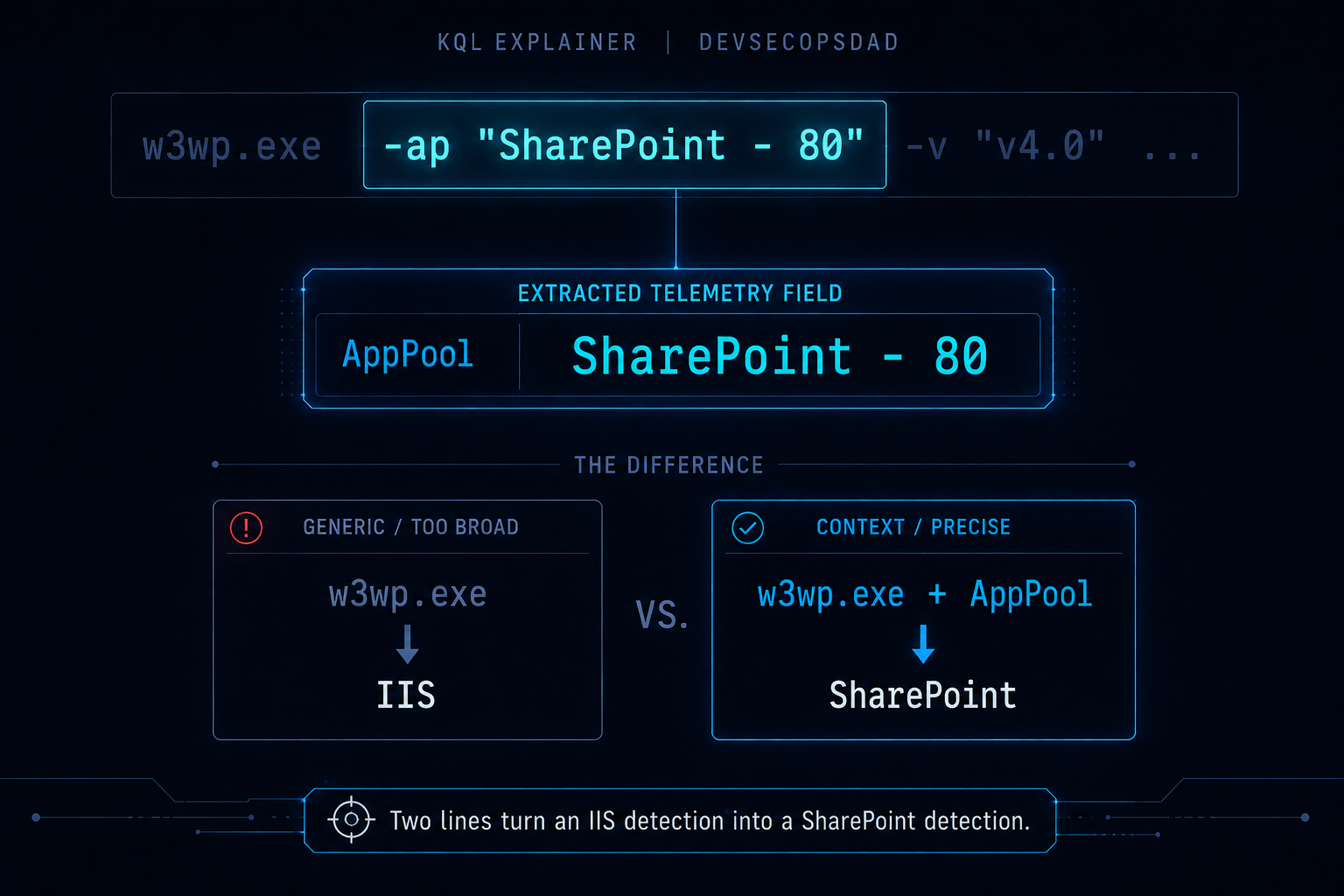
The line that does the work
| extend AppPool = extract(@'-ap\s+"([^"]+)"', 1, tostring(InitiatingProcessCommandLine))
| where AppPool contains "SharePoint"
     or AppPool contains "SecurityTokenService"
Two lines, and they convert an IIS detection into a SharePoint detection.
Every w3wp.exe worker process carries its application pool name in the command line. It’s the -ap argument, it’s always quoted, and it’s the primary identity of the worker — not the binary name (which is always w3wp.exe), not the folder path (which is always inetsrv), and not the device name (which tells you where, not what). The application pool is what this worker is hosting, and on a server running SharePoint, the default pool names all contain the word SharePoint.
Note what this buys: no device list. No watchlist. No device group. No phone call to the infrastructure team. No manual maintenance when a server is added or decommissioned. The scoping is derived from the data, which means it cannot drift from the data, which means it will still be correct on the day someone deploys a new SharePoint farm and forgets to update the detection.
Note the trade-off: this is high-precision scoping at the cost of renamed pools. An organisation that renames its SharePoint pool to WebApp-Prod-01 disappears from this query entirely — the where drops the row, and the analyst never sees it. That is a real blind spot, and if you cannot trust your naming conventions, fall back to a device-name or device-group scope and accept the maintenance cost. The application pool approach works best when you control the convention; when you don’t, it fails silently. AppPool stays in the output so that when the query does fire, the analyst sees which pool triggered it without pivoting — but it cannot show what the where already discarded.
And note what this isn’t: it isn’t InitiatingProcessFolderPath has @"\Windows\System32\inetsrv", which is Friday’s improvement over the others. The path filter narrows from everything to IIS, which helps, but inetsrv is still every IIS application on the box. The application pool narrows from IIS to this specific web application, and that is the unit the CVE is about.
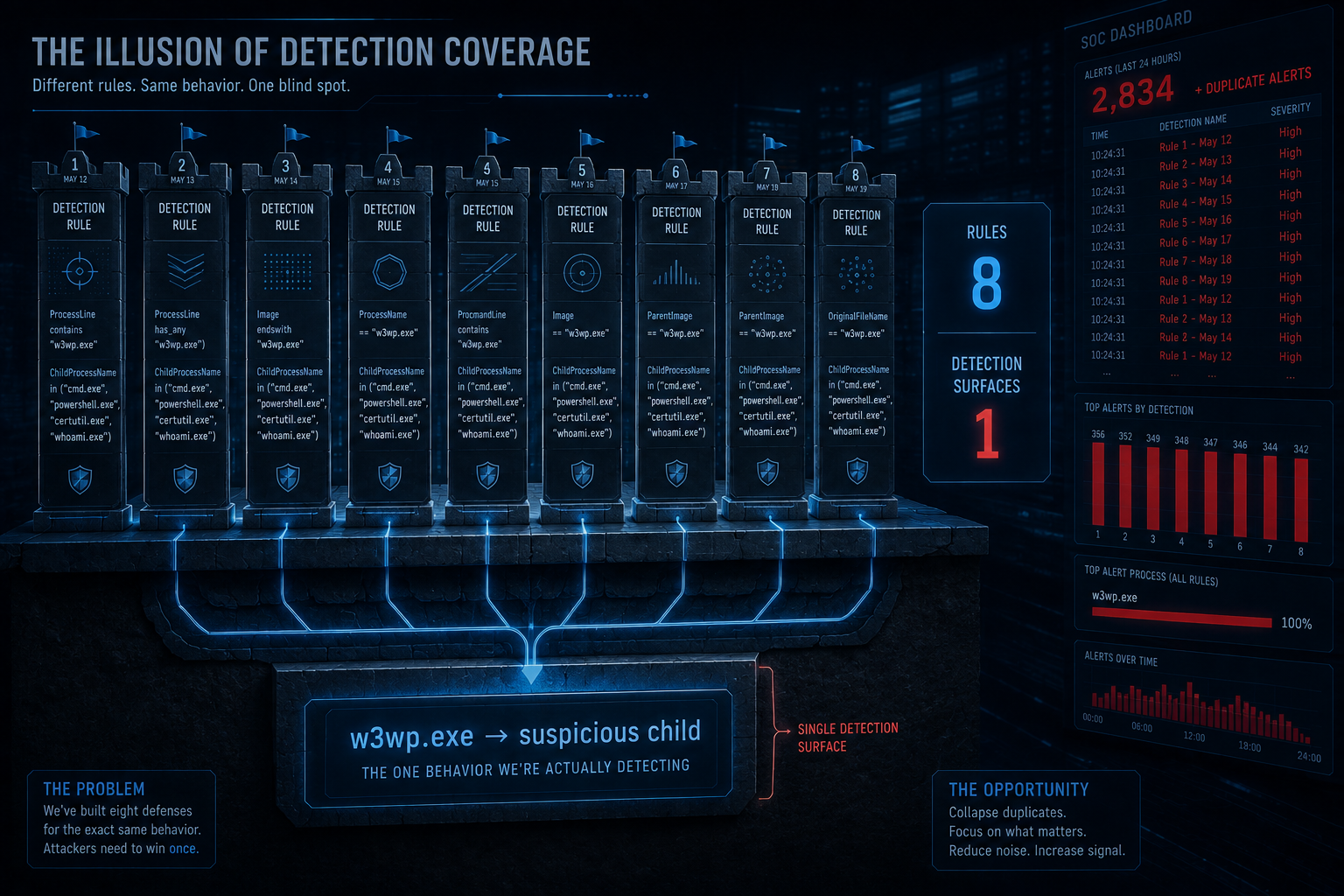
Eight detections, one pattern, zero deduplication
Worth a section because it’s visible to anyone reading the week. Here is the same detection, dated:
| Day | Detection | Core predicate |
|---|---|---|
| Wed 12 | Detection 1 | w3wp.exe → suspicious child |
| Wed 12 | Detection 4 | w3wp.exe → suspicious child + inbound HTTP |
| Thu 13 | Detection 1 | w3wp.exe → suspicious child + PostExploitPatterns |
| Thu 13 | Detection 4 | w3wp.exe → outbound connection |
| Fri 14 | Detection 1 | w3wp.exe → suspicious child (IIS path scoped) |
| Fri 14 | Detection 2 | w3wp.exe → suspicious child + OfficeActivity |
| Sat 15 | Detection 3 | w3wp.exe → suspicious child |
| Sun 16 | Detection 3 | w3wp.exe → suspicious child + outbound |
The intelligence context is the same CVE pair. The KQL is the same where. The child-process list varies by one or two entries. Thursday adds a PostExploitPatterns flag. Friday adds an inetsrv path check. Wednesday and Sunday add a network correlation. But the detection question — “did an IIS worker process spawn a shell?” — is identical across all eight, and the tuning notes are nearly word-for-word.
This is not a criticism of the individual queries. Each one, taken alone, is reasonable. The issue is the aggregate: eight instances of the same detection, distributed across five days, with no mechanism to recognise they are the same. A SOC that deploys all of them has eight rules firing on the same event, eight alert queues, eight tuning cycles, and the illusion of coverage depth when there is coverage width of one.
The brief pipeline produces detections per intelligence input. The CVE was reported on five consecutive days. The pipeline doesn’t know it already wrote this query yesterday. That’s an honest limitation of the automation, and it’s worth naming because the fix is not in the KQL — it’s in the pipeline.
Keeping it honest
- Application pool scoping assumes default names. An organisation that renames its SharePoint pool to
WebApp-Prod-01breaks the filter, and the query goes from SharePoint-specific to nothing — thewheredrops the row silently. This is the cost of high-precision scoping: it fails closed. If you control your naming convention, this works. If you don’t, add a device-name filter and accept the maintenance cost. w3wp.exe → cmd.exeis not novel, and this query does not make it novel. This detection pattern has been the answer to every IIS RCE since ProxyShell, and most environments already have a version of it. The interesting question is not “should I write this query” — it’s “do I already have it, and if so, does it already cover SharePoint?” If the answer to both is yes, the correct response to this week’s eight detections is zero new rules.- The
PostExploitFragmentslist is what I could think of. It is not exhaustive, it will not catch an attacker who uses a technique not on it, and adding entries to it is a subscription, not a solution. The classifier is a triage accelerator, not a detection boundary — the detection boundary is thewhere, not theextend. SampleCmdpicks one post-exploitation row, arbitrarily.take_anyif(ProcessCommandLine, HasPostExploit)selects only from rows where the predicate is true, so it will not return a benigncmd.exeinvocation when apowershell -encrow exists — the predicate ensures the sample comes from the post-exploitation set. The limitation is different: when multiple post-exploitation rows exist for the same device,take_anyifgives you an arbitrary example, not necessarily the most severe.make_setof full command lines is prohibitively expensive; a single arbitrary sample from the right subset is a compromise, not a guarantee.- This query cannot see webshell execution. A webshell that runs inside the
w3wp.exeprocess (ASP.NET, ASPX) does not spawn a child process at all — it executes as managed code within the same worker. The only telemetry for that is file creation (the webshell itself being dropped) and network traffic.DeviceProcessEventsis the wrong table for it, and every query this week is blind to it by construction.
🥈 Act II: The Correlation That Correlates Everything
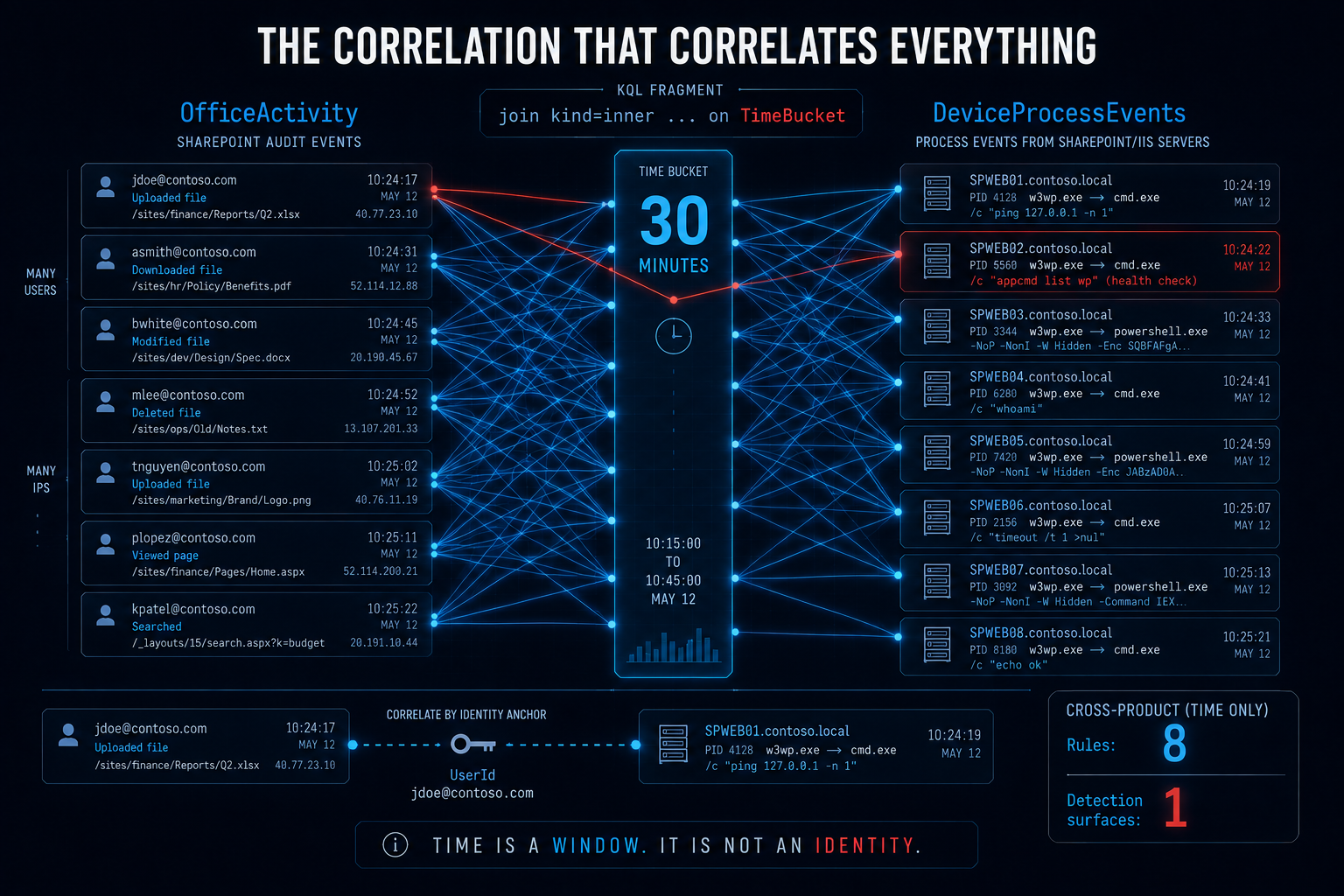
Friday’s Detection 2 is the most ambitious query of the week. It correlates OfficeActivity (SharePoint application-layer audit events) with DeviceProcessEvents (host-level process telemetry) to find a compound signal: a suspicious SharePoint operation and a suspicious w3wp.exe child process in the same time window. If both fire together, the confidence goes up. The intent is exactly right.
The implementation correlates everything with everything:
SuspiciousW3WPChildren
| join kind=inner SuspiciousSharePointOps on TimeBucket
The join key is TimeBucket — a 30-minute time window. There is no DeviceId. There is no DeviceName. There is no IP address. There is no user. The join says: any w3wp.exe child process on any SharePoint server in the fleet, correlated with any SharePoint audit operation by any user from any IP, as long as they happened in the same half hour.
In an environment with three SharePoint servers handling 500 users, this is a 30-minute sliding cross-product. A legitimate file upload at 10:14 on Server A correlates with a legitimate cmd.exe health-check at 10:22 on Server B. They have no connection to each other. They share a time bucket. The query reports them as a correlated finding.
The brief’s own caveats acknowledge this — “the time-bucket join correlates on a 30-minute window globally, not per SharePoint server” — but the detection still ships, rated hunting-only, with a 30-minute window that produces a match on every run in any moderately active SharePoint farm.
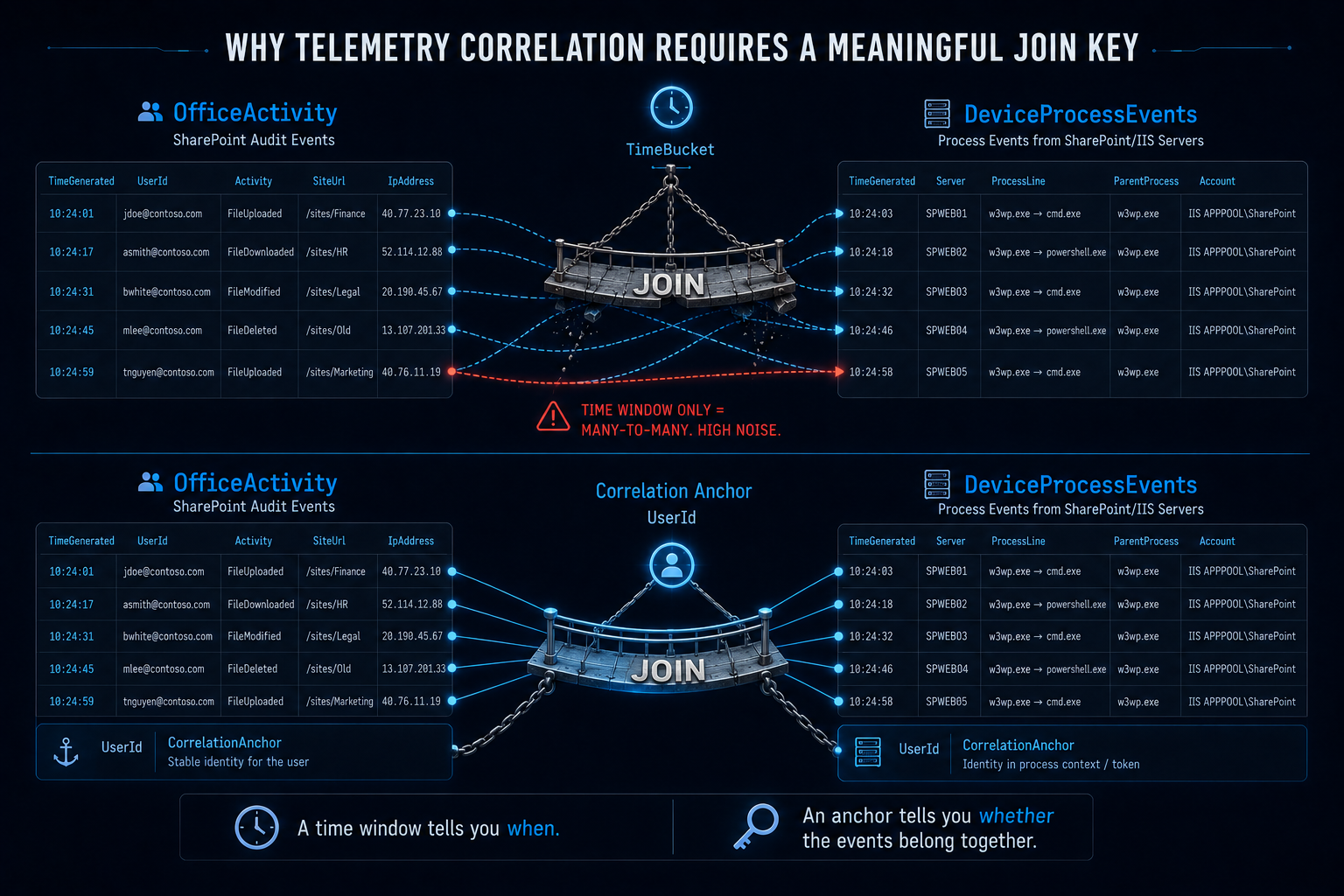
The fix requires an anchor between the two tables — a column that is present in both and that means “the same server.” The problem is that OfficeActivity and DeviceProcessEvents do not share one. OfficeActivity has ClientIP, which Microsoft defines as the IP address of the device that performed the activity — the user’s workstation, or even an intermediary proxy. It is not the SharePoint server’s address. DeviceProcessEvents has DeviceName (the server’s hostname), which OfficeActivity doesn’t carry. There is no column in either table that identifies the SharePoint server from the other table’s perspective.
The honest answer is that there is no clean anchor. These two tables were not designed to be joined, and no column that exists in both means “the same server.” What we can do is scope both sides tightly to SharePoint and then let a narrow temporal window do the correlation — not because time is a good join key, but because it’s the only key available once both tables have been filtered to the same workload. If you have reverse-proxy, WAF, or IIS request logs that contain both the client source IP and the backend server identity, correlate against those — they provide the actual bridge between the user’s session and the server that processed it. The query below works without that bridge, and makes the constraint explicit rather than hiding it behind a join key that promises more than it delivers.
The KQL
let lookback = 1d;
let Bare = (s:string) {
    trim_end(@"\.(exe|cmd|bat|com|ps1)", tolower(extract(@"([^\\/]+)$", 1, tostring(s))))
};
let SuspiciousChildren = dynamic([
    "cmd","powershell","pwsh","cscript","wscript","mshta",
    "certutil","bitsadmin","rundll32","regsvr32","whoami",
    "nltest","net","net1"
]);
// High-privilege SharePoint operations that matter for CVE-2026-55040.
// These are the ones the auth bypass enables: the attacker is acting as
// a site admin they never authenticated as.
let PrivilegedOps = dynamic([
    "SiteCollectionAdminAdded","PermissionLevelAdded","PermissionLevelModified",
    "AddedToGroup","SiteAdminChangeRequest","SiteCollectionCreated"
]);
// STEP 1: Host-side signal. w3wp.exe child process, scoped to SharePoint
// by application pool.
let HostSignal = DeviceProcessEvents
| where Timestamp > ago(lookback)
| where InitiatingProcessFileName =~ "w3wp.exe"
| extend AppPool = extract(@'-ap\s+"([^"]+)"', 1, tostring(InitiatingProcessCommandLine))
| where AppPool contains "SharePoint" or AppPool contains "SecurityTokenService"
| extend Self = Bare(FileName)
| where Self in (SuspiciousChildren) or Self has_any (SuspiciousChildren)
| project
    ProcTimestamp = Timestamp,
    DeviceId, DeviceName,
    AppPool,
    // The service account is NOT the join key — see Step 3. It stays in the
    // output because the analyst needs it: if the account running w3wp.exe
    // is not the expected SharePoint service identity, that is a separate
    // finding worth investigating.
    ServiceAccount = tolower(tostring(InitiatingProcessAccountName)),
    ChildProcess = Self,
    ProcessCommandLine,
    InitiatingProcessCommandLine;
// STEP 2: Application-layer signal. Privileged SharePoint operations.
// UserId is the ACTOR — the identity performing the operation. After the
// CVE-2026-55040 JWT auth bypass, this is the impersonated user (e.g.
// alice@contoso.com), NOT the SharePoint service account. This distinction
// is the reason you cannot join on ServiceAccount == UserId: the auth
// bypass makes them different identities by design, and that join would
// return nothing for exactly the attack scenario the detection is meant
// to catch.
let AppSignal = OfficeActivity
| where TimeGenerated > ago(lookback)
| where OfficeWorkload == "SharePoint"
| where Operation in (PrivilegedOps)
| where ResultStatus == "Succeeded"
| project
    OpTimestamp = TimeGenerated,
    Actor = tolower(UserId),
    ClientIP,
    Operation,
    SiteUrl,
    ResultStatus;
// STEP 3: Correlate on TIME within SharePoint-scoped events.
//
// CONSTRAINT: OfficeActivity and DeviceProcessEvents share no natural
// device-level join key. OfficeActivity carries ClientIP (the user's
// source address) and UserId (the impersonated identity). DeviceProcess-
// Events carries DeviceName (the server hostname) and the service account
// running w3wp.exe. No column present in both tables means "the same
// server." This is a telemetry-boundary problem, not a query problem —
// the tables were not designed to be joined.
//
// What makes this correlation viable despite the missing anchor: both
// sides are already scoped to SharePoint. AppPool on the host side limits
// to SharePoint worker processes. OfficeWorkload + PrivilegedOps on the
// app side limits to high-privilege SharePoint audit events. The cross-
// product is bounded: SharePoint process events × SharePoint audit events
// in a narrow time window.
//
// In a single-farm environment this becomes a bounded hunting correlation
// — one farm's audit events correlating with one farm's process events,
// both filtered to SharePoint-only. In a multi-farm environment it cross-
// products across farms. If you operate multiple SharePoint farms, you
// need reverse-proxy, WAF, or IIS request logs that carry both the client
// source IP and the backend server identity — those provide the actual
// bridge. OfficeActivity.ClientIP is the user's source address (or a
// proxy), not the SharePoint server's, so resolving DeviceName to a
// server IP does not help.
HostSignal
| extend _sp = 1
| join kind=inner (AppSignal | extend _sp = 1) on _sp
| project-away _sp, _sp1
// Temporal filter: the privileged operation precedes the process spawn.
// The attack chain is auth bypass → privileged op → RCE → child process,
// so the app-layer event comes first. 10-minute lookback with a 2-minute
// forward margin for ingestion clock skew between OfficeActivity's
// TimeGenerated and the device-local Timestamp.
| where OpTimestamp between ((ProcTimestamp - 10m) .. (ProcTimestamp + 2m))
| project
    ProcTimestamp, OpTimestamp,
    DeviceName, AppPool, ServiceAccount,
    ChildProcess, ProcessCommandLine,
    Actor, Operation, SiteUrl, ClientIP,
    ResultStatus
| order by ProcTimestamp desc
The line that does the work
| where OpTimestamp between ((ProcTimestamp - 10m) .. (ProcTimestamp + 2m))
There is no clever join key here, and that is the point. The original brief used TimeBucket — a 30-minute window with no device anchor. The natural instinct is to find a better key. But OfficeActivity and DeviceProcessEvents share no column that means “the same server”: OfficeActivity has ClientIP (the user’s source address, not the server’s), and DeviceProcessEvents has DeviceName (the server’s hostname, which OfficeActivity doesn’t carry). You cannot join what is not there.
What makes this correlation usable despite the missing anchor is the scoping on both sides. The host signal is already filtered to SharePoint by application pool. The application signal is already filtered to SharePoint by OfficeWorkload and to high-privilege operations by PrivilegedOps. The cross-product is not “every process × every audit event” — it is “SharePoint child-process spawns × SharePoint admin operations in a 10-minute window.” In a single-farm environment, that is a bounded hunting correlation. The time window is asymmetric — 10 minutes backward, 2 minutes forward — because the attack chain has a direction (auth bypass → privileged operation → RCE → child process), and the forward margin exists only for ingestion clock skew between OfficeActivity’s TimeGenerated and the device-local Timestamp.
Note that the Actor (the impersonated identity from OfficeActivity) and the ServiceAccount (the process identity from DeviceProcessEvents) both appear in the output but are not joined on. They will be different values in the auth-bypass scenario — the attacker acts as alice@contoso.com while w3wp.exe runs as svc_sharepoint — and showing both is the triage signal. If they are the same value, the operation was performed by the SharePoint application itself, which is a different investigation.
Keeping it honest
- There is no device-level join key. This is a scoped temporal correlation, not a keyed join. In a single-farm environment the scoping is sufficient — one farm’s SharePoint process events correlating with one farm’s SharePoint audit events in a 10-minute window. In a multi-farm environment, this cross-products across farms: a privileged operation on Farm A correlates with a child process spawn on Farm B. If you operate multiple SharePoint farms, you need reverse-proxy, WAF, or IIS request logs that carry both the client source IP and the backend server identity — those provide the bridge that neither table has. Note that
OfficeActivity.ClientIPis the user’s source address (or an intermediary proxy), not the SharePoint server’s IP, so resolvingDeviceNameto a server IP viaDeviceNetworkInfodoes not create a usable join key. The query is honest about the constraint; the constraint is real. - I am less confident in this query than in Act I. The correlation between OfficeActivity and DeviceProcessEvents is crossing a telemetry boundary that was not designed to be crossed — one table is a cloud audit log, the other is a host-level process table, and they share no natural key. The scoped temporal correlation is the best available approach without a lookup table, and it is not great. If you have TLS inspection or reverse-proxy logs that carry both the client IP and the backend server identity, correlate against those instead — you will have an actual anchor.
- OfficeActivity covers SharePoint Online and has a different shape for on-premises SharePoint Server. On-premises audit events require the Microsoft 365 audit log connector, which not every on-premises deployment has. If your SharePoint is on-prem and the connector isn’t enabled, the
AppSignalhalf of this query returns nothing, the join returns nothing, and the correlation looks clean. It isn’t — it’s blind. - The
PrivilegedOpslist is scoped to CVE-2026-55040. The auth bypass is the reason an attacker can perform site-admin operations without authenticating. A query that correlates any SharePoint operation with a child process spawn would catch more and mean less. The list is narrow on purpose.
🎖 Honorable Mention: The Admin Who Has Never Administered
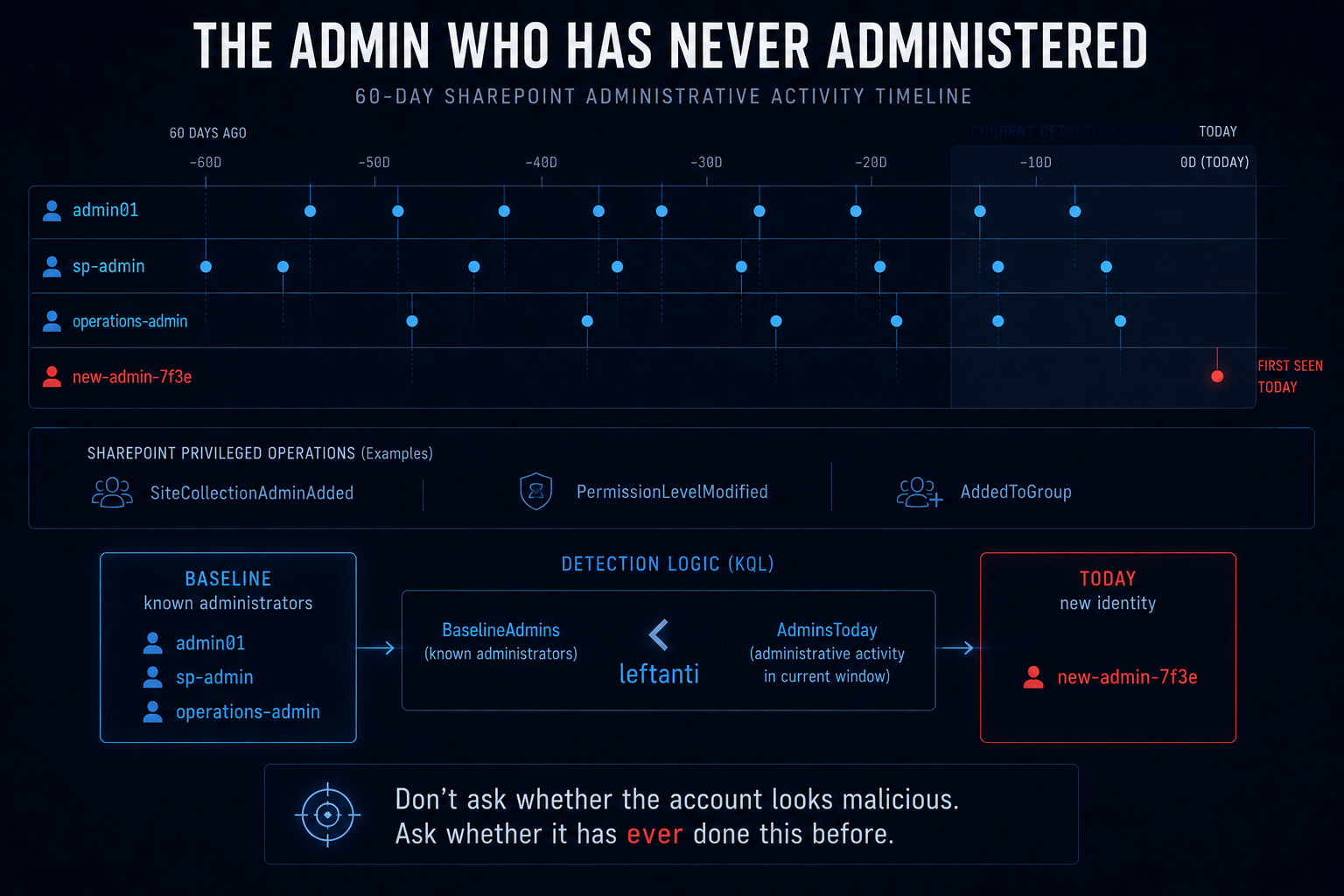
Wednesday’s Detection 3 asks a different question from every other detection this week. It doesn’t look for a process. It doesn’t look for a network connection. It asks: has this account ever performed a SharePoint admin operation before?
let known_admins = OfficeActivity
    | where TimeGenerated between (ago(30d) .. ago(1d))
    | where OfficeWorkload == "SharePoint"
    | where Operation in (admin_ops)
    | where ResultStatus == "Succeeded"
    | summarize by UserId;
OfficeActivity
| where TimeGenerated > ago(1d)
| where OfficeWorkload == "SharePoint"
| where Operation in (admin_ops)
| where ResultStatus == "Succeeded"
| where UserId !in (known_admins)
This is a first-seen baseline, structurally identical to last week’s lifecycle-script inventory and to Act II’s first-seen destination baseline the week before that. It establishes who has historically performed admin operations, and then surfaces anyone new. The CVE-2026-55040 auth bypass lets an attacker impersonate a site admin. If the impersonated account has never administered SharePoint before, this query catches it — not by detecting the exploit, but by detecting the consequence.
The query is simple enough that there’s little to fix. I’ll extend it in two ways: adding the source IP and operation context so triage can start without a pivot, and computing a per-account admin frequency so the analyst can distinguish “new admin, never seen” from “infrequent admin, seen once 29 days ago.”
The KQL
let baseline_window = 60d;
let detection_window = 1d;
let admin_ops = dynamic([
    "SiteCollectionAdminAdded","PermissionLevelAdded","PermissionLevelModified",
    "AddedToGroup","SiteAdminChangeRequest","SiteCollectionCreated"
]);
// Baseline: who has performed admin operations in the past, and how often?
// Frequency matters: an account that did it once in 60 days is not the same
// risk profile as one that does it daily.
let AdminBaseline = OfficeActivity
| where TimeGenerated between (ago(baseline_window) .. ago(detection_window))
| where OfficeWorkload == "SharePoint"
| where Operation in (admin_ops)
| where ResultStatus == "Succeeded"
| summarize
    BaselineOps   = count(),
    BaselineDays  = dcount(bin(TimeGenerated, 1d)),
    LastBaseline   = max(TimeGenerated),
    BaselineOpsSet = make_set(Operation, 10)
    by UserId;
// Detection window: privileged operations from accounts not in the baseline.
let RecentOps = OfficeActivity
| where TimeGenerated > ago(detection_window)
| where OfficeWorkload == "SharePoint"
| where Operation in (admin_ops)
| where ResultStatus == "Succeeded"
| project TimeGenerated, UserId, ClientIP, Operation, SiteUrl, ResultStatus;
// NEW admins: accounts with zero baseline history.
let NewAdmins = RecentOps
| join kind=leftanti AdminBaseline on UserId
| extend AdminType = "NeverSeenBefore";
// RARE admins: accounts IN the baseline but with very low frequency.
// A "known admin" who performed one operation 58 days ago is not the same
// as a daily operator, and the leftanti would have let them through.
let RareAdmins = RecentOps
| join kind=inner AdminBaseline on UserId
| where BaselineOps <= 2 and BaselineDays <= 1
| extend AdminType = "RarelySeenBefore";
// Union both. NeverSeenBefore is a stronger signal; RarelySeenBefore is
// a hunt. Both appear in the output, ranked.
union NewAdmins, RareAdmins
| summarize
    Ops             = count(),
    Operations      = make_set(Operation, 10),
    SourceIPs       = make_set(ClientIP, 10),
    SiteUrls        = make_set(SiteUrl, 10),
    FirstSeen       = min(TimeGenerated),
    LastSeen        = max(TimeGenerated)
    by UserId, AdminType
| order by AdminType asc, Ops desc
The line that does the work
| join kind=leftanti AdminBaseline on UserId
| extend AdminType = "NeverSeenBefore"
Same leftanti pattern as the brief’s original, and the same move as last week’s honorable mention in a different domain. The detection isn’t looking for an adversary. It’s looking for a configuration change in the identity space: an account that now does something it has never done. The identical rows would appear if a newly promoted admin performed their first site-collection change with no CVE involved. That is exactly the point — the query surfaces a change worth investigating, not a verdict.
RareAdmins extends the pattern one step. The original brief uses a binary baseline: either you’re in the 30-day history or you’re not. An account that performed one admin operation on day 29 clears the baseline and is invisible on day 30. Adding a frequency threshold catches the case the binary baseline misses: the account that is technically known but behaviorally anomalous.
Keeping it honest
- OfficeActivity requires the Microsoft 365 audit log connector. If it’s not enabled, this table is empty and the query returns nothing — which looks like “no anomalous admins” when it actually means “no data.” The brief calls this out correctly and repeatedly.
- Service principals and managed identities do not appear in SigninLogs but do appear in OfficeActivity. The original detection that joined OfficeActivity to SigninLogs (Wednesday’s Detection 2) has a structural false-positive for every automation account. The baseline approach avoids this entirely — a service principal that has been performing admin operations for 60 days is in the baseline, and one that hasn’t is new, regardless of how it authenticated.
- 60 days is arbitrary. The right baseline window is the one that captures a full cycle of your admin operations. If SharePoint admin activity is monthly, 60 days catches two cycles. If it’s quarterly, you need 120. The wrong window is whichever one is shorter than the admin’s rotation, because then every rotation looks new.
- This is a SharePoint Online detection. On-premises SharePoint audit events are not in OfficeActivity by default, and the OfficeActivity schema for on-premises may differ in field names and population. Test before you trust, and if you’re on-prem without the connector, this query does not exist for you.
✨ Bonus: When the Pipeline Is the Finding
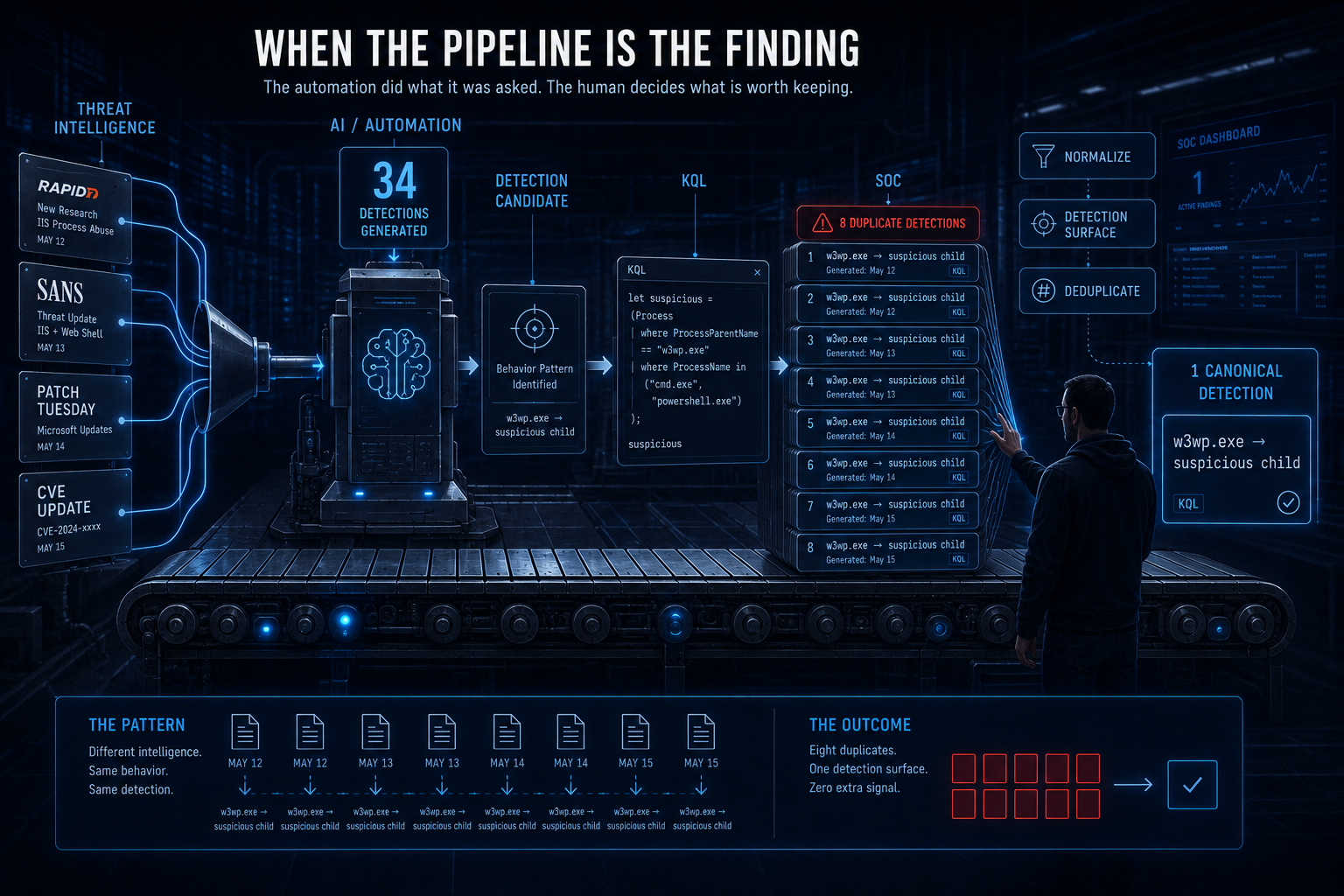
Eight instances of the same detection across five days is not a KQL problem. It’s a pipeline problem, and it’s one worth thinking about because most detection-engineering programs will have it.
The daily brief automation works like this: intelligence comes in, the pipeline processes it, and each intelligence item produces one or more detection candidates. If two intelligence reports reference the same CVE on consecutive days — because Rapid7 published analysis on Tuesday and SANS covered it on Wednesday — the pipeline produces two detection candidates for the same behaviour. Neither run knows about the other. The pipeline has no memory.
This is fine when the intelligence is genuinely different — a new actor, a new exploitation technique, a variant payload. It is redundant when the intelligence is the same story re-reported, and the detection surface is the same w3wp.exe → suspicious child shape that was already emitted on day one.
The solutions range from simple to architectural:
Signature deduplication. Before publishing a detection, hash the normalised KQL (strip comments, whitespace, lookback values) and compare against a rolling window of published detections. If the hash matches, suppress or flag as a duplicate. This catches syntactically identical queries and misses semantic duplicates — two queries with different variable names and the same behaviour.
Detection-surface tagging. Tag each detection with its core telemetry assertion: DeviceProcessEvents + InitiatingProcessFileName=w3wp.exe + FileName in (shell list). Detections with the same tag set are candidates for consolidation. This catches semantic duplicates and requires a taxonomy.
Human review. The approach this series already takes — read the week’s output, identify the cluster, collapse it manually, and write about why. This is the most expensive and the most reliable, and it’s what this article is.
The honest answer for this week: the pipeline did its job. It surfaced the CVE on every day it appeared in the intelligence feed. The deduplication is the detection engineer’s job, and the detection engineer is you, reading this and deciding how many of the eight to keep. I’d keep one — Act I’s — and retire the other seven.
The Bigger Lesson
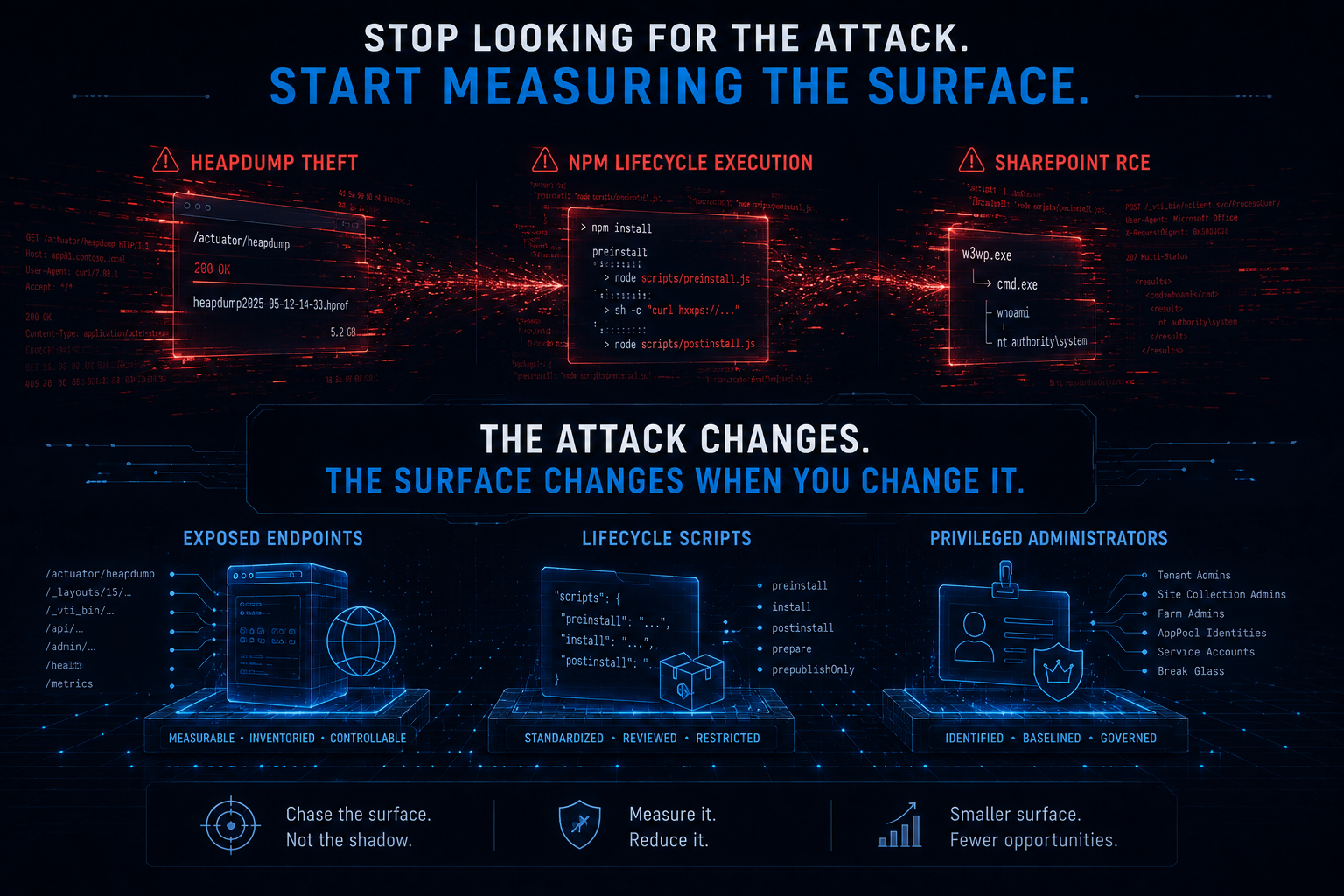
The common thread this week: every new vulnerability was detectable by an old query.
w3wp.exespawning shells is not new. It was the detection for ProxyShell (2021), for ProxyNotShell (2022), for CVE-2023-29357 (2023), and for every SharePoint RCE before and since. The detection pattern is the same one that has been in circulation for five years. If you have a mature IIS detection already scoped to your SharePoint infrastructure, this week’s CVEs added zero new queries to your workload. If you don’t, this week should not have been the first time you wrote it.- The auth bypass is the interesting vulnerability, and it’s the one the process detections can’t see. CVE-2026-55040 lets an unauthenticated attacker perform privileged SharePoint operations as a site admin. That is not a process event. That is not a file event. That is an identity event, visible in OfficeActivity and nowhere else. The eight process detections this week catch what happens after the auth bypass — if the attacker then chains to RCE. If they don’t — if they stop at data access, permission changes, or exfiltration through the application layer — the process detections are blind and the baseline detection is the only query in the week that sees them.
- And once more: the best detection is the boring one. The honorable mention doesn’t detect an exploit. It doesn’t use a join. It doesn’t reference a CVE. It asks “has this account done this before?” and surfaces anyone new. That’s the same structural finding as last week’s lifecycle-script inventory, and the week before that’s heapdump exposure inventory. Three weeks, three domains, same move: stop looking for the attack and start measuring the surface. The attack changes every week. The surface changes when you change it.
The most useful thing in this week’s data isn’t in any of the three queries above. It’s the observation that the pipeline wrote the same detection eight times and no one noticed until a human read it. Automation scales the production of detections. It does not scale the judgment about which ones to keep. That is still a human job, it is the hardest part of detection engineering, and it is the reason this series exists.
Every one of these came straight out of this week’s daily briefs — each detection shipped with ATT&CK mappings, telemetry requirements, deployment gates, triage runbooks, false-positive notes, and an honest readiness call. Thirty-four this week, and once again the ones worth writing about were the ones that needed a human between the automation and the analyst.
This kind of detection content is published daily — fresh threat intel translated straight into deployable detections, so you spend your time tuning and shipping instead of reading and re-deriving — that’s the whole point of the Daily Detection Engineering Brief at DevSecOpsDadAttack.com.
Helpful Links and References:
This Week’s Detection Engineering Briefs:
- Monday, 10th August
- Tuesday, 11th August
- Wednesday, 12th August
- Thursday, 13th August
- Friday, 14th August
- Saturday, 15th August
- Sunday, 16th August
DevSecOpsDadAttack Tags:
- detection-engineering
- kql
- SharePoint
- CVE-2026-63520
- CVE-2026-55040
- IIS
- w3wp
- Auth Bypass
- Baselining
- OfficeActivity
- DeviceProcessEvents
- Application Pool
- Term Index
- Detection Redundancy
- Patch Tuesday
- T1190
- T1059
- T1068
- T1098.003
- Microsoft Sentinel
- Defender XDR
ATT&CK Coverage in This Article:
Detected by the queries above:
- T1190 — Exploit Public-Facing Application (Act I and Act II. The chained exploitation of CVE-2026-63520 and CVE-2026-55040 against an internet-facing SharePoint server is the textbook definition. Both the process detection and the OfficeActivity correlation cover consequences of this technique.)
- T1059.001 / T1059.003 — PowerShell / Windows Command Shell (Act I. The
w3wp.exe → powershell.exeandw3wp.exe → cmd.exechains are the execution layer of the RCE. Note this maps to the child process, not the exploitation itself — the shell is the tool, not the access.) - T1068 — Exploitation for Privilege Escalation (Act II and Honorable Mention. CVE-2026-55040 bypasses JWT authentication to elevate from unauthenticated to site administrator. This is the escalation that makes the RCE reachable; without it the attacker has no session.)
- T1098.003 — Additional Cloud Roles (Honorable Mention.
SiteCollectionAdminAddedandAddedToGroupare the operations the auth bypass enables. The baseline detects these by identity anomaly rather than by exploit signature, which is why it catches the technique even when the RCE does not follow.)
Present in the activity, not cleanly mappable:
- T1505.003 — Web Shell (Discussed in Act I’s “Keeping it honest” section as the blind spot. A webshell running inside
w3wp.exeas managed code is not a child process and is invisible to every detection this week. The technique is present in the attack chain; the telemetry for it is not inDeviceProcessEvents.)
Deliberately unmapped:
- The honorable mention’s baseline carries no technique for the same reason as the last two weeks. It measures who has administered SharePoint, not what an adversary did. A newly promoted admin performing their first legitimate operation produces the same row. Configuration measurements are not adversary behaviour and do not belong on a coverage map.
Discussed as a correction, not covered by any query here:
- T1071.001 on a host-side process detection. Thursday’s Detection 1 maps
w3wp.exe → cmd.exeto both T1071 (Application Layer Protocol) and T1041 (Exfiltration Over C2 Channel). A child process spawn is T1059 (Execution); it is not C2 and it is not exfiltration. What the child process does next might be either, but the process event itself is not. - T1190 at low confidence on a detection that fires on any w3wp.exe in the estate. Several briefs map T1190 at “high” confidence to queries that do not scope to SharePoint. An IIS detection that fires on every web application in the estate is not a high-confidence indicator of SharePoint exploitation; it is a medium-confidence indicator that some IIS application spawned a shell, and the confidence is about the class, not the CVE.
External Sources:
- Rapid7. CVE-2026-63520: Microsoft SharePoint Remote Code Execution (FIXED). https://www.rapid7.com/blog/post/etr-cve-2026-63520-microsoft-sharepoint-remote-code-execution-fixed
- Rapid7. Microsoft SharePoint JWT Token Authentication Bypass (CVE-2026-55040). https://www.rapid7.com/blog/post/ra-microsoft-sharepoint-jwt-token-authentication-bypass-cve-2026-55040
- Rapid7. Patch Tuesday — August 2026. https://www.rapid7.com/blog/post/em-patch-tuesday-august-2026
- SANS ISC. Microsoft Patch Tuesday August 2026. https://isc.sans.edu/diary/rss/33236
- Microsoft Learn. DeviceProcessEvents table in the advanced hunting schema. https://learn.microsoft.com/en-us/defender-xdr/advanced-hunting-deviceprocessevents-table
- Microsoft Learn. String operators — understanding string terms. https://learn.microsoft.com/en-us/kusto/query/datatypes-string-operators
- Microsoft Learn. OfficeActivity table in Microsoft Sentinel. https://learn.microsoft.com/en-us/azure/azure-monitor/reference/tables/officeactivity
- MITRE ATT&CK. Exploit Public-Facing Application (T1190). https://attack.mitre.org/techniques/T1190/
- MITRE ATT&CK. Additional Cloud Roles (T1098.003). https://attack.mitre.org/techniques/T1098/003/
- MITRE ATT&CK. Exploitation for Privilege Escalation (T1068). https://attack.mitre.org/techniques/T1068/
- DevSecOpsDad.com From RSS Noise to CISO Signal: Automating Cyber Threat Intel. https://www.hanley.cloud/2026-04-28-From-RSS-Noise-to-CISO-Signal-Automating-Cyber-Threat-Intelligence-That-Actually-Matters/
Stay Ahead of Emerging Threats
Looking for actionable threat intelligence and detection engineering insights?
DevSecOpsDadAttack publishes daily:
📈 Threat Intelligence Briefs focused on active campaigns, exploitation trends, and operational risk
🛠️ Detection Engineering Briefs with ATT&CK mappings, telemetry requirements, KQL detections, tuning guidance, and triage workflows
🔍 Practical analysis designed for SOC teams, threat hunters, detection engineers, and security leaders
Visit DevSecOpsDadAttack.com for the latest intelligence and detection content.
📚 Want to go deeper?
Anyone can aggregate threat intel. Very few teams can prove why they acted—or why they didn’t.
The below books are about closing that gap; turning curated signal into defensible decisions across KQL, PowerShell, and the Microsoft security stack.
🛠️ KQL Toolbox: Turning Logs into Decisions in Microsoft Sentinel
🧰 PowerShell Toolbox: Hands-On Automation for Auditing and Defense
📖 Ultimate Microsoft XDR for Full Spectrum Cyber Defense
Real-world detections, Sentinel, Defender XDR, and Entra ID — end to end.