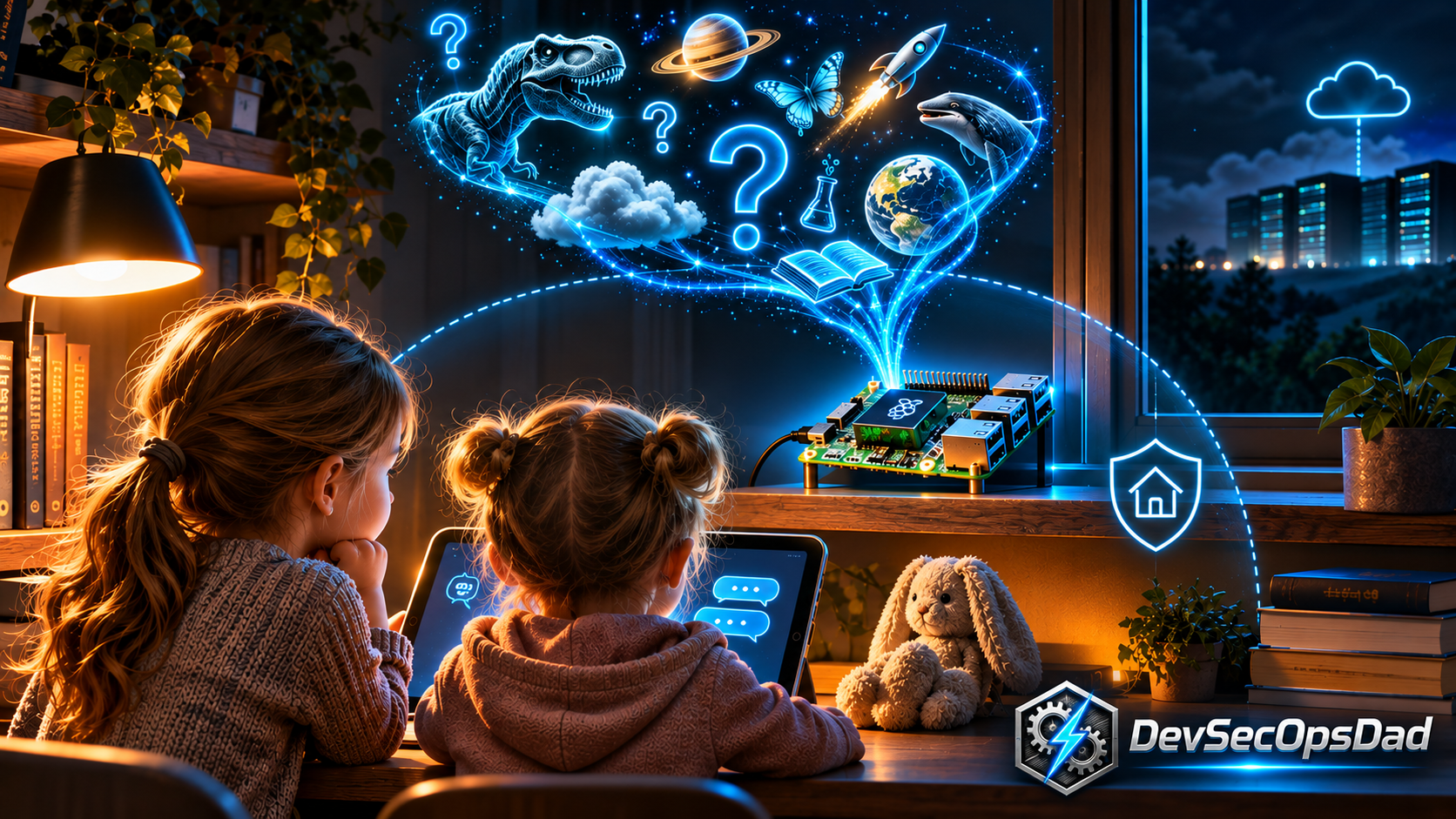
My 4-year-old and my 6-year-old ask approximately nine hundred questions a day. Why is the sky blue. Where do clouds go. Do fish sleep. Is a tomato a fruit or a vegetable (don’t).
A few months back I’d put a quantized Qwen3 model on a Raspberry Pi 4B, benchmarked it on Ollama, and come away convinced the little box was genuinely mine — no API key, no monthly bill, no off switch that belonged to someone else. It sat on a shelf being quietly impressive and doing nothing in particular. Then it collided with the nine hundred questions.
The path of least resistance for all that curiosity is a smart speaker or a chatbot app. And every time I reached for one, the detection engineer in me flinched. Those questions — what a small child is curious about, in her own words, in her own voice — are about as intimate a telemetry stream as exists. I spend my working life thinking about where data goes and who gets to keep it. I was not about to pipe my kids’ curiosity into someone’s ad-targeting graph in exchange for a convenient answer.
So I pointed the Pi at the problem. The brain was already there and already private; it just needed a face.
Getting Ollama and Qwen3 onto the Pi in the first place is its own write-up — I covered that part here — so this one starts from a Pi that already answers on port 11434, and builds everything the kids actually touch.
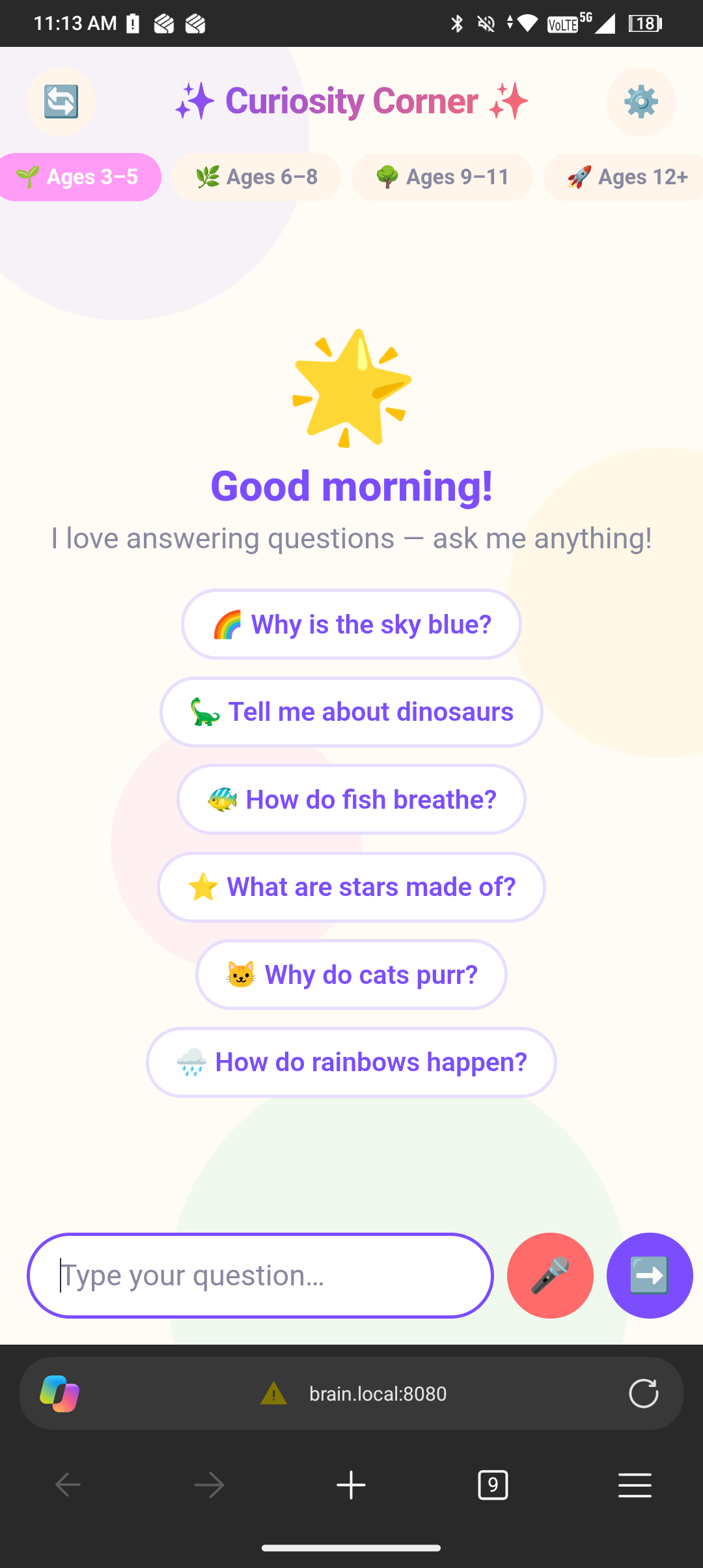
So I built Curiosity Corner: a kid-friendly front end for the Pi, with big buttons, a cheerful voice, and answers tuned to the age of whoever’s asking. No cloud model, no accounts, no monthly bill — and, with one labeled exception I’ll come to, nothing they ask leaves the house.
One File, No Framework
The whole front end is a single curiosity-corner.html file. No React, no build step, no node_modules folder quietly eating your SD card. One file you can scp to the Pi and serve with Python’s built-in web server.
That’s a deliberate choice, not laziness. On a device whose entire job is to be simple and durable, a single static file is the most boring possible thing — and boring is exactly what you want from infrastructure your kids depend on. Nothing to update, nothing to break, nothing with a supply chain.
Put that one file in a dedicated directory — deliberately not your home folder — and serve it with the standard library:
sudo mkdir -p /srv/curiosity-corner
sudo cp curiosity-corner.html /srv/curiosity-corner/
sudo chmod 644 /srv/curiosity-corner/curiosity-corner.html

python3 -m http.server 8080 --directory /srv/curiosity-corner
Then from any tablet on the home network:
http://brain.local:8080/curiosity-corner.html
The HTML talks to Ollama’s /api/chat endpoint over the LAN and streams the response token-by-token into a chat bubble. The only state the app keeps lives in the browser tab. There’s no database, and the page writes no conversation history to disk — I didn’t have to build privacy in so much as decline to build surveillance in. (That’s the application. The operating system underneath keeps its own operational logs, and I’ll be straight about that further down — overclaiming is its own kind of privacy theater.)
Letting the tablet reach the brain
One gotcha from the first article that bites everyone here too: by default, Ollama only listens on localhost. That’s fine when you’re ssh‘d into the Pi, but the tablet in the living room is a different machine, and localhost on the tablet means the tablet. You have to tell Ollama to listen on the network and to accept cross-origin requests from the page:
sudo systemctl edit ollama
[Service]
Environment="OLLAMA_HOST=0.0.0.0"
Environment="OLLAMA_ORIGINS=http://brain.local:8080"
sudo systemctl daemon-reload
sudo systemctl restart ollama
Resist the wildcard. OLLAMA_ORIGINS=* lets any page a browser happens to load script requests at your Pi; scoping it to the exact origin the frontend is served from is one cheap line of defense-in-depth. List every origin the kids actually use — if they reach the page by IP as well as hostname, add http://192.168.4.38:8080 alongside the brain.local one.
Two honest caveats, though, because this is the kind of thing that breeds false confidence:
- CORS is not authentication. It’s a browser-enforced control on which web origins can call the API. It does nothing against a script, a
curl, or anything that isn’t a cooperating browser. - Network isolation is not authentication either. It just shrinks the blast radius.
There’s no password on this API. So it lives on an isolated segment of my home network and never, ever touches the public internet. Don’t put 11434 on the internet. I meant it the first time too. If you want to do this properly, the cleaner architecture is a small reverse proxy (nginx or Caddy) that serves the page and proxies /api/ to Ollama on the same origin — that removes the cross-origin problem entirely and gives you one place to add real auth later. That’s the upgrade I’d reach for before this ever grew beyond the living room.
“Instruct” Means Instruct
Here’s the first wall I walked into, and it’s worth calling out because it cost me an embarrassing amount of time.
I pulled qwen3:4b-instruct specifically because the instruct variant skips the <think> phase — it answers directly instead of narrating a chain of reasoning first. For a kid waiting on a talking computer, that reasoning phase is dead air. Perfect.
Then I wanted the younger tiers to be snappier, so I reached for the smaller qwen3:1.7b. Dropped it in, asked it why the sky is blue, and watched the spinner churn for what felt like a geological age.
The problem is in the model tags themselves:
ian@brain:~ $ ollama list
NAME                 ID              SIZE      MODIFIED
qwen3:4b-instruct    0edcdef34593    2.5 GB    2 hours ago
qwen3:1.7b           8f68893c685c    1.4 GB    3 days ago
qwen3:8b             500a1f067a9f    5.2 GB    30 hours ago
See it? 4b-instruct is the non-thinking variant. 1.7b is not — there’s no 1.7b-instruct to pull. The small model I grabbed for speed was burning its entire time budget on hidden reasoning tokens before it said a single word out loud.
The fix is a single flag in the API body. Ollama lets you force thinking off per-request:
body: JSON.stringify({
  model: t.model,
  messages,
  stream: true,
  think: false,          // kills the reasoning phase on thinking models
  keep_alive: '30m',
  options: {
    num_predict: t.num_predict,
    num_ctx: t.num_ctx,
    temperature: 0.7,
  },
}),
think: false is a no-op on 4b-instruct (it doesn’t think anyway) and a night-and-day difference on 1.7b. One line. The lesson, as usual: read the model card, not the model name.
Four Models, Four Kids-In-One
My two daughters are two years apart, which doesn’t sound like much until you watch them ask questions. The 6-year-old wants because and how. The 4-year-old wants one sentence and a happy noise. A single answer can’t serve both.
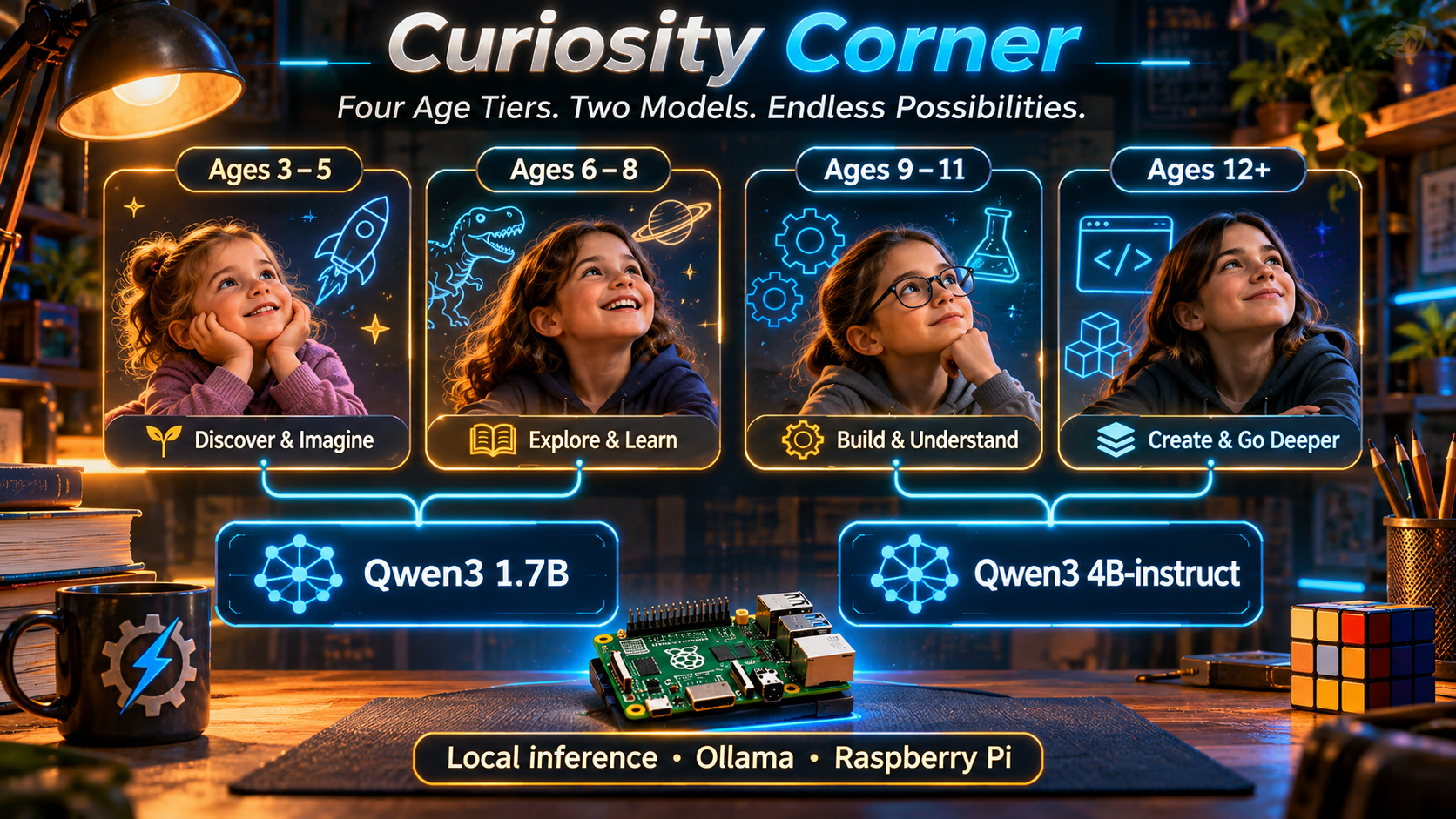
So Curiosity Corner has an age selector across the top — four tiers — and switching it changes everything behind the question: which model runs, how long the answer can be, how much vocabulary it reaches for, and how much conversation history it carries.
The tier boundaries aren’t arbitrary. They’re loosely mapped to how kids actually develop — Piaget’s stages, if you want the textbook name:
- Ages 3–5 (preoperational): concrete, literal, tiny vocabulary, short attention. One or two sentences, compared to things in the room.
- Ages 6–8 (early concrete operational): starting to grasp cause-and-effect and why. A little more room.
- Ages 9–11 (concrete operational): categories, sequences, real scientific reasoning. Can handle a defined technical term.
- Ages 12+ (formal operational): abstraction, analogy, multiple perspectives. Paragraphs are fine.
And here’s the move that made the whole thing feel fast: the younger two tiers run the 1.7B model, the older two run 4B-instruct. A 4-year-old’s “why is the sky blue” does not need a 4-billion-parameter model — the 1.7B answers it just as well and roughly twice as fast. Spend the compute where the complexity actually is.
The entire tier system is a single config object in the HTML:
const TIERS = {
  preschool: {
    model: 'qwen3:1.7b',
    prompt: `1–2 simple sentences for a 4-year-old. Warm tone. End with one emoji.`,
    num_predict: 100,
    num_ctx: 1024,
    history_limit: 6,
    // ...suggested questions
  },
  early: {
    model: 'qwen3:1.7b',
    prompt: `2–3 sentences for a 7-year-old. Simple cause-and-effect OK. End with one emoji.`,
    num_predict: 180,
    num_ctx: 1024,
    history_limit: 8,
  },
  upper: {
    model: 'qwen3:4b-instruct',
    prompt: `3–5 sentences for a 10-year-old. Define technical terms inline. End with one emoji.`,
    num_predict: 300,
    num_ctx: 2048,
    history_limit: 14,
  },
  middle: {
    model: 'qwen3:4b-instruct',
    prompt: `Full paragraph for a 13-year-old. Use proper terminology in context. Encourage deeper thinking.`,
    num_predict: 450,
    num_ctx: 2048,
    history_limit: 20,
  },
};
Here’s the full tier matrix:
| Tier | Model | Context | Max tokens | History |
|---|---|---|---|---|
| 🌱 Ages 3–5 | qwen3:1.7b | 1024 | 100 | 3 exchanges |
| 🌿 Ages 6–8 | qwen3:1.7b | 1024 | 180 | 4 exchanges |
| 🌳 Ages 9–11 | qwen3:4b-instruct | 2048 | 300 | 7 exchanges |
| 🚀 Ages 12+ | qwen3:4b-instruct | 2048 | 450 | 10 exchanges |
What This Actually Looks Like
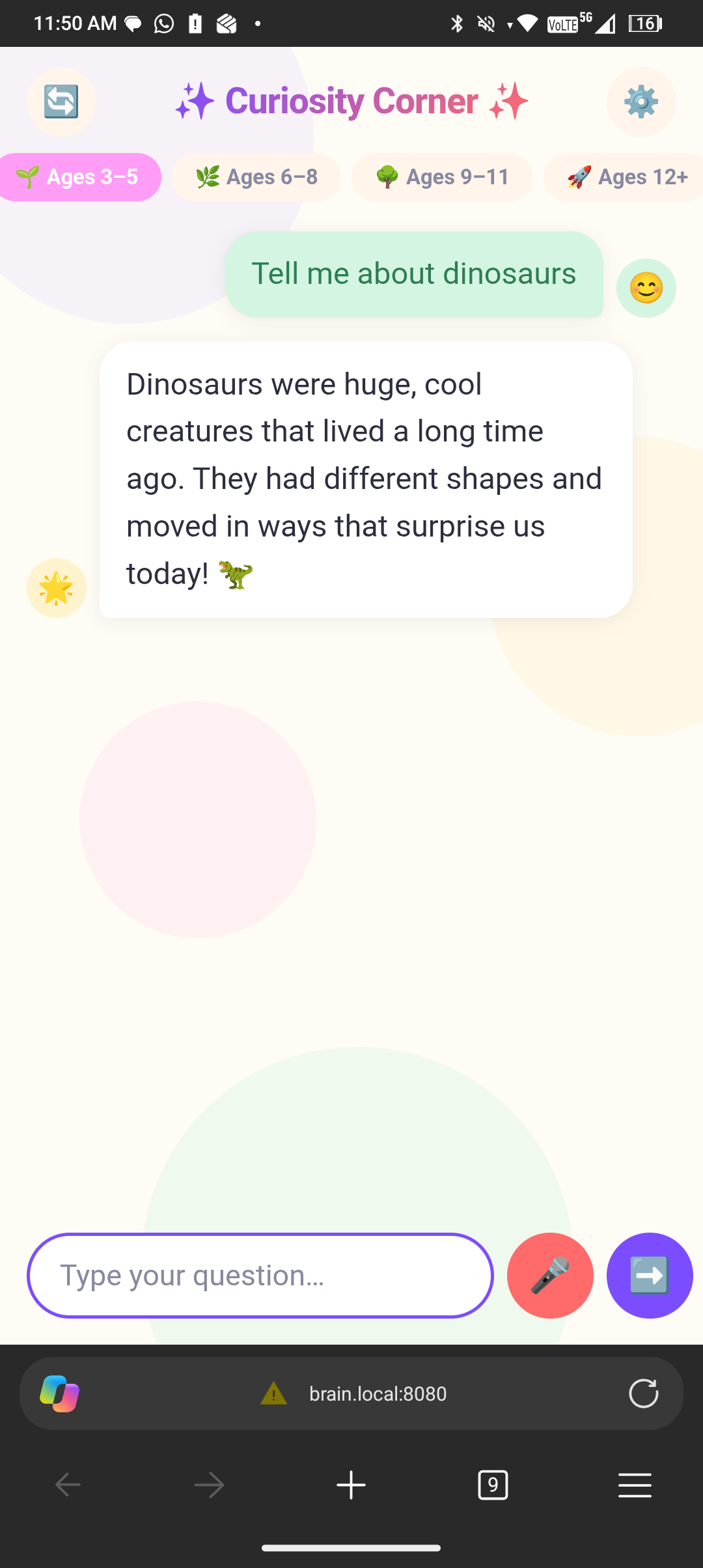
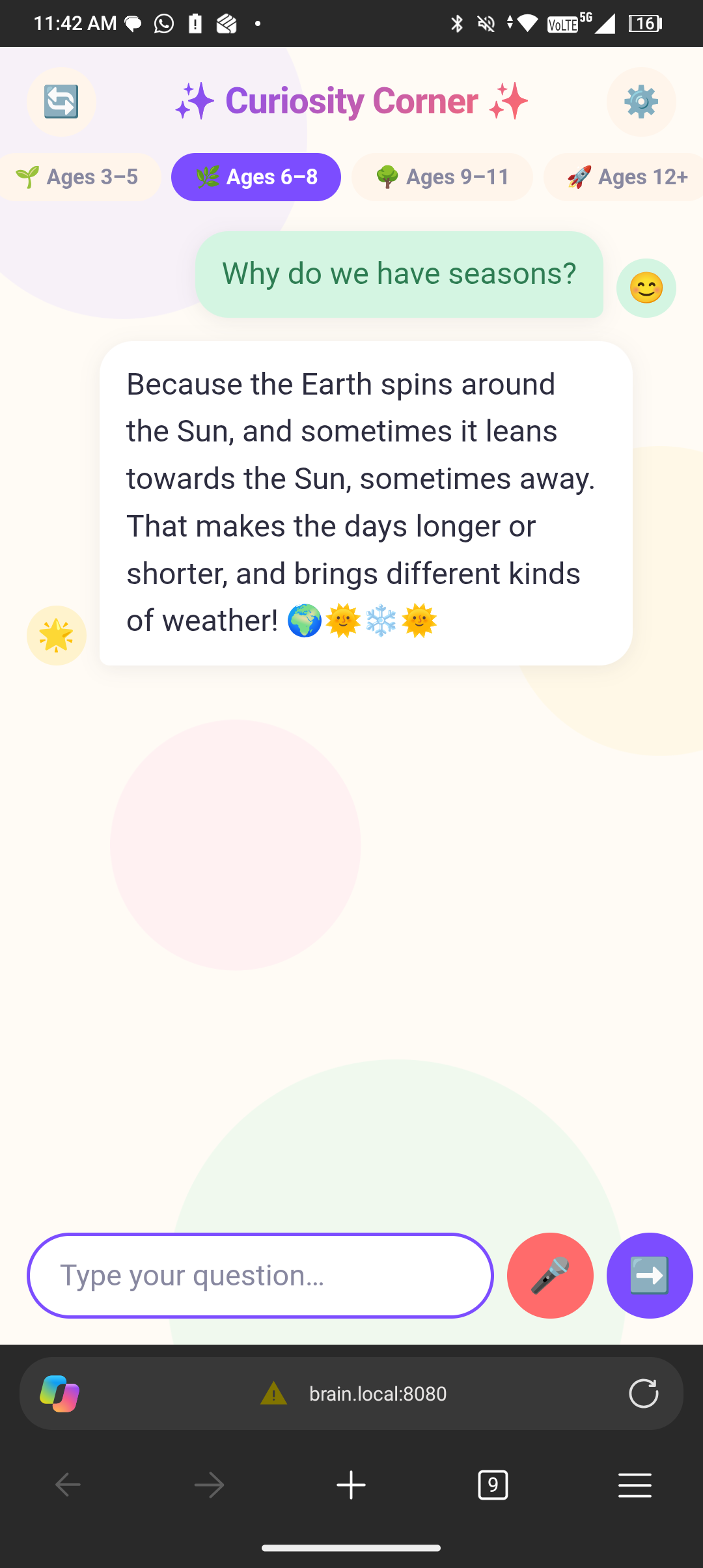
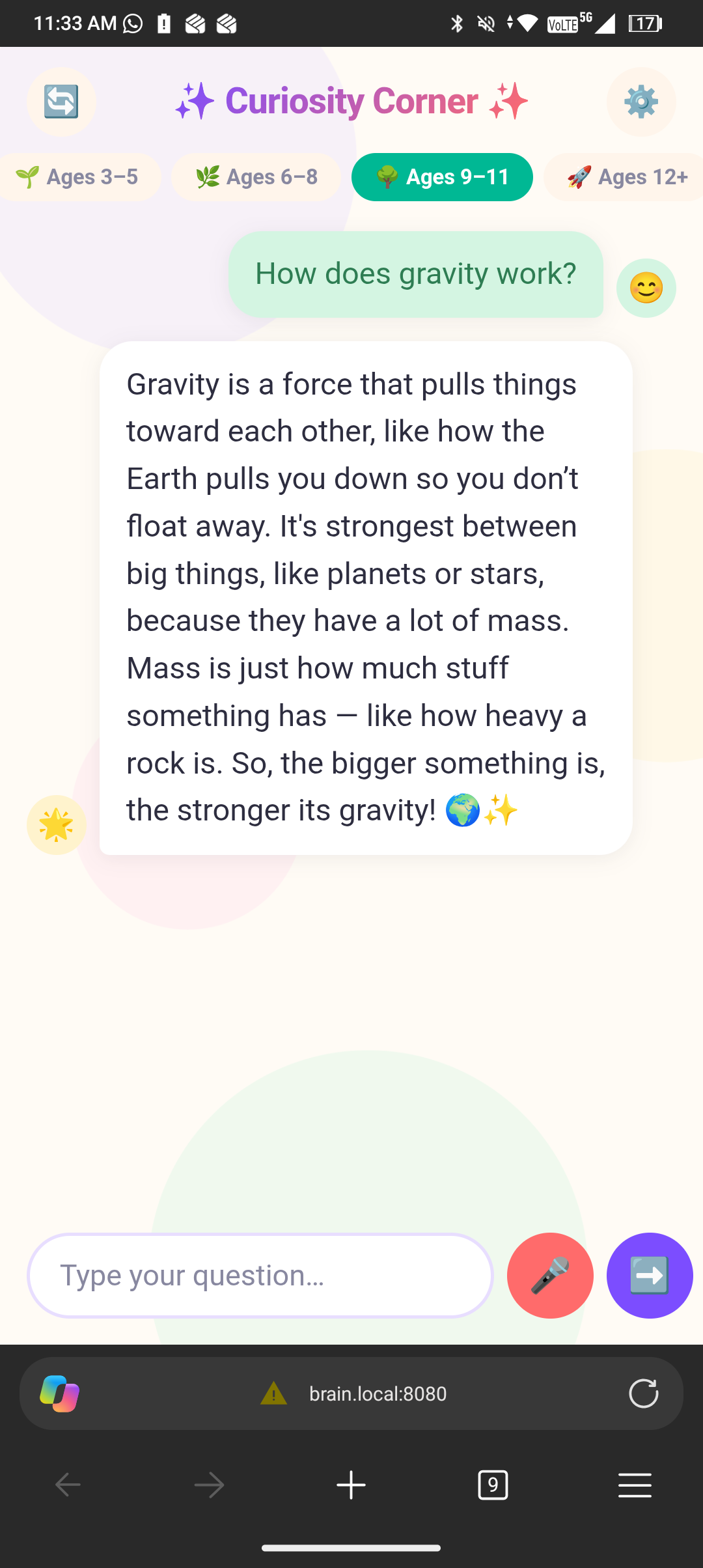
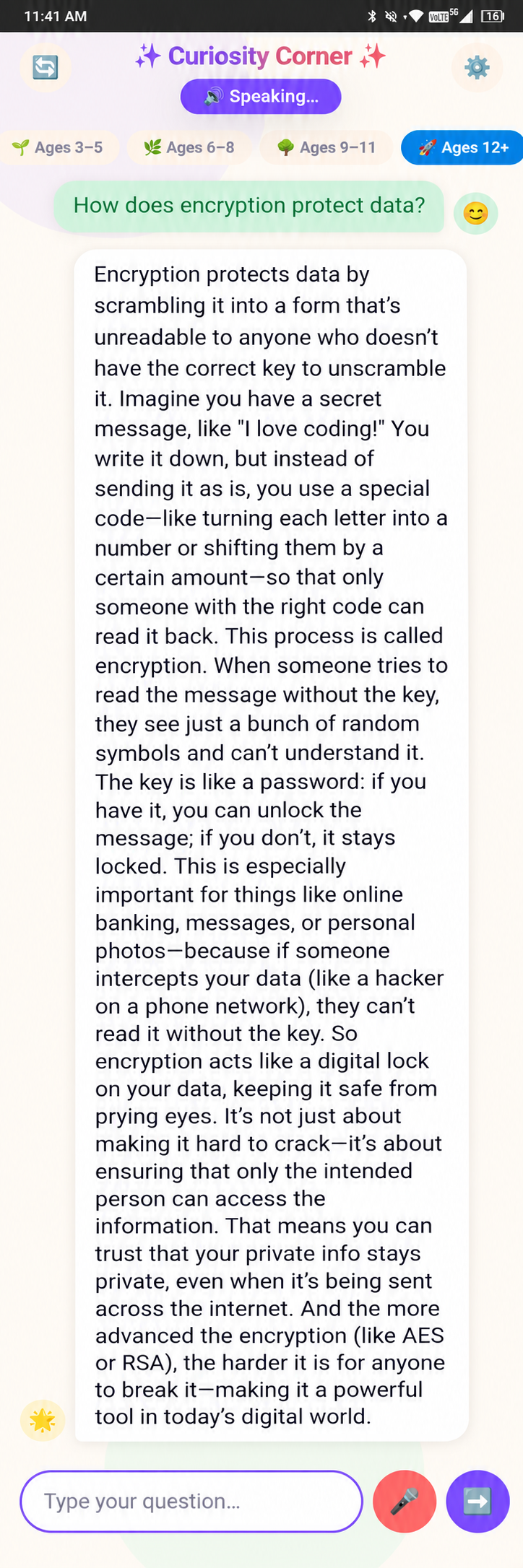
Enough JavaScript. What does all of this actually look like to a kid holding a tablet? These are real responses to different questions, one example from each age tier — illustrations of the experience, not a controlled comparison of the models.
Ages 3–5 — Qwen3 1.7B
Ages 6–8 — Qwen3 1.7B
Ages 9–11 — Qwen3 4B-instruct
Ages 12+ — Qwen3 4B-instruct
There’s a quiet bonus to building it this way: the tiers are a runway, not a snapshot. My daughters climb it as they grow — and the 9-month-old asleep down the hall already has a lane waiting at the bottom. The device I built for a 4- and 6-year-old will serve all three with no rework; it just advances them up the ladder as they go.
Notice the system prompts are tiny. An earlier draft had ten-line prompts full of polite instructions. On a Pi, every token in that system prompt is a token the CPU has to chew through on every single request before it generates a word. Cutting them to a single line each roughly halved the prompt-eval work per question. The model doesn’t need a lecture; it needs a lane.
Making It Fast Enough for a 4-Year-Old
A 4-year-old’s patience is measured in low single-digit seconds. This was the real engineering problem — not accuracy, latency. Here’s every lever I pulled, roughly in order of impact.
“Thinking” isn’t the only thing that feels like thinking
Before the first token appears, Ollama has to process your entire prompt — the system prompt plus any conversation history — through the model. That’s prompt evaluation, and on an ARM CPU it’s slow and completely invisible. The spinner looks identical whether the model is “thinking” or just reading your question. Half my early “why is it so slow” confusion was prompt eval masquerading as reasoning.
Shorter prompts (above) and shorter history (history_limit) both attack this directly.
Keep the model warm
By default Ollama unloads a model from RAM after five minutes idle. On a Pi reading from an SD card, reloading 2.5 GB of weights is brutal — easily the worst-case delay in the whole system. Setting keep_alive: '30m' on every request keeps the active model resident for half an hour, so the model stays hot as long as somebody asks a question every so often.
Pre-warm on tier select, not on first question
This one’s my favorite little trick. The model doesn’t start loading until the first request arrives — which means the very first question of the day always paid the load tax. But we know which model a tier needs the instant the tier is selected, before anyone types anything. So I fire a throwaway request the moment a tier pill is tapped:
function warmModel() {
  const t = tier();
  fetch(`${config.apiUrl}/api/generate`, {
    method: 'POST',
    headers: { 'Content-Type': 'application/json' },
    body: JSON.stringify({ model: t.model, keep_alive: '30m' }),
  }).catch(() => {}); // fire and forget
}
It runs on page load and on every tier switch. By the time a kid finishes tapping a suggestion chip, the model is already loaded and waiting. Pre-emption beats optimization.
Pin the CPU to full speed
The Pi defaults to the ondemand governor, which throttles the clock down when it thinks the CPU is idle — and then has to spin back up when a request lands, adding latency to exactly the moment you care about. Force performance:
echo performance | sudo tee /sys/devices/system/cpu/cpu*/cpufreq/scaling_governor
On Raspberry Pi OS Trixie the old cpufrequtils package is gone, so to make it stick across reboots I wrote a tiny one-shot service (more on the systemd pattern below).
Overclock (with a heatsink, please)
Inference is purely CPU-bound, so clock speed converts directly into tokens per second. The Pi 4B is comfortable at 2.0 GHz with real cooling. In /boot/firmware/config.txt:
# Overclock
over_voltage=6
arm_freq=2000
gpu_freq=750
ian@brain:~ $ vcgencmd measure_clock arm
frequency(48)=2000478464
Ten to fifteen percent, free. Do not do this without a heatsink and fan — a throttling Pi is slower than a stock one, and you’ll have chased the gain right back out the thermal exhaust.
Flash attention and thread count
Two more Ollama environment flags, alongside the networking ones from earlier:
Environment="OLLAMA_NUM_THREADS=4"
Environment="OLLAMA_FLASH_ATTENTION=1"
Four threads for four cores; flash attention trims the memory bandwidth cost of the attention step.
Here’s the whole optimization story in one table. These are levers and their qualitative effect, not a benchmark — your mileage depends on cooling, storage, and which tier you’re on:
| Lever | What it actually does | Felt impact |
|---|---|---|
think: false |
Stops the 1.7B from generating hidden reasoning | Huge (younger tiers) |
| Pre-warm on select | Pays the model-load tax before the question | Huge (first question) |
keep_alive: 30m |
Keeps weights resident in RAM | Large (steady use) |
performance governor |
No clock spin-up delay per request | Medium |
| 2.0 GHz overclock | More tokens/sec, CPU-bound | ~10–15% |
| Trimmed system prompts | Fewer tokens to prompt-eval per request | Medium |
| 1.7B for younger tiers | Half the parameters to run | Large (those tiers) |
| Flash attention + threads | Cheaper attention, full core use | Small–medium |
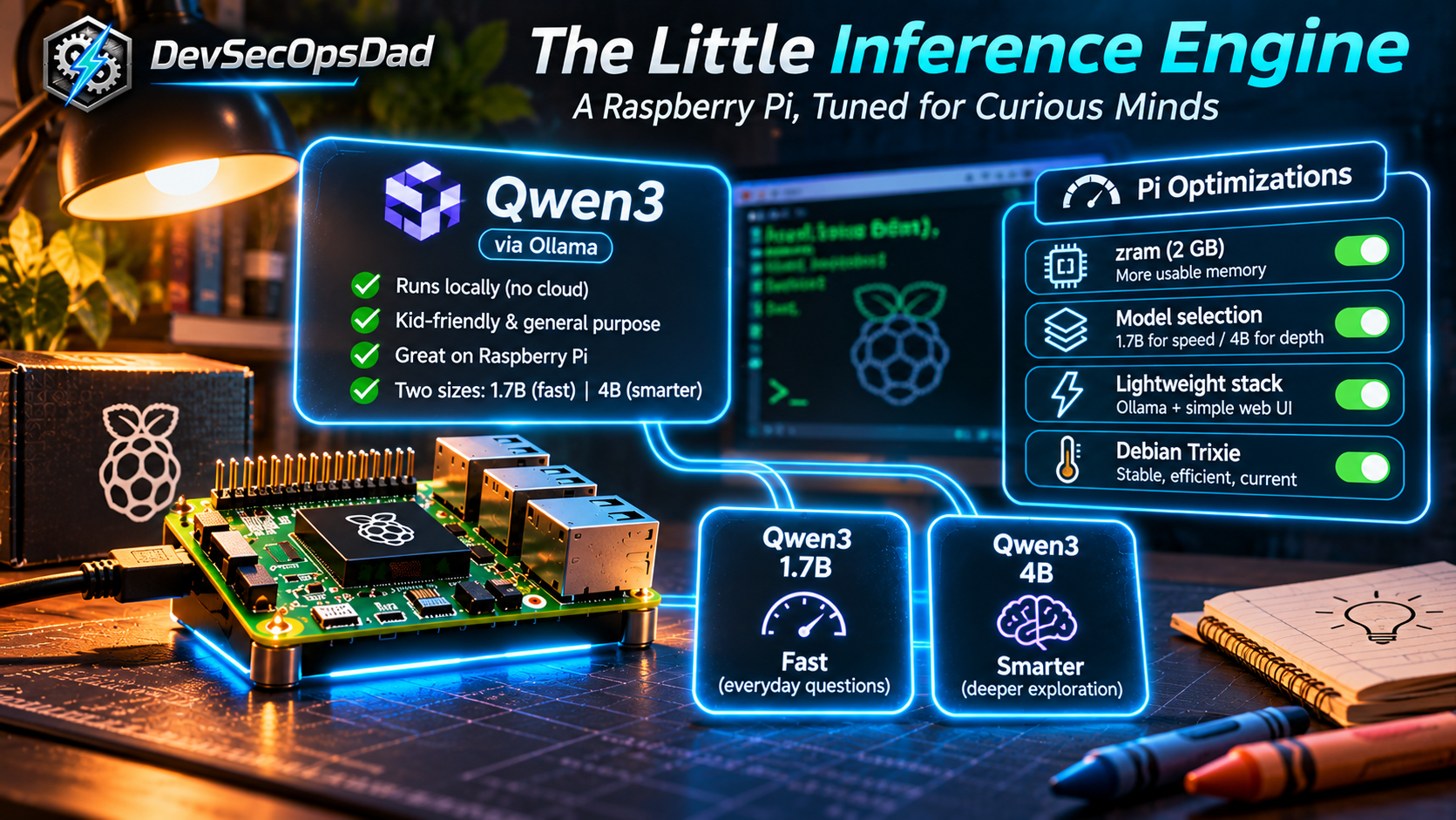
The age-aware frontend is designed for children; the underlying general-purpose models are not child-safety systems.
Stack them all and the little ones get their answer in a beat or two. Which, for this audience, is the entire ballgame.
None of This Needs a Pi
Worth saying plainly: the Raspberry Pi isn’t load-bearing here. I reached for it because it was sitting in my lab, and because “run a useful SLM on deliberately constrained hardware, privately” sounded like a genuinely fun problem. The constraint was the hobby. But nothing about Curiosity Corner is Pi-specific.
The portable core is just two pieces: Ollama serving a model on your LAN, and one static HTML file. That runs anywhere Ollama does — a mini PC (an N100 box is a great fit), an old laptop you stopped using, a NAS, a spare desktop, even a Mac. Point the frontend’s Ollama address at that machine and you’re done.
What changes on roomier hardware is mostly that you get to delete effort:
- The entire “Making It Fast” section largely evaporates. No overclock, no governor wrangling, no SD-card anxiety. A box with real RAM and an SSD loads models quickly and holds them easily.
- You can run bigger models across the board — 4B on every tier, or an 8B for the older kids — and widen the context windows while you’re at it.
- Concurrency stops being something to avoid. With more cores and memory,
OLLAMA_NUM_PARALLELbecomes reasonable, so two kids really can ask at the same time without taking turns.
What doesn’t change is everything that matters: the single-file frontend, the age tiers, the systemd units, the fail-closed voice, and the whole privacy posture. Those are hardware-agnostic — they’re the actual project. The Pi just happens to be a cheap, silent, low-power way to run it, with a fun engineering constraint baked in. If you’ve got something beefier gathering dust, use that instead; the rest of this guide applies unchanged.
It Has to Just Be There
Infrastructure my kids use has a hard requirement: it survives a reboot and comes back on its own. Nobody is going to ssh in to start a web server because the power blinked. If it isn’t automatic, it doesn’t exist.
Ollama’s installer already registers a systemd service, so that half is handled. The web server and the tuning each got their own unit.
The web server — and this is the one process actually listening on the network, so it’s worth being deliberate. Two rules: it serves from a dedicated directory, never a home folder, and it runs inside the tightest sandbox systemd will give it.
# /etc/systemd/system/curiosity-corner.service
[Unit]
Description=Curiosity Corner Web Server
After=network.target

[Service]
Type=simple
User=www-data
WorkingDirectory=/srv/curiosity-corner
ExecStart=/usr/bin/python3 -m http.server 8080 --directory /srv/curiosity-corner
Restart=on-failure
RestartSec=5

# Least privilege — it only needs to read static files and bind one port
NoNewPrivileges=true
ProtectSystem=strict
ProtectHome=true
PrivateTmp=true

[Install]
WantedBy=multi-user.target
python3 -m http.server will serve anything under its root, so the root is a dedicated /srv/curiosity-corner holding exactly one world-readable HTML file — not /home/ian, which is full of things a tablet has no business being able to request. The sandbox directives are the rest of the belt and suspenders: ProtectHome=true makes /home invisible to the process entirely, ProtectSystem=strict mounts the whole filesystem read-only beneath it, PrivateTmp=true hands it a throwaway /tmp, and NoNewPrivileges=true means even a compromised server can’t escalate. For something whose entire job is to hand out one static file, there’s no reason to grant more. You can go further — DynamicUser=true, a SystemCallFilter allow-list — but those four are the high-value floor, and I’d rather show the floor than a fortress nobody copies.
A candid footnote, since I’d want one from anyone else writing this: the box on my own shelf predates half of this hardening. I’m documenting the build I’d stand behind, not litigating my lab’s git history — and calling the gap out beats quietly shipping the weaker config as though it were the lesson.
The CPU governor, since Trixie dropped cpufrequtils:
# /etc/systemd/system/cpu-performance.service
[Unit]
Description=Set CPU governor to performance
After=multi-user.target

[Service]
Type=oneshot
ExecStart=/bin/bash -c 'echo performance | tee /sys/devices/system/cpu/cpu*/cpufreq/scaling_governor'
RemainAfterExit=yes

[Install]
WantedBy=multi-user.target
And the warm-up, so even the first question after a cold boot is fast — this one loads the default model into RAM five seconds after Ollama is up:
# /etc/systemd/system/ollama-warmup.service
[Unit]
Description=Pre-warm Ollama model
After=ollama.service
Requires=ollama.service

[Service]
Type=oneshot
ExecStartPre=/bin/sleep 5
ExecStart=/usr/bin/curl -s http://localhost:11434/api/generate -d '{"model":"qwen3:1.7b","keep_alive":"60m"}'
RemainAfterExit=yes

[Install]
WantedBy=multi-user.target
sudo systemctl daemon-reload
sudo systemctl enable --now curiosity-corner cpu-performance ollama-warmup
Now a cold boot comes up fully armed. After a reboot, the proof is all green:
ian@brain:~ $ curl -s http://localhost:11434/api/ps | python3 -m json.tool
{
    "models": [
        {
            "name": "qwen3:1.7b",
            "size": 1882424605,
            "details": { "parameter_size": "2.0B", "quantization_level": "Q4_K_M" },
            "expires_at": "2026-08-21T21:42:09-04:00"
            // [...]
        }
    ]
}
The model is already sitting in RAM before anyone opens a browser. That’s the whole point.
“Can They Break It?”
The question every parent-engineer asks: what happens when both kids hammer it at once?
Two different things are being served, and they behave differently. The web server is handing out one static file — a hundred tabs could request it and the Pi wouldn’t notice; there’s nothing to compute. Ollama processes inference sequentially by default. If both girls fire a question within a few seconds of each other, Ollama finishes the first completely, then immediately starts the second. The second kid just watches the dots a little longer. It queues; it does not crash.
You can set OLLAMA_NUM_PARALLEL to run requests concurrently — and on a Pi 4 you absolutely should not. Two inference streams on the same model halves the speed of both and puts real pressure on 8 GB of RAM. Sequential queuing is the correct behavior here, not a limitation to engineer around. For two kids taking turns, it’s a non-issue. The realistic ceiling is three or four casual users before the wait times get annoying — and even then it degrades into slow, never down.
And because every browser session keeps its own state in its own tab, there’s nothing shared to corrupt and nothing on the Pi to clean up. No cron job to clear a cache. No scheduled reboot to stay healthy. The model is stateless; nothing accumulates between questions. It just sits there, boring and ready.
The Voice — and the Honest Caveats
Half the magic for a pre-reader is that it talks back. Curiosity Corner reads every answer aloud with the browser’s built-in SpeechSynthesis API, and the microphone button uses its sibling SpeechRecognition. Both are convenient. Neither is guaranteed to run on-device — and that’s the part most write-ups, including my own first draft, quietly skip.
Speech-to-text is the bigger leak. In Chrome and Chromium, SpeechRecognition ships the captured audio off to Google’s servers to transcribe. For a project whose whole thesis is that questions stay home, that’s a real contradiction and I’m not going to paper over it. There’s a newer SpeechRecognition.processLocally flag meant to force on-device recognition, but browser support is still thin — treat cloud transcription as the default until you’ve confirmed otherwise in the exact browser your kids use.
Text-to-speech is subtler, and I got it wrong at first. I originally called it “fully local.” It isn’t, necessarily: whether a voice runs on-device depends on the browser, the OS, and the specific voice chosen — several of the nicer-sounding ones are cloud-backed and stream your text out to be synthesized. The saving grace is that the API tells you. Every voice exposes SpeechSynthesisVoice.localService, a boolean for whether it runs locally, so you can insist on an on-device voice instead of hoping for one:
const voices = speechSynthesis.getVoices();

const localVoice = voices.find(v => v.localService && v.lang.startsWith('en'))
                || voices.find(v => v.localService);

// Fail closed: if there's no on-device voice, stay silent rather than let the
// browser fall back to a default that might be cloud-backed.
if (!localVoice) {
  console.warn('No local voice available. Speech disabled.');
  return;
}

utter.voice = localVoice;
speechSynthesis.speak(utter);
The first draft of this had a bug worth dwelling on, because it’s the exact shape of mistake that undoes a privacy feature. It ended with utter.voice = localVoice || null — and setting voice to null hands the choice back to the browser, which is free to pick a cloud-backed default. The comment said “don’t fall back to a cloud voice”; the code did precisely that. Failing open is how a privacy control quietly becomes decorative.
So this version fails closed: no local voice, no speech. One more detail matters — getVoices() often returns an empty array on the first call while the browser is still loading its voice list, so a robust implementation waits for the voiceschanged event and retries rather than concluding “no local voice” prematurely. (The shipped curiosity-corner.html does exactly that.)
Privacy shouldn’t depend on which fallback the browser happens to pick. If I can’t guarantee a local voice, silence is the correct failure mode.
So here’s the honest version of the note I surface in the UI:
🔒 Your typed and tapped questions go only to the model on your local network. The microphone — and some voices — may use your browser’s cloud speech services. Keep voice off, or use the keyboard, for a fully local session.
The keyboard and the tappable suggestion chips are the fully-local path, always. Voice is a labeled convenience with a possible cloud dependency on both the way in and the way out. The genuinely sovereign fix is a local speech stack on the Pi itself — Whisper.cpp for recognition, Piper for synthesis — which is its own project given the 4B’s constraints, and one I’ll write up separately.
Naming the leak is the security-practitioner move. The worst privacy story is the one that pretends it’s airtight.
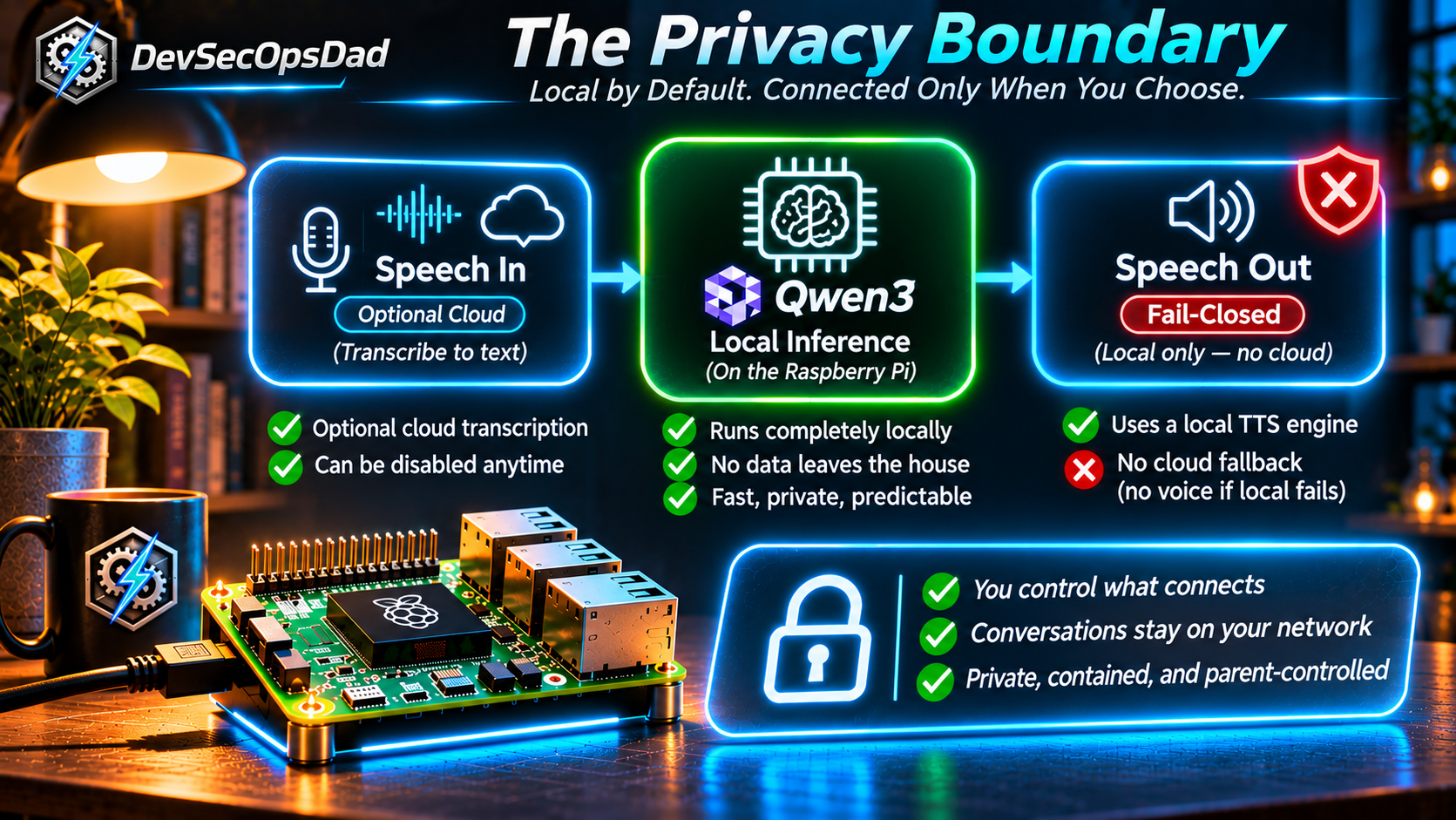
The local inference path stays on the home network. Microphone input may leave it for transcription; speech output does not fall back to a cloud voice.
Self-Hosting Changes the Control Plane — For Them, Too
I’ve made this argument before about myself. It lands harder when it’s about my kids.
When a child asks a cloud assistant a question, that question becomes someone else’s data. It gets logged, associated, retained under a policy you didn’t write and can’t see, used to train models you’ll never audit. We’ve normalized this so thoroughly that not doing it reads as paranoia. A July 2026 reminder — when Hugging Face got hit and a pile of tokens and private model data walked out the door — is just the version of that story that made the news. The quieter version runs every day, and the data is kids’ curiosity.
Curiosity Corner doesn’t collect anything. The app keeps no database and writes no conversation history to disk — the Q&A lives in a browser tab and isn’t persisted by the page. But “doesn’t collect” is a more honest claim than “can’t log,” so let me draw the line precisely. The operating system underneath still keeps operational logs: journald captures the web server’s access lines and Ollama’s service output, so that a request happened is on record even though the child’s question text isn’t written to a store. The browser can restore tabs after a crash or restart, so a conversation isn’t guaranteed to vanish the instant a tab closes. And whatever’s resident in RAM is resident until it’s overwritten. None of that is a cloud keeping your data forever — but it isn’t nothing, and if you want those operational logs quieter you can drop Ollama’s log level and silence http.server’s request logging.
What I can say cleanly is the part that actually matters: the model weights sit on an SD card in my house, the answers are generated by a CPU I overclocked myself, and — with cloud-backed voice features disabled — nothing in the application’s inference path ships my kids’ questions to a third party to be logged, associated, or used for training. Unplug it and there’s no copy somewhere else. That’s the claim I’ll defend — and it’s a different claim than “impossible to log,” which would have been a lie.
That’s not a smaller version of the cloud experience. It’s a different control plane — the same one I care about for my own machines, pointed now at the people I most want it pointed at.
Private Doesn’t Automatically Mean Safe
Here’s the distinction I most want other parent-builders to leave with: I solved a privacy problem, not a safety problem. They’re different, and it would be dangerous to let the first masquerade as the second.
Everything above is about where the data goes. None of it makes the model’s answers reliable. The age tiers shape how a response sounds — vocabulary, length, complexity — but a system prompt is a stylistic steering wheel, not a safety guardrail. Concretely:
- Small models hallucinate, confidently. A 1.7B model will state something false in the exact same cheerful tone it states something true. There’s no hedging in its voice for a six-year-old to catch.
- The age instructions can be bypassed. “Pretend you’re talking to a grown-up” is often all it takes. The prompts are a default, not a lock.
- There’s no moderation layer in front of a local model. The big managed services have teams and filtering devoted to this; my Pi has a one-line system prompt. It can produce inappropriate or outright unsafe advice, and nothing on the device is guaranteed to catch it.
- Some questions shouldn’t go to a toy at all. Anything touching health, medicine, dangerous activities, or personal safety needs a trusted adult — not a 4B model on a shelf. That’s a rule I’m teaching my kids, not a filter I’m trusting the model to enforce.
So Curiosity Corner is scoped honestly in my house: a supervised educational companion, not an authority and not a babysitter. It lives in shared space, used within earshot, the way I’d want any new tool around my kids to be at first. The privacy work keeps their curiosity home; the supervision keeps the answers in bounds — and that second part is my job, not the Pi’s.
This isn’t a disclaimer bolted on at the end. It’s the same security-first instinct as the rest of the build: know exactly what your control does and doesn’t cover, and never let a solved problem lull you into assuming an adjacent one is solved too.
Your Kids’ AI Doesn’t Have to Be Huge to Be Theirs
Let me be clear-eyed about what this is. A 1.7B/4B quantized model on a $75 computer. It is not going to tutor anyone through calculus. It gets things wrong sometimes — which is exactly why it stays supervised. It is slower than the thing in your pocket.
It is also ours, in a way nothing in my pocket is.
The model isn't enormous.
The hardware isn't impressive.
The latency isn't zero.

But the questions are theirs.
And so are the answers.
My daughters don’t know what a control plane is. They know the little box on the shelf answers their questions in a friendly voice, and that it’s theirs. Their baby brother doesn’t know anything yet — but the bottom tier is already there, holding a place for his first why. One day all three will understand the rest of it — that somebody chose to keep their curiosity at home instead of renting it out.
That’s a feature no benchmark measures.
Want to go deeper?
If you liked the self-hosting and detection-engineering mindset in this one, the KQL Detection of the Week series and my Microsoft security books (PowerShell Toolbox, KQL Toolbox, Ultimate Microsoft XDR) are where I spend most of my words.
Helpful Links, References, & Resources
- AI Sovereignty on a Raspberry Pi: Running Qwen3 with Ollama — the Pi build and benchmarks this one stands on
- Ollama — the local inference runtime
- Qwen3 model family on Ollama
- Ollama API reference —
keep_alive,think, andoptions - MDN: Web Speech API — including
SpeechSynthesisVoice.localServiceand the newerSpeechRecognition.processLocally - systemd sandboxing directives — the
Protect*,PrivateTmp, andNoNewPrivilegesoptions - whisper.cpp (STT) and Piper (TTS) — the pieces of a future fully-local voice stack
- WireGuard — still the right way to reach any of this remotely